Minecraft Flex UI
Implement a Flex layout-based Minecraft GUI framework based on facebook's open source Yoga layout engine.
Screenshots
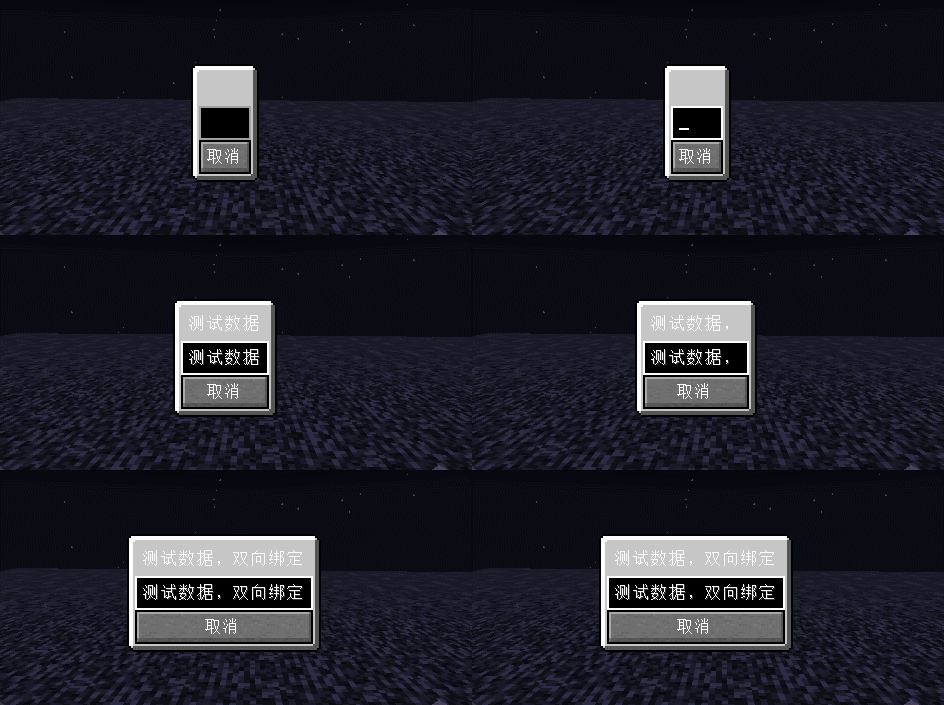
About this Mod
Minecraft Flex UI
For ordinary players do not download the mod
In most cases the module is used by other module developers and is included in their mod Jar package
Description
Based on facebook open source Yoga layout engine implements the Minecraft GUI framework based on the Flex layout.
A subset of the Flex standard is implemented on top of Yoga and most of the CSS properties are implemented as well.
The design concept of MVC is adopted to realize the one-way and two-way data binding.
Developers can design and implement complex UI interfaces on top of this, and this project can be used as Yoga engine embedded in the game as a non-exhaustive reference implementation of the game layout engine.
Example

public class WidgetTestScreen extends WidgetScreen {
	protected StringBuilderObservable text = new StringBuilderObservable();

	public WidgetTestScreen() {
		super(Text.of("test"));
	}

	@Override
	public void widget(ScreenWidget root) {
		root.flexDirection.set(WidgetFlexDirection.Row)
				.justifyContent.set(WidgetJustify.Center)
				.alignItems.set(WidgetAlign.Center)
				.child(new BoxWidget()
						.background.set(RectDrawable.LIGHT_PANEL)
						.child(new LabelWidget()
								.text.binding(text.computed((StringBuilderObservable text) -> Text.of(text.getString())))
								.margin(WidgetEdge.All, 4))
						.child(new TextBoxWidget()
								.text.binding(text))
						.child(new ButtonWidget()
								.click.on((mouse) -> close())
								.child(new LabelWidget()
										.text.set(Text.of("取消"))))
				);
	}
}
Data Binding
By default all bindings from non-computed binding sources are bi-directional bindings.
Setting values for
computed binding sourcesis ignored
But most components will only operate one-way on bound values
Available Versions
How to Install Minecraft Flex UI on Your Server
Order Server
Order a Minecraft Java server with at least 3 GB RAM (4 GB recommended).
Set fabric Loader
In the panel under "Egg", select the fabric loader and matching Minecraft version (1.19.3).
Install Mod
Open the mod browser in the dashboard and search for "Minecraft Flex UI". Click "Install" – done! Alternatively, upload the .jar via SFTP to the /mods folder.
Compatibility
Mod Loaders
Minecraft Versions
1.19.3, 1.19.2, 1.19.1 (+1 more)
Server-side
✓ RequiredRecommended RAM
4 GB(min. 3 GB)Frequently Asked Questions
Minecraft Flex UI server crashes on startup – what to do?
Most common cause: wrong fabric version or insufficient RAM. Check the server log (latest.log) for "OutOfMemoryError" or "Mixin" errors. With Mado Hosting: ensure at least 3 GB RAM is allocated and the loader matches the mod version (1.19.3). You can switch loaders with one click in the panel.
Is Minecraft Flex UI compatible with fabric?
Minecraft Flex UI officially supports fabric for Minecraft 1.19.3, 1.19.2, 1.19.1. The Mado dashboard automatically detects incompatible loader combinations.
Server lagging with Minecraft Flex UI – how to optimize performance?
Recommended RAM: 4 GB (per 8 players). Use /spark profiler to check if Minecraft Flex UI consumes the most tick time. Common fixes: reduce server view-distance to 8-10, install "performant" or "starlight" as supplementary mods on Forge. With Mado Hosting, your server runs on NVMe SSDs with dedicated CPU cores for minimal latency.
Similar Mods



Rent Modded Server
Install Minecraft Flex UI with just one click on your server.