
MineMention
A mention mod for the minecraft chat.
Screenshots
About this Mod
MineMention
MineMention is a mention mod for the chat so you can specify who should get your messages better.
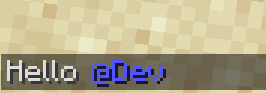
MineMention allows you to mention people or groups in chat. Whenever your message contains at least one mention, it will not be displayed to all users but only to the ones you mentioned. But you can mention multiple people.
whenever you type an @ you'll get autocompletion for your mentions:
MineMention has three builtin Groups you can mention but other mods can easily add more:
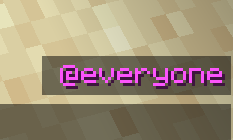
@everyonementions every player on the server.@herementions every player in the same dimension.@nearmentions every player within a 100 block distance
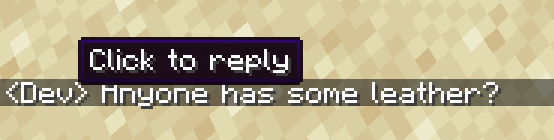
You can also click on mentions or the sender name of a message in the chat to write a reply:
Now you might think: when I write private messages with another payer I don't want to type @PlayerName all the time.
Luckily you can run the command /d PlayerName to change your default mentions (those are applied if you don't provide a mention explicitly)
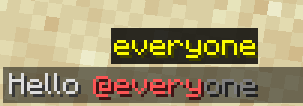
To change the default mentions run /d with a list of mentions as arguments that should be your new default mentions (but without the preceding @ character). Run /d without arguments to reset it to @everyone.
You can also see your current default mentions right over your chat:
Whenever multiple mods register the same special mention (seems to happen a lot with @team), none of them will be available by default. You can however change that in the config. There's a map called mentions where you can specify what special mention should be what. The key is always the name of the special mention and the value is an id of what the mentions does. You can redirect all mentions except @everyone. If you redirect a mention to minemention:none, you can remove it.
Example:
{
  "mentions": {
    "here": "minemention:none",
    "near": "minemention:none",
    "close": "minemention:near"
  }
}
This would remove @here and rename @near to @close.
The ids of the builtin mentions are minemention:everyone, minemention:here, minemention:near, minemention:ftb and minemention:none.
Available Versions
How to Install MineMention on Your Server
Order Server
Order a Minecraft Java server with at least 3 GB RAM (4 GB recommended).
Set forge Loader
In the panel under "Egg", select the forge loader and matching Minecraft version (1.20.1).
Install Mod
Open the mod browser in the dashboard and search for "MineMention". Click "Install" – done! Alternatively, upload the .jar via SFTP to the /mods folder.
Compatibility
Mod Loaders
Minecraft Versions
1.20.1, 1.19.4, 1.19.3 (+7 more)
Server-side
✓ RequiredRecommended RAM
4 GB(min. 3 GB)Frequently Asked Questions
MineMention server crashes on startup – what to do?
Most common cause: wrong forge version or insufficient RAM. Check the server log (latest.log) for "OutOfMemoryError" or "Mixin" errors. With Mado Hosting: ensure at least 3 GB RAM is allocated and the loader matches the mod version (1.20.1). You can switch loaders with one click in the panel.
Is MineMention compatible with forge?
MineMention officially supports forge for Minecraft 1.20.1, 1.19.4, 1.19.3. The Mado dashboard automatically detects incompatible loader combinations.
Server lagging with MineMention – how to optimize performance?
Recommended RAM: 4 GB (per 8 players). Use /spark profiler to check if MineMention consumes the most tick time. Common fixes: reduce server view-distance to 8-10, install "performant" or "starlight" as supplementary mods on Forge. With Mado Hosting, your server runs on NVMe SSDs with dedicated CPU cores for minimal latency.
Similar Mods






Rent Modded Server
Install MineMention with just one click on your server.