
mineopbot
Minecraft AI Assistant Mod / 一个基于 Fabric 的 Minecraft 模组,将 AI 助手集成到游戏中。
Screenshots
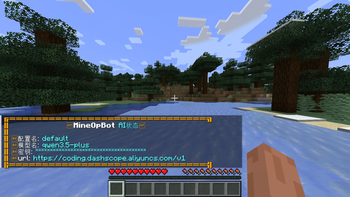
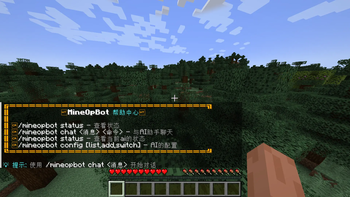
About this Mod
MineOpBot




Minecraft AI Assistant Mod | Minecraft AI 助手模组
一个基于 Fabric 的 Minecraft 模组,将 AI 助手集成到游戏中。 | A Fabric-based Minecraft mod that integrates an AI assistant into the game.
项目简介 | Project Overview
| 简体中文 | English |
|---|---|
| MineOpBot 是一个 Minecraft Java 版 Fabric 模组,通过 OpenAI 兼容 API 将 AI 助手集成到游戏中。玩家可以通过游戏内命令与 AI 进行对话,AI 可以理解玩家意图并执行游戏操作。 | MineOpBot is a Minecraft Java Edition Fabric mod that integrates an AI assistant into the game via OpenAI-compatible APIs. Players can chat with the AI using in-game commands, and the AI can understand player intentions and execute game actions. |
核心特性 | Core Features
| 简体中文 | English |
|---|---|
| AI 对话集成 - 支持 OpenAI 兼容 API(OpenAI、DeepSeek、Claude 等) | AI Chat Integration - Supports OpenAI-compatible APIs (OpenAI, DeepSeek, Claude, etc.) |
| 流式响应 - 实时显示 AI 回复,提供流畅的交互体验 | Streaming Responses - Real-time display of AI responses for smooth interaction |
| Action 系统 - AI 可通过 JSON 格式响应执行 Minecraft 命令 | Action System - AI can execute Minecraft commands via JSON-formatted responses |
| 多配置管理 - 支持多个 AI 配置,运行时动态切换 | Multi-Config Management - Supports multiple AI configs with runtime switching |
| 用户信息模式 (UIM) - 向 AI 提供玩家的完整游戏状态信息 | User Information Mode (UIM) - Provides AI with complete player game state information |
| 会话管理 - 每位玩家独立的聊天历史记录 | Session Management - Independent chat history for each player |
模块说明 | Module Description
1. Command Module (org.mineopbot.command) | 命令模块
| 简体中文 | English |
|---|---|
| 命令注册与处理模块,提供玩家与模组交互的入口。 | Command registration and processing module, providing the entry point for player interaction with the mod. |
command/
├── MineOpBotCommand.java      # 命令注册中心 | Command Registration Center
└── handler/
    ├── AiReplyHandler.java    # AI 回复协调器 | AI Reply Coordinator
    ├── MessageHelper.java     # 消息格式化工具 | Message Formatting Utility
    └── command/
        ├── ChatCommandHandler.java    # 聊天命令处理 | Chat Command Handler
        ├── ConfigCommandHandler.java  # 配置命令处理 | Config Command Handler
        └── StatusCommandHandler.java  # 状态命令处理 | Status Command Handler
2. AI Module (org.mineopbot.ai) | AI 模块
| 简体中文 | English |
|---|---|
| AI 核心功能模块,负责与 AI API 的交互。 | AI core functionality module, responsible for interacting with AI APIs. |
ai/
├── chat/
│   ├── AiChatManager.java              # 聊天会话管理 | Chat Session Manager
│   ├── AiChatStreamingResponseHandler.java  # 流式响应处理 | Streaming Response Handler
│   └── UserInformationMessage.java     # 用户信息构建 (UIM) | User Info Builder (UIM)
├── config/
│   ├── AiConfig.java           # 配置数据模型 | Config Data Model
│   ├── AiConfigManager.java    # 配置管理器 | Config Manager
│   └── AiConfigStore.java      # 配置持久化存储 | Config Persistent Storage
├── action/
│   ├── MineOpBotAction.java    # Action 接口定义 | Action Interface Definition
│   ├── ActionManager.java      # Action 注册与执行 | Action Registration & Execution
│   ├── ActionParser.java       # AI 响应解析器 | AI Response Parser
│   ├── ActionCallback.java     # 异步回调接口 | Async Callback Interface
│   └── command/
│       └── ExecuteCommandAction.java  # 命令执行 Action | Command Execution Action
└── util/
    └── UserMessageCommandParser.java  # 消息命令解析 | Message Command Parser
3. Mixin Module (org.mineopbot.mixin) | Mixin 模块
| 简体中文 | English |
|---|---|
| Mixin 扩展模块,用于修改或扩展 Minecraft 原版行为。 | Mixin extension module for modifying or extending vanilla Minecraft behavior. |
使用方法 | Usage
安装 | Installation
| 步骤 | Step | 中文说明 | English Description |
|---|---|---|---|
| 1 | 1 | 确保已安装 Minecraft 1.21.4 和 Fabric Loader 0.18.4+ | Ensure Minecraft 1.21.4 and Fabric Loader 0.18.4+ are installed |
| 2 | 2 | 安装 Fabric API | Install Fabric API |
| 3 | 3 | 将模组 JAR 文件放入 mods 文件夹 |
Place the mod JAR file into the mods folder |
| 4 | 4 | 启动游戏 | Launch the game |
配置 | Configuration
| 简体中文 | English |
|---|---|
首次运行后,在游戏对话框输入 /mineopbot config add <name> <apiKey> <baseUrl> <model> 命令,即可在 游戏目录/config/ 下创建配置文件: |
After the first run, enter the command /mineopbot config add <name> <apiKey> <baseUrl> <model> in the game chat to create a configuration file in game_directory/config/: |
mineopbot_configs.json
{
  "configs": [
    {
      "name": "openai",
      "apiKey": "sk-your-api-key",
      "baseUrl": "https://api.openai.com/v1",
      "modelName": "gpt-4o"
    },
    {
      "name": "deepseek",
      "apiKey": "sk-your-api-key",
      "baseUrl": "https://api.deepseek.com/v1",
      "modelName": "deepseek-chat"
    }
  ]
}
| 简体中文 | English |
|---|---|
| 支持任何 OpenAI 兼容的 API 服务 | Supports any OpenAI-compatible API service |
命令介绍 | Command Reference
| 命令 Command |
描述 Description |
示例 Example |
|---|---|---|
/mineopbot |
显示帮助信息 Display help information |
/mineopbot |
/mineopbot chat <message> |
与 AI 对话 Chat with AI |
/mineopbot chat 你好 |
/mineopbot chat <message> UIM |
带 UIM 模式的对话 Chat with UIM mode enabled |
/mineopbot chat 我在哪里 UIM |
/mineopbot status |
查看当前 AI 配置状态 View current AI configuration status |
/mineopbot status |
/mineopbot config list |
列出所有配置 List all configurations |
/mineopbot config list |
/mineopbot config add <name> <apiKey> <baseUrl> <model> |
添加新配置 Add new configuration |
/mineopbot config add myai sk-xxx https://api.xxx.com/v1 gpt-4 |
/mineopbot config remove <name> |
删除配置 Remove configuration |
/mineopbot config remove myai |
/mineopbot config switch <name> |
切换当前配置 Switch current configuration |
/mineopbot config switch deepseek |
已实现功能 | Implemented Features
AI 对话系统 | AI Chat System
| 状态 | 中文 | English |
|---|---|---|
| [x] | OpenAI 兼容 API 集成 | OpenAI-compatible API integration |
| [x] | 流式响应显示 | Streaming response display |
| [x] | 会话历史管理 | Session history management |
| [x] | 自定义系统提示词 | Custom system prompt |
配置管理 | Configuration Management
| 状态 | 中文 | English |
|---|---|---|
| [x] | 多配置支持 | Multi-configuration support |
| [x] | 运行时配置切换 | Runtime configuration switching |
| [x] | JSON 持久化存储 | JSON persistent storage |
| [x] | API Key 安全显示 | API Key secure display |
Action 系统 | Action System
| 状态 | 中文 | English |
|---|---|---|
| [x] | Action 注册机制 | Action registration mechanism |
| [x] | command_execute - 执行 Minecraft 命令 |
command_execute - Execute Minecraft commands |
| [x] | AI 响应 JSON 解析 | AI response JSON parsing |
| [x] | 异步执行与回调 | Async execution and callback |
用户信息模式 (UIM) | User Information Mode (UIM)
| 状态 | 中文 | English |
|---|---|---|
| [x] | 玩家位置与维度信息 | Player position and dimension info |
| [x] | 生命值与饥饿值 | Health and hunger values |
| [x] | 装备信息 | Equipment information |
| [x] | 游戏模式与经验 | Game mode and experience |
| [x] | 移动状态 | Movement status |
TODO | 待办事项
| 中文 | English |
|---|---|
| Block Action - 添加方块操作相关 Action | Block Action - Add block manipulation actions |
| 持久化对话记录 - 保存玩家的聊天历史 | Persistent Chat History - Save player chat history |
| 权限分级 - 不同权限等级的玩家可使用的功能不同 | Permission Levels - Different features available based on player permission levels |
| 知识库 - 集成 RAG 知识库,增强 AI 对 Minecraft 的理解 | Knowledge Base - Integrate RAG knowledge base to enhance AI's understanding of Minecraft |
开发环境 | Development Environment
环境要求 | Requirements
| 中文 | English |
|---|---|
| JDK 21+ | JDK 21+ |
| Gradle 9.1.0+ | Gradle 9.1.0+ |
构建项目 | Building the Project
| 平台 | Platform | 命令 Command |
|---|---|---|
| Windows | Windows | .\gradlew build |
| Linux/macOS | Linux/macOS | ./gradlew build |
运行测试环境 | Running Test Environment
| 目标 | Target | 命令 Command |
|---|---|---|
| 服务端 | Server | .\gradlew runServer |
| 客户端 | Client | .\gradlew runClient |
技术栈 | Tech Stack
| 技术 Technology |
版本 Version |
用途 Usage |
|---|---|---|
| Minecraft | 1.21.4 | 目标游戏版本 Target game version |
| Fabric Loader | 0.18.4 | 模组加载器 Mod loader |
| Fabric API | 0.119.4+1.21.4 | Fabric API 模块 Fabric API modules |
| LangChain4j | 1.11.0 | AI API 集成 AI API integration |
| Java | 21 | 编程语言 Programming language |
项目结构 | Project Structure
| 路径 Path |
说明 Description |
|---|---|
src/main/java/org/mineopbot/ |
源代码目录 Source code directory |
MineOpBot.java |
主入口 Main entry point |
MineOpBotClient.java |
客户端入口 Client entry point |
ai/ |
AI 模块 AI module |
command/ |
命令模块 Command module |
mixin/ |
Mixin 模块 Mixin module |
src/main/resources/ |
资源目录 Resources directory |
fabric.mod.json |
Fabric 模组元数据 Fabric mod metadata |
mineopbot.mixins.json |
Mixin 配置 Mixin configuration |
assets/mineopbot/ |
模组资源 Mod assets |
config/ |
配置示例 Configuration examples |
prompt/ |
系统提示词 System prompts |
build.gradle |
构建配置 Build configuration |
gradle.properties |
Gradle 属性 Gradle properties |
LICENSE |
许可证 License |
License | 许可证
| 简体中文 | English |
|---|---|
| 本项目采用 CC0 1.0 Universal 许可证。 | This project is licensed under the CC0 1.0 Universal License. |
Contributing | 贡献指南
| 简体中文 | English |
|---|---|
| 欢迎贡献!请随时提交 Pull Request。 | Contributions are welcome! Please feel free to submit a Pull Request. |
| 1. Fork 本仓库 2. 创建功能分支 ( git checkout -b feature/AmazingFeature)3. 提交更改 ( git commit -m 'Add some AmazingFeature')4. 推送到分支 ( git push origin feature/AmazingFeature)5. 打开 Pull Request |
1. Fork the repository 2. Create your feature branch ( git checkout -b feature/AmazingFeature)3. Commit your changes ( git commit -m 'Add some AmazingFeature')4. Push to the branch ( git push origin feature/AmazingFeature)5. Open a Pull Request |
Made with love by PYmili | 由 PYmili 倾心制作
Available Versions
How to Install mineopbot on Your Server
Order Server
Order a Minecraft Java server with at least 3 GB RAM (4 GB recommended).
Set fabric Loader
In the panel under "Egg", select the fabric loader and matching Minecraft version (1.21.4).
Install Mod
Open the mod browser in the dashboard and search for "mineopbot". Click "Install" – done! Alternatively, upload the .jar via SFTP to the /mods folder.
Compatibility
Mod Loaders
Minecraft Versions
1.21.4
Server-side
✗ UnsupportedRecommended RAM
4 GB(min. 3 GB)Frequently Asked Questions
mineopbot server crashes on startup – what to do?
Most common cause: wrong fabric version or insufficient RAM. Check the server log (latest.log) for "OutOfMemoryError" or "Mixin" errors. With Mado Hosting: ensure at least 3 GB RAM is allocated and the loader matches the mod version (1.21.4). You can switch loaders with one click in the panel.
Is mineopbot compatible with fabric?
mineopbot officially supports fabric for Minecraft 1.21.4. The Mado dashboard automatically detects incompatible loader combinations.
Server lagging with mineopbot – how to optimize performance?
Recommended RAM: 4 GB (per 8 players). Use /spark profiler to check if mineopbot consumes the most tick time. Common fixes: reduce server view-distance to 8-10, install "performant" or "starlight" as supplementary mods on Forge. With Mado Hosting, your server runs on NVMe SSDs with dedicated CPU cores for minimal latency.
Similar Mods






Rent Modded Server
Install mineopbot with just one click on your server.