
Miner's Compass
The Miner's Compass is an innovative tool designed for the savvy Minecraft miner. With its unique functionality, this compass is not just a direction finder but a game-changer in your mining adventures.
Screenshots
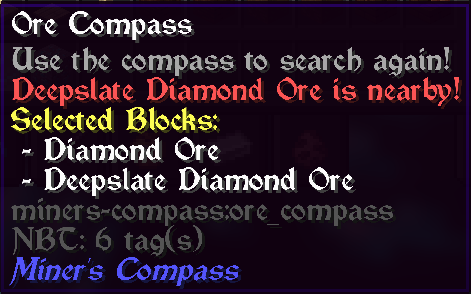
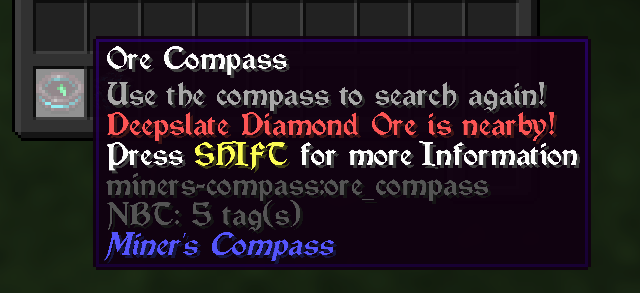
About this Mod
The Ultimate Mining Companion! 🧭⛏️
The Miner's Compass is a revolutionary tool that transforms how you mine in Minecraft. Whether you're playing vanilla or with 100+ mods, this compass intelligently detects and guides you to the ores you need most.
Perfect for modded servers, large modpacks, and vanilla players alike!
🚀 What's New in Version 2.0
Automatic Modded Ore Detection
No more manual configuration! The compass automatically detects ores from ANY mod:
- ✅ Create - Zinc ore
- ✅ Mythic Metals - All 20+ ores (Adamantite, Mythril, Orichalcum, etc.)
- ✅ Immersive Engineering - Aluminum, Lead, Nickel, Silver, Uranium
- ✅ SoulsWeapons - Moonstone, Verglas
- ✅ Blue Skies - Charoite, Diopside, Pyrope, and more
- ✅ Many more other mods supported automatically
Intelligent Ore Grouping
Smart grouping system that combines ore variants:
- "Iron Ore" includes both
iron_oreanddeepslate_iron_ore - "Moonstone Ore" groups all moonstone variants
- Proper names - No more "Moon Ore" or "Deepslate Ore"
Modern GUI System
- Right-click to open sleek ore selection screen
- Visual ore list with proper colors and names
- Multi-select your favorite ores
- Search and find exactly what you need
Powerful Configuration
Complete control over ore detection:
- Exclude entire ore types (
"coal", "zinc") - Exclude specific blocks (
"minecraft:coal_ore") - Add custom ores from any mod
- Performance tuning for large modpacks
🎯 Key Features
Universal Mod Compatibility
Works with ANY modpack out of the box:
- Automatic detection of 80+ common modded ores
- Fallback patterns for unknown mods
- Custom ore support for edge cases
- Future-proof design for new mods
Intelligent Navigation
- Dynamic targeting - Always points to the closest ore
- Multi-ore tracking - Search for up to 20 ore types simultaneously
- Chunk-based scanning - Configurable search radius
- Cross-dimension support - Works in Nether, End, and modded dimensions
Advanced Filtering
- Hardness filtering - Excludes decorative blocks
- Mod exclusions - Ignore problematic mods
- Smart grouping - Related ores grouped together
- Custom categories - Create your own ore types
Performance Optimized
- Efficient scanning - Minimal impact on game performance
- Configurable radius - Balance between coverage and performance
- Smart caching - Remembers previous searches
- Async processing - Doesn't block gameplay
🎮 How to Use
Getting Started
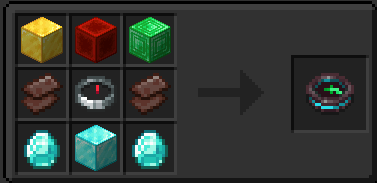
- Craft the compass with the recipe below
- Right-click to open the ore selection GUI
- Select ores you want to find
- Click "Done" and start mining!
Advanced Usage
- Shift-right-click on ore blocks to quickly add/remove them
- Shift-right-click air to clear all selections
- Configure in
.minecraft/config/miners-compass.json5
Crafting Recipe
⚙️ Complete Configuration Guide
Full Configuration Example
{
  // How many chunks around player to search (0-100)
  // Higher values = larger area but more performance impact
  "chunkRadius": 2,

  // Maximum ore types selectable at once (0-20)
  // Balance between flexibility and performance
  "maxBlocks": 3,

  // Enable automatic detection of modded ores
  // Set false to only use custom definitions
  "enableAutoDiscovery": true,

  // Group ore variants together (coal_ore + deepslate_coal_ore = "Coal Ore")
  // Set false to treat each block separately
  "groupSimilarOres": true,

  // Minimum block hardness for ore detection (0.0-50.0)
  // Higher values filter out soft decorative blocks
  "minimumHardness": 1.0,

  // Additional keywords to help detect missed ores
  // Add terms commonly used in mod ore names
  "additionalOreKeywords": [
    "gem",
    "crystal",
    "ingot",
    "core",
    "debris"
  ],

  // Exclude entire mods from ore detection
  // Add mod IDs that cause false positives
  "excludedMods": [
    "decorative_blocks",
    "chisel"
  ],

  // Add custom ore types not detected automatically
  // Format: "oreName:COLOR:blockId1,blockId2"
  "customOreTypes": [
    "exquisite:BLACK:arphex:exquisite_ore"
  ],

  // Force include specific blocks as ores
  // For blocks that should be detected but aren't
  "forceIncludeBlocks": [],

  // Exclude entire ore types (removes all variants)
  // Hide ore categories you don't want
  "excludedOreTypes": [],

  // Exclude specific ore blocks while keeping the type
  // Fine-grained control over individual blocks
  "excludedBlocks": []
}
Configuration Options Explained
Basic Settings
chunkRadius- Search area around player (larger = more lag)maxBlocks- How many ore types you can select simultaneouslyenableAutoDiscovery- Automatically find modded ores vs manual onlygroupSimilarOres- Combine variants vs separate entriesminimumHardness- Filter out soft decorative blocks
Detection Enhancement
additionalOreKeywords- Help detect ores with unusual namescustomOreTypes- Add ores that aren't detected automaticallyforceIncludeBlocks- Force specific blocks to be treated as ores
Exclusion Controls
excludedMods- Ignore entire mods that cause problemsexcludedOreTypes- Hide entire ore categories (all coal, all zinc, etc.)excludedBlocks- Hide specific blocks while keeping the ore type
Common Configuration Examples
Performance-Optimized
{
  "chunkRadius": 2,
  "maxBlocks": 3,
  "minimumHardness": 2.0,
  "excludedOreTypes": ["coal", "iron", "copper"]
}
Rare Ores Only
{
  "excludedOreTypes": ["coal", "iron", "copper", "zinc", "tin", "lead", "aluminum"]
}
Vanilla-Only Setup
{
  "excludedMods": ["create", "mythicmetals", "immersiveengineering", "soulsweapons"]
}
No Deepslate Variants
{
  "excludedBlocks": [
    "minecraft:deepslate_coal_ore",
    "minecraft:deepslate_iron_ore",
    "minecraft:deepslate_gold_ore",
    "create:deepslate_zinc_ore"
  ]
}
Available Colors for Custom Ores
WHITE, YELLOW, GOLD, RED, DARK_RED, GREEN, DARK_GREEN, AQUA, DARK_AQUA, BLUE, DARK_BLUE, LIGHT_PURPLE, DARK_PURPLE, GRAY, DARK_GRAY, BLACK
🔄 Migration from v1.x
v1.x users: Your old config will work, but consider upgrading:
Old Config (v1.x)
{
  "chunkRadius": 2,
  "maxBlocks": 3
}
New Config (v2.0)
{
  // Basic settings (compatible)
  "chunkRadius": 2,
  "maxBlocks": 3,

  // New features
  "enableAutoDiscovery": true,
  "excludedOreTypes": ["coal", "iron"],
  "customOreTypes": ["mythril:AQUA:modname:mythril_ore"]
}
Migration is automatic - your old config continues working while new features become available!
Q&A
Forge/Backport?
For forge support, Sinytra Connector, Connector Extras, Forgified Fabric API combination tested and works as expected.
Y-Axis Direction?
For those interested in knowing the Y-axis direction, I highly recommend using Compass3D, developed by AdamRaichu. My gratitude goes out to him for integrating support for this feature into the mod.
Available Versions
How to Install Miner's Compass on Your Server
Order Server
Order a Minecraft Java server with at least 3 GB RAM (4 GB recommended).
Set fabric Loader
In the panel under "Egg", select the fabric loader and matching Minecraft version (1.20.6).
Install Mod
Open the mod browser in the dashboard and search for "Miner's Compass". Click "Install" – done! Alternatively, upload the .jar via SFTP to the /mods folder.
Compatibility
Mod Loaders
Minecraft Versions
1.20.6, 1.20.5, 1.20.4 (+3 more)
Server-side
✓ RequiredRecommended RAM
4 GB(min. 3 GB)Frequently Asked Questions
Miner's Compass server crashes on startup – what to do?
Most common cause: wrong fabric version or insufficient RAM. Check the server log (latest.log) for "OutOfMemoryError" or "Mixin" errors. With Mado Hosting: ensure at least 3 GB RAM is allocated and the loader matches the mod version (1.20.6). You can switch loaders with one click in the panel.
Is Miner's Compass compatible with fabric?
Miner's Compass officially supports fabric for Minecraft 1.20.6, 1.20.5, 1.20.4. The Mado dashboard automatically detects incompatible loader combinations.
Server lagging with Miner's Compass – how to optimize performance?
Recommended RAM: 4 GB (per 8 players). Use /spark profiler to check if Miner's Compass consumes the most tick time. Common fixes: reduce server view-distance to 8-10, install "performant" or "starlight" as supplementary mods on Forge. With Mado Hosting, your server runs on NVMe SSDs with dedicated CPU cores for minimal latency.
Similar Mods




Rent Modded Server
Install Miner's Compass with just one click on your server.