
Mini Tardis ComputerCraft Bridge
Bridges Mini Tardis and CC:Tweaked
Screenshots
About this Mod
Mini Tardis ComputerCraft Bridge
Bridges Mini Tardis and CC:Tweaked
Automate your TARDIS!
About
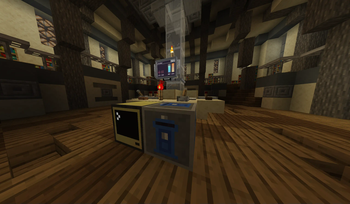
Adds TARDIS Computer Interface block that acts as a peripheral for ComputerCraft, it can be crafted as following:
(Any wired modem will do)
How To Use
- Place the block inside of Mini Tardis and connect it to a computer like you normally would
- Wrap the peripheral using
peripheral.wrap(<side>)orperipheral.find("minitardis_bridge") - Refer to Method Reference as you script your TARDIS
You can also use scripts I wrote that automate TARDIS
You can find the scripts on GitHub of the mod, View Source link on the right side of the page
scripts/tardisServer.lua- put this script on a computer inside of the TARDIS, rename it tostartup.lua,
change modem channels found on top of the file if there's multiple people playing.
Computer must have TARDIS Computer Interface next to it and optionally ender modem if you want to use remotescripts/tardisRemote.lua- put this script on a pocket computer with ender modem, change channels if needed in the filescripts/gpsHost.lua- build a GPS constellation with wired modems and ender modems,
put info about your modems on top of the file and set which dimension the constellation is in. Rename script tostartup.lua
Method Reference
isLinked()returns boolean, tells if Computer Interface is within TARDIS
All following methods will error if Computer Interface is not inside of a TARDIS
getState()checks TARDIS state and returns one of following strings:booting_up, TARDIS is currently booting upcrashed, TARDIS has crashed and needs to be rebootedcrashing, TARDIS is in process of crashingdisabled, TARDIS is currently powered offdrifting, TARDIS is drifting between dimensionsflying, TARDIS is flying to the destinationlanded, TARDIS is stationarylanding, TARDIS is currently landingrefueling, TARDIS is refuelingsearching_for_landing, TARDIS is about to start landingsuspended_flight, energy conduits are locked in middle of flighttaking_off, TARDIS is taking off
boot()returns true if successful, boots TARDIS up fromdisabledstateshutdown()returns true if successful, shuts TARDIS down fromlandedorcrashedstatesrefuel(boolean)returns true if successful, sets refueling stategetFuel()returns number 0 to 1000, tells how much fuel TARDIS hasgetStability()returns number 0 to 1000, tells how much stability TARDIS hasgetAvailableWorlds()returns an array of strings, tells which dimensions TARDIS is able to travel togetCurrentPos()returns array of 3 numbers as XYZ, errors if TARDIS is not landed, current position of TARDISgetCurrentFacing()returns one of following strings, errors if TARDIS is not landed, which way TARDIS is currently facing:northeastwestsouth
getCurrentWorld()returns string, world TARDIS is currently ingetDestinationPos()returns array of 3 numbers as XYZ, errors if destination is unknown, current destination of TARDISgetDestinationFacing()returns compass direction string, errors if destination is unknown, which way TARDIS should face at the destinationgetDestinationWorld()returns string, errors if destination is unknown, world TARDIS will try to fly toresetDestination()returns true if successful, resets destination back to current TARDIS locationsetDestinationPos(x, y, z)returns true if successful, errors if destination is unreachable, sets destination to provided coordinatessetDestinationFacing(compass_direction)returns true if successful, sets which way TARDIS will face at the destinationsetDestinationWorld(world_id)returns true if successful, errors if TARDIS can't go in that world or it's not yet discovered with Dimensions app, sets destination worldisDestinationLocked()returns boolean, tells if destination is lockedsetDestinationLocked(boolean)returns true if successful, sets lock state of destination lockareConduitsUnlocked()returns boolean, tells if energy conduits are unlockedsetConduitsUnlocked(boolean)returns true if successful, locks or unlocks energy conduitshandbrake(boolean)returns true if successful, sets handbrake stategetErrorOffsets()returns array of offsets, can only be called duringflyingstate, errors otherwise, each offset is an array of 2 elements.- First element of an offset is north/south offset, 1 means TARDIS needs to be nudged south, -1 means TARDIS needs to be nudged north
- Second element of an offset is west/east offset, 1 means TARDIS needs to be nudged east, -1 means TARDIS needs to be nudged west
- Return example:
{ {0,0}, {1,-1}, {1,0}, {0,-1} }
getCoordinateScale()returns number 0 to 3, tells the value of Localization Scale InterpretersetCoordinateScale(number 0 to 3)returns true if successful, sets value of Localization Scale Interpreter, also used to select which offset will be nudged duringflyingstatenudgeDestination(direction)returns true if successful, nudges destination in provided direction, used for adjusting offsets duringflyingstate. Direction can be one of following strings:northeastwestsouthupdown
getTotalDriftingPhases()returns number, can only be called duringdriftingstate, errors otherwise, tells how many drifting phases are theregetDriftingPhasesComplete()returns number, can only be called duringdriftingstate, errors otherwise, tells how many drifting phases have been completedisDriftingPhaseReady()returns boolean, can only be called duringdriftingstate, errors otherwise, is true when TARDIS is ready for phase shift, callhandbrake(true)to phase shift
Available Versions
How to Install Mini Tardis ComputerCraft Bridge on Your Server
Order Server
Order a Minecraft Java server with at least 3 GB RAM (4 GB recommended).
Set fabric Loader
In the panel under "Egg", select the fabric loader and matching Minecraft version (1.21.1).
Install Mod
Open the mod browser in the dashboard and search for "Mini Tardis ComputerCraft Bridge". Click "Install" – done! Alternatively, upload the .jar via SFTP to the /mods folder.
Compatibility
Mod Loaders
Minecraft Versions
1.21.1, 1.20.1
Server-side
✓ RequiredRecommended RAM
4 GB(min. 3 GB)Frequently Asked Questions
Mini Tardis ComputerCraft Bridge server crashes on startup – what to do?
Most common cause: wrong fabric version or insufficient RAM. Check the server log (latest.log) for "OutOfMemoryError" or "Mixin" errors. With Mado Hosting: ensure at least 3 GB RAM is allocated and the loader matches the mod version (1.21.1). You can switch loaders with one click in the panel.
Is Mini Tardis ComputerCraft Bridge compatible with fabric?
Mini Tardis ComputerCraft Bridge officially supports fabric for Minecraft 1.21.1, 1.20.1. The Mado dashboard automatically detects incompatible loader combinations.
Server lagging with Mini Tardis ComputerCraft Bridge – how to optimize performance?
Recommended RAM: 4 GB (per 8 players). Use /spark profiler to check if Mini Tardis ComputerCraft Bridge consumes the most tick time. Common fixes: reduce server view-distance to 8-10, install "performant" or "starlight" as supplementary mods on Forge. With Mado Hosting, your server runs on NVMe SSDs with dedicated CPU cores for minimal latency.
Similar Mods





Rent Modded Server
Install Mini Tardis ComputerCraft Bridge with just one click on your server.