
Mining Limits
Adds features related to mining and ways to control it in a better way.
Screenshots



About this Mod
Overview
Mining Limits lets you have more control over the stuff you are mining, it allows you to do things like limiting your mining space to a single chunk and controlling how much time it takes for you to break blocks.
Features
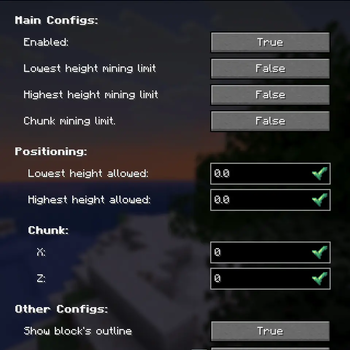
Adds a configurable border for the highest height the player can mine
- Lets you mine only up to a certain height (ex: allows you to only mine up to layer 70, any layer higher than 70 would not be minable)
- This can be turned off in settings
Adds a configurable border for the lowest height the player can mine
- Lets you mine only down to a certain height (ex: allows you to only mine down to layer -10, any layer lower than -10 would not be minable)
- This can be turned off in settings
Adds an option to only be able to mine in one chunk
- Allows you to give only the position of a block that is inside of that chunk, so you won't need to calculate what is that chunk position in the world
- The other borders would still work, so you can limit mining to a chunk and only mine down to a certain height
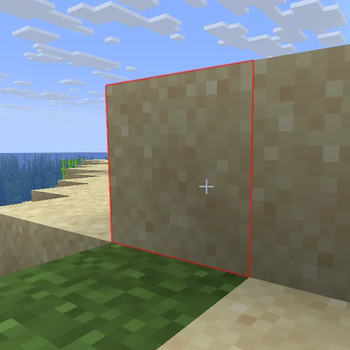
Allows you to have a different outline color for blocks outside of limits
- You can choose any color you'd want for the outline, the color and opacity are completely customizable
- Note: This may interfere with mods that change the block's outline, so it also has an option to turn this off
Adds an option to turn off Instant Mining and lets you control how long it takes to break a block while you are sneaking
- Note: Having a breaking speed higher than your normal one will just use your normal speed instead
Mod Menu configuration support
Brazilian Portuguese translations
FAQ
Can i use this on my modpack/server?
- As long as you don't claim it as your own, i don't see a problem in using it.
How do i select the chunk that i can mine? / How do i turn on/off this feature?
- There is two ways of doing it, you can either do it using Mod Menu or by going to .minecraft > config > mining-limits and changing the config.toml file.
Do i need to have this mod installed on the server?
- As far as i know, with the way that the mod handles the configs, the mod is required in both ends. I also plan on changing to another Config API and since the rely on getting anything from the server, it probably will be able to be a client-side mod.
My FPS is dropping every time that i look at a block, how can i fix it?
- This is probably being caused by the red outline around blocks, this can be turned off in the mod settings.
My game crashed after looking at a block
- There is probably a mod conflicting with the block outline rendering of the mod, try to look for an error in your game logs. If you are stuck with the game crashing every time you enter a world, you will have to manually turn the outline rendering off in the config.toml file. If you are still having problems with this, please open a issue here.
Will you port this mod to X version??
- Currently i only have plans to port it down to 1.20.1 (and possibly 1.19.2), but every version after 1.21 will probably be ported to.
Forge/Neoforge version?
- If someone wants to port it themself there will be, but there is no plans for it.
Does this work with Quilt?
- Possibly, it was not tested tho.
Source code can be found on GitHub
Available Versions
How to Install Mining Limits on Your Server
Order Server
Order a Minecraft Java server with at least 3 GB RAM (4 GB recommended).
Set fabric Loader
In the panel under "Egg", select the fabric loader and matching Minecraft version (1.21.11).
Install Mod
Open the mod browser in the dashboard and search for "Mining Limits". Click "Install" – done! Alternatively, upload the .jar via SFTP to the /mods folder.
Compatibility
Mod Loaders
Minecraft Versions
1.21.11, 1.21.10, 1.21.9 (+2 more)
Server-side
✓ RequiredRecommended RAM
4 GB(min. 3 GB)Frequently Asked Questions
Mining Limits server crashes on startup – what to do?
Most common cause: wrong fabric version or insufficient RAM. Check the server log (latest.log) for "OutOfMemoryError" or "Mixin" errors. With Mado Hosting: ensure at least 3 GB RAM is allocated and the loader matches the mod version (1.21.11). You can switch loaders with one click in the panel.
Is Mining Limits compatible with fabric?
Mining Limits officially supports fabric for Minecraft 1.21.11, 1.21.10, 1.21.9. The Mado dashboard automatically detects incompatible loader combinations.
Server lagging with Mining Limits – how to optimize performance?
Recommended RAM: 4 GB (per 8 players). Use /spark profiler to check if Mining Limits consumes the most tick time. Common fixes: reduce server view-distance to 8-10, install "performant" or "starlight" as supplementary mods on Forge. With Mado Hosting, your server runs on NVMe SSDs with dedicated CPU cores for minimal latency.
Similar Mods




![[TaCZ] Timeless and Classics Zero](https://cdn.modrinth.com/data/SzzJttH8/fd27766d2bb8390d284696b1dbd358f87e081439_96.webp)

Rent Modded Server
Install Mining Limits with just one click on your server.