
Madencilik Modu (Mining Mode)
Minecraft'a çok güçlü, madencilik yaparken işinizi kolaylaştıracak efektler veren zırhlar ve çok güçlü bir kazma ekler. (It adds very strong armors and a very strong pickaxe to Minecraft, which gives effects that will make your job easier while mining.)
Screenshots
About this Mod
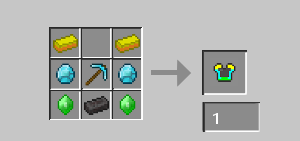
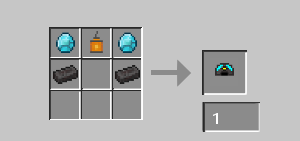
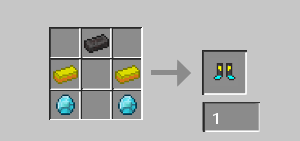
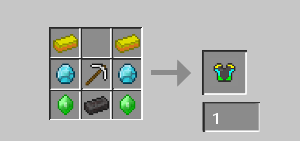
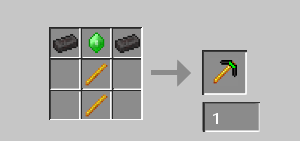
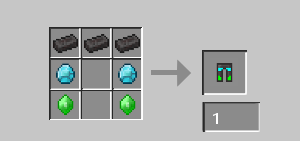
Artık yeni bir zırh takımı mı gerkli, madende çelışırken yavaşsın / göremiyorsun / yükseğe zıplayamıyorsun / yavaş maden yapıyorsun? Tüm sorunlarını bu mod çözecek. "Kask: Gece Görüş / Göğüslük Seviye 1: Acele 2 / Göğüslük Seviye 2: Acele 3 / Tozluk: Zıplama Desteği / Bot: Hız 2" efektlerini verir. Ayrıca netheriteden bile güçlü bir kazmada eklenmiştir. Eklenen tüm itemlerin yapılışları "Galeri/Fotoğraflar" bölümünde yer almaktadır. (Do you need a new armor set now? You're slow when mining / you can't see / you can't jump high / you mine slowly? This mod will solve all your problems. It gives the effects of "Helmet: Night Vision / Chest Plate Level 1: Haste 2 / Chest Plate Level 2: Haste 3 / Leggings: Jump Boost / Boots: Speed 2". A pickaxe even stronger than netherite has also been added. The build instructions for all added items can be found in the "Gallery/Photos" section.)
Available Versions
How to Install Madencilik Modu (Mining Mode) on Your Server
Order Server
Order a Minecraft Java server with at least 3 GB RAM (4 GB recommended).
Set neoforge Loader
In the panel under "Egg", select the neoforge loader and matching Minecraft version (1.21.8).
Install Mod
Open the mod browser in the dashboard and search for "Madencilik Modu (Mining Mode)". Click "Install" – done! Alternatively, upload the .jar via SFTP to the /mods folder.
Compatibility
Mod Loaders
Minecraft Versions
1.21.8
Server-side
✓ RequiredRecommended RAM
4 GB(min. 3 GB)Frequently Asked Questions
Madencilik Modu (Mining Mode) server crashes on startup – what to do?
Most common cause: wrong neoforge version or insufficient RAM. Check the server log (latest.log) for "OutOfMemoryError" or "Mixin" errors. With Mado Hosting: ensure at least 3 GB RAM is allocated and the loader matches the mod version (1.21.8). You can switch loaders with one click in the panel.
Is Madencilik Modu (Mining Mode) compatible with neoforge?
Madencilik Modu (Mining Mode) officially supports neoforge for Minecraft 1.21.8. The Mado dashboard automatically detects incompatible loader combinations.
Server lagging with Madencilik Modu (Mining Mode) – how to optimize performance?
Recommended RAM: 4 GB (per 8 players). Use /spark profiler to check if Madencilik Modu (Mining Mode) consumes the most tick time. Common fixes: reduce server view-distance to 8-10, install "performant" or "starlight" as supplementary mods on Forge. With Mado Hosting, your server runs on NVMe SSDs with dedicated CPU cores for minimal latency.
Similar Mods




Rent Modded Server
Install Madencilik Modu (Mining Mode) with just one click on your server.