
We do a miniscule amount of Warden buffery
Buffs the Warden and makes it drop things from randomly selected loot table
Screenshots
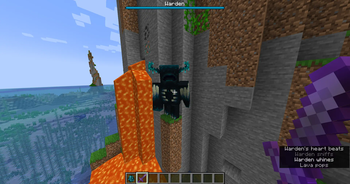
About this Mod
We do a miniscule amount of Warden buffery
This mod buffs the Warden and makes it drop things from randomly selected loot table
Features
- Buffed Warden and changed its loot
- It now has 4000 HP instead of usual 500
- It now regenerates health on its own with the rate of 1 HP per 10 game ticks (half a second)
- It is now immune to projectile damage
- It is also immune to fall damage
- Reduced cooldown of Sonic Boom to 30 ticks instead of 40
- It will now drop 30000 experience points instead of 5
- Instead of dropping a single sculk catalyst, it also drops random loot table. It could be from some wool to
end city's chest, giving player more reasons to spawn Warden and get annihilated by it. - Warden now has a boss bar (it is now actual boss guys)
- If it is about to fall into the void, it will teleport to the top of the world and fall down quickly
- Modified Attribute Class
- Max health attribute now caps at 4096
Note that nothing has been changed about the spawn mechanics so you can
pretty much just not summon it when you go in the Deep Dark if you're careful enough
Another note: This mod was made because I am tired of people complaining about Warden not giving something interesting
Not needed on Client if you want to run it server-side only. Client side installation is for Singleplayer & LAN worlds.
Available Versions
How to Install We do a miniscule amount of Warden buffery on Your Server
Order Server
Order a Minecraft Java server with at least 3 GB RAM (4 GB recommended).
Set fabric Loader
In the panel under "Egg", select the fabric loader and matching Minecraft version (1.19).
Install Mod
Open the mod browser in the dashboard and search for "We do a miniscule amount of Warden buffery". Click "Install" – done! Alternatively, upload the .jar via SFTP to the /mods folder.
Compatibility
Mod Loaders
Minecraft Versions
1.19
Server-side
✓ RequiredRecommended RAM
4 GB(min. 3 GB)Frequently Asked Questions
We do a miniscule amount of Warden buffery server crashes on startup – what to do?
Most common cause: wrong fabric version or insufficient RAM. Check the server log (latest.log) for "OutOfMemoryError" or "Mixin" errors. With Mado Hosting: ensure at least 3 GB RAM is allocated and the loader matches the mod version (1.19). You can switch loaders with one click in the panel.
Is We do a miniscule amount of Warden buffery compatible with fabric and quilt?
We do a miniscule amount of Warden buffery officially supports fabric, quilt for Minecraft 1.19. The Mado dashboard automatically detects incompatible loader combinations.
Server lagging with We do a miniscule amount of Warden buffery – how to optimize performance?
Recommended RAM: 4 GB (per 8 players). Use /spark profiler to check if We do a miniscule amount of Warden buffery consumes the most tick time. Common fixes: reduce server view-distance to 8-10, install "performant" or "starlight" as supplementary mods on Forge. With Mado Hosting, your server runs on NVMe SSDs with dedicated CPU cores for minimal latency.
Similar Mods





Rent Modded Server
Install We do a miniscule amount of Warden buffery with just one click on your server.