
Mine Mine no Mi: Crew Manager
An Addon for Mine Mine no Mi that synchronizes your crews with Discord and allows you to manage the size of crews.
Screenshots




About this Mod
Download the mod file directly here
It is imperative that for now this custom version is used. Changes in there are purely server sided. So only you need to install this version on your server.
Players can still use the normal Mine Mine no Mi Version.
Crew Manager
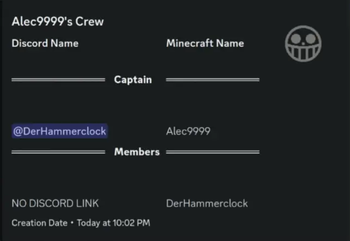
This Mine Mine no Mi Addon manages the sizes of your crews and can optionally use Discord Integration to synchronize your crews with Discord.
It can:
- Limit your crew sizes
- Dissolve existing crews that go over the crew limit
If Discord Integration is present it will additionally:
- List Crews neatly organized in a forum channel
- Show crew creation date
- Display captain
- Display members
- Display the crews banner
Config Options
["Crew Display"]
        "Sync Crew Members" = true
        "Show Crew Creation Date" = true
        #Has to be a Forum channel! Therefore your server MUST be a community server if you want to use this feature!
        #Range: 0 ~ 9223372036854775807
        "Crew Forum Channel Id" = 0
        "Show Captain of the crew" = true
        "Sync Crew Banner" = true

["Crew Manager"]
        #Leave it as -1 if you do not want any crew size limits. Crew size includes the captain! So 4 Members and 1 Captain would need a crew size of 5 to exist.
        # Setting this to 0 will disable crews on your server.
        #Range: > -1
        "Limit crew size" = -1
        #If set to true existing crews that are over the crew limit will be dissolved and removed
        "Dissolve existing crews" = false
Available Versions
How to Install Mine Mine no Mi: Crew Manager on Your Server
Order Server
Order a Minecraft Java server with at least 3 GB RAM (4 GB recommended).
Set forge Loader
In the panel under "Egg", select the forge loader and matching Minecraft version (1.16.5).
Install Mod
Open the mod browser in the dashboard and search for "Mine Mine no Mi: Crew Manager". Click "Install" – done! Alternatively, upload the .jar via SFTP to the /mods folder.
Compatibility
Mod Loaders
Minecraft Versions
1.16.5
Server-side
✓ RequiredRecommended RAM
4 GB(min. 3 GB)Frequently Asked Questions
Mine Mine no Mi: Crew Manager server crashes on startup – what to do?
Most common cause: wrong forge version or insufficient RAM. Check the server log (latest.log) for "OutOfMemoryError" or "Mixin" errors. With Mado Hosting: ensure at least 3 GB RAM is allocated and the loader matches the mod version (1.16.5). You can switch loaders with one click in the panel.
Is Mine Mine no Mi: Crew Manager compatible with forge?
Mine Mine no Mi: Crew Manager officially supports forge for Minecraft 1.16.5. The Mado dashboard automatically detects incompatible loader combinations.
Server lagging with Mine Mine no Mi: Crew Manager – how to optimize performance?
Recommended RAM: 4 GB (per 8 players). Use /spark profiler to check if Mine Mine no Mi: Crew Manager consumes the most tick time. Common fixes: reduce server view-distance to 8-10, install "performant" or "starlight" as supplementary mods on Forge. With Mado Hosting, your server runs on NVMe SSDs with dedicated CPU cores for minimal latency.
Similar Mods






Rent Modded Server
Install Mine Mine no Mi: Crew Manager with just one click on your server.