
Mine Mine no Mi: Role Assigner
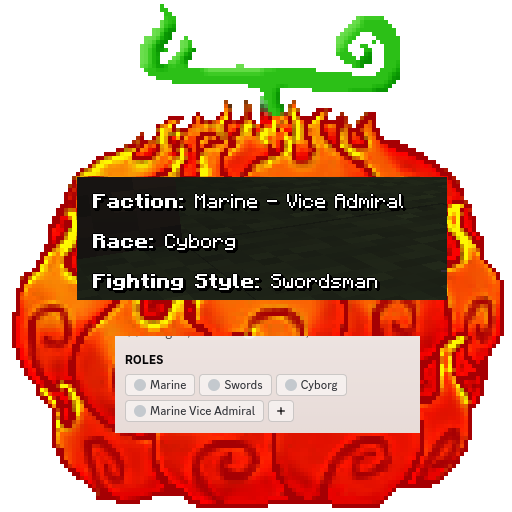
Automatically synchronize in-game stats like race, faction, fighting style etc. with a matching role in Discord. A must-have for server owners.
Screenshots
About this Mod
Discord Role Assigner
This Mine Mine no Mi Addon uses Discord Integration to synchronize the in-game stats with Discord as a Role.
It synchronizes:
- Faction
- Race
- Fighting Style
- Marine Rank
- Revolutionary Rank
- Mink Subrace
Compile it yourself
git clone https://github.com/rathmerdominik/mmnm-role-assigner
cd mmnm-role-assigner
./gradlew build
cd build/libs
You can now just take the jar file out of this directory and place it under the mods/ folder on your server.
This mod requires Discord Integration 3.0.5 to be installed and setup on your server!
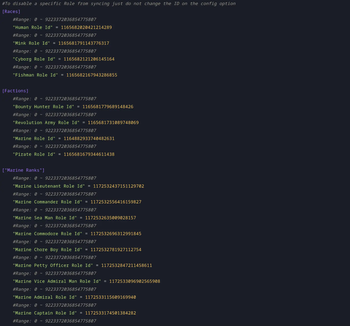
Config Options
#To disable a specific Role from syncing just do not change the ID on the config option
[Races]
    #Range: 0 ~ 9223372036854775807
    "Human Role Id" = 0
    #Range: 0 ~ 9223372036854775807
    "Mink Role Id" = 0
    #Range: 0 ~ 9223372036854775807
    "Cyborg Role Id" = 0
    #Range: 0 ~ 9223372036854775807
    "Fishman Role Id" = 0

[Mink Sub Races]
    #Range: 0 ~ 9223372036854775807
    "Bunny Role Id" = 0
    #Range: 0 ~ 9223372036854775807
    "Dog Role Id" = 0
    #Range: 0 ~ 9223372036854775807
    "Lion Role Id" = 0

[Factions]
    #Range: 0 ~ 9223372036854775807
    "Bounty Hunter Role Id" = 0
    #Range: 0 ~ 9223372036854775807
    "Revolution Army Role Id" = 0
    #Range: 0 ~ 9223372036854775807
    "Marine Role Id" = 0
    #Range: 0 ~ 9223372036854775807
    "Pirate Role Id" = 0

["Marine Ranks"]
    #Range: 0 ~ 9223372036854775807
    "Marine Lieutenant Role Id" = 0
    #Range: 0 ~ 9223372036854775807
    "Marine Commander Role Id" = 0
    #Range: 0 ~ 9223372036854775807
    "Marine Sea Man Role Id" = 0
    #Range: 0 ~ 9223372036854775807
    "Marine Commodore Role Id" = 0
    #Range: 0 ~ 9223372036854775807
    "Marine Chore Boy Role Id" = 0
    #Range: 0 ~ 9223372036854775807
    "Marine Petty Officer Role Id" = 0
    #Range: 0 ~ 9223372036854775807
    "Marine Vice Admiral Man Role Id" = 0
    #Range: 0 ~ 9223372036854775807
    "Marine Admiral Role Id" = 0
    #Range: 0 ~ 9223372036854775807
    "Marine Captain Role Id" = 0
    #Range: 0 ~ 9223372036854775807
    "Marine Fleet Admiral Role Id" = 0

["Revolutionary Ranks"]
    #Range: 0 ~ 9223372036854775807
    "Revolutionary Army Officer Role Id" = 0
    #Range: 0 ~ 9223372036854775807
    "Revolutionary Army Supreme Commander Role Id" = 0
    #Range: 0 ~ 9223372036854775807
    "Revolutionary Army Member Role Id" = 0
    #Range: 0 ~ 9223372036854775807
    "Revolutionary Army Commander Role Id" = 0
    #Range: 0 ~ 9223372036854775807
    "Revolutionary Army Chief of Staff Role Id" = 0

["Fighting Styles"]
    #Range: 0 ~ 9223372036854775807
    "Art of Weather Role Id" = 0
    #Range: 0 ~ 9223372036854775807
    "Brawler Role Id" = 0
    #Range: 0 ~ 9223372036854775807
    "Sniper Role Id" = 0
    #Range: 0 ~ 9223372036854775807
    "Black Leg Role Id" = 0
    #Range: 0 ~ 9223372036854775807
    "Doctor Role Id" = 0
    #Range: 0 ~ 9223372036854775807
    "Swords Man Role Id" = 0
Available Versions
How to Install Mine Mine no Mi: Role Assigner on Your Server
Order Server
Order a Minecraft Java server with at least 3 GB RAM (4 GB recommended).
Set forge Loader
In the panel under "Egg", select the forge loader and matching Minecraft version (1.16.5).
Install Mod
Open the mod browser in the dashboard and search for "Mine Mine no Mi: Role Assigner". Click "Install" – done! Alternatively, upload the .jar via SFTP to the /mods folder.
Compatibility
Mod Loaders
Minecraft Versions
1.16.5
Server-side
✓ RequiredRecommended RAM
4 GB(min. 3 GB)Frequently Asked Questions
Mine Mine no Mi: Role Assigner server crashes on startup – what to do?
Most common cause: wrong forge version or insufficient RAM. Check the server log (latest.log) for "OutOfMemoryError" or "Mixin" errors. With Mado Hosting: ensure at least 3 GB RAM is allocated and the loader matches the mod version (1.16.5). You can switch loaders with one click in the panel.
Is Mine Mine no Mi: Role Assigner compatible with forge?
Mine Mine no Mi: Role Assigner officially supports forge for Minecraft 1.16.5. The Mado dashboard automatically detects incompatible loader combinations.
Server lagging with Mine Mine no Mi: Role Assigner – how to optimize performance?
Recommended RAM: 4 GB (per 8 players). Use /spark profiler to check if Mine Mine no Mi: Role Assigner consumes the most tick time. Common fixes: reduce server view-distance to 8-10, install "performant" or "starlight" as supplementary mods on Forge. With Mado Hosting, your server runs on NVMe SSDs with dedicated CPU cores for minimal latency.
Similar Mods






Rent Modded Server
Install Mine Mine no Mi: Role Assigner with just one click on your server.