
Mo' Tools Mod
Adds More Tools Made Of Materials That Make Sense As Tools!
Screenshots
About this Mod
Mo' Tools Mod
The Mo' Tools Mod adds in over 110+ tools to your Minecraft world along with upgrades to make your tools even better. Check out the Mod Showcase below for an in-game look of the mod!
Features
- Adds 110 base tools which can all be upgraded
- Andesite
- Diorite
- Granite
- Netherrack
- End Stone
- Glass
- Lapis Lazuli
- Amethyst
- Emerald
- Echo
- Copper
- Obsidian
- Redstone
- Coal
- Sandstone
- Red Sandstone
- Terracotta
- Tuff
- Quartz
- Adds 7 upgrades 4 of which can be applied to all tools
- Blaze Upgrade
- Spider Upgrade
- Star Upgrade
- Lapis Upgrade
- Quartz Upgrade
- Redstone Upgrade
- Obsidian Upgrade
- Adds nuggets to smelt down added tools
- Netherite Nugget
- Diamond Nugget
- Emerald Nugget
- Lapis Nugget
- Copper Nugget
- Amethyst Nugget
- Echo Nugget
- Obsidian Nugget
Upgrades
Blaze Upgrade
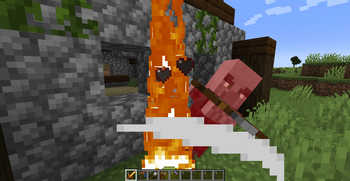
The Blaze Upgrade is applied to only Diamond tools when put into a smithing table. Blaze Tools can set mobs on fire, which is helpful for getting cooked meat fast and easy. The Blaze Tools can also smelt the blocks they mind, for exmple, Stone -> Smooth Stone, Logs -> Charcoal, Clay -> Terracotta, and more!

Blaze Upgrade needs Blaze Powder to combine with Diamond Tools
Spider Upgrade
The Spider Upgrade is applied to only Iron Tools when put into a smithing table. Spider Tools can give mobs the poison effect, which lasts for a few seconds. They can also freeze mobs in place for a second like they are stuck in a web.

Spider Upgrade needs Spider Eye to combine with Iron Tools
Star Upgrade
The Star Upgrade is applied to only Diamond Tools when put into a smithing table. Star Tools are more powerful Diamond Tools, with increased attack speed and damage.

Star Upgrade needs Neather Star to combine with Diamond Tools
Lapis Upgrade
The Lapis Upgrade is applied to all tools, except Star Tools, when put into a smithing table. Tools with the Lapis Upgrade are givin increased enchantablity, which inreases the chance of getting multiple good enchantments on the tools.

Lapis Upgrade needs Lapis Lazuli to combine with Tools
Quartz Upgrade
The Quartz Upgrade is applied to all tools, except Star Tools, when put into a smithing table. Tools with the Quartz Upgrade are givin increased attack speed.

Quartz Upgrade needs Quartz to combine with Tools
Redstone Upgrade
The Redstone Upgrade is applied to all tools, except Star Tools, when put into a smithing table. Tools with the Redstone Upgrade are givin increase efficiency, which makes your tools mine faster then normal.

Redstone Upgrade needs Redstone Dust to combine with Tools
Obsidian Upgrade
The Obsidian Upgrade is applied to all tools, except Star Tools, when put into a smithing table. Tools with the Obsidian Upgrade are givin double the durability, multipling the base durability of the tool by two.

Obsidian Upgrade needs Obsidian to combine with Tools
Images

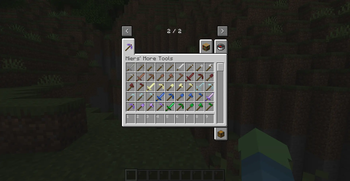
Mo' Tools Creative Tab

Blaze Sword In Action

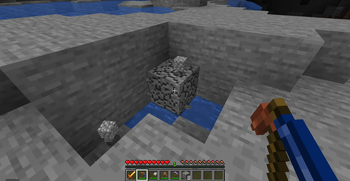
Lapis Tipped Copper Pickaxe In Action
Recipes

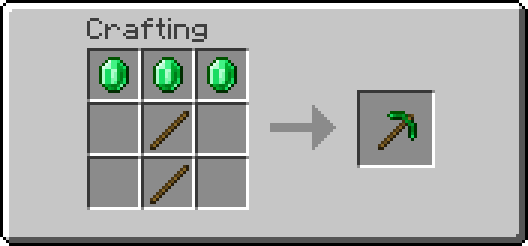
All Tools Are Still Made The Same Way


Blaze Upgrade Recipe


Spider Upgrade Recipe


Star Upgrade Recipe


Lapis Upgrade Recipe


Redstone Upgrade Recipe


Quartz Upgrade Recipe


Obsidian Upgrade Recipe
Modpacks
Yes, it's perfectly find for you to use this mod in a modpack.
Support
If you enjoy the mod and would like to support the project, feel free to leave a donation on my Ko-fi. Support is greatly appreciated!
Available Versions
How to Install Mo' Tools Mod on Your Server
Order Server
Order a Minecraft Java server with at least 3 GB RAM (4 GB recommended).
Set neoforge Loader
In the panel under "Egg", select the neoforge loader and matching Minecraft version (1.21.4).
Install Mod
Open the mod browser in the dashboard and search for "Mo' Tools Mod". Click "Install" – done! Alternatively, upload the .jar via SFTP to the /mods folder.
Compatibility
Mod Loaders
Minecraft Versions
1.21.4
Server-side
✓ RequiredRecommended RAM
4 GB(min. 3 GB)Frequently Asked Questions
Mo' Tools Mod server crashes on startup – what to do?
Most common cause: wrong neoforge version or insufficient RAM. Check the server log (latest.log) for "OutOfMemoryError" or "Mixin" errors. With Mado Hosting: ensure at least 3 GB RAM is allocated and the loader matches the mod version (1.21.4). You can switch loaders with one click in the panel.
Is Mo' Tools Mod compatible with neoforge?
Mo' Tools Mod officially supports neoforge for Minecraft 1.21.4. The Mado dashboard automatically detects incompatible loader combinations.
Server lagging with Mo' Tools Mod – how to optimize performance?
Recommended RAM: 4 GB (per 8 players). Use /spark profiler to check if Mo' Tools Mod consumes the most tick time. Common fixes: reduce server view-distance to 8-10, install "performant" or "starlight" as supplementary mods on Forge. With Mado Hosting, your server runs on NVMe SSDs with dedicated CPU cores for minimal latency.
Similar Mods




![[TaCZ] Timeless and Classics Zero](https://cdn.modrinth.com/data/SzzJttH8/fd27766d2bb8390d284696b1dbd358f87e081439_96.webp)

Rent Modded Server
Install Mo' Tools Mod with just one click on your server.