
Mob Flow Utilities
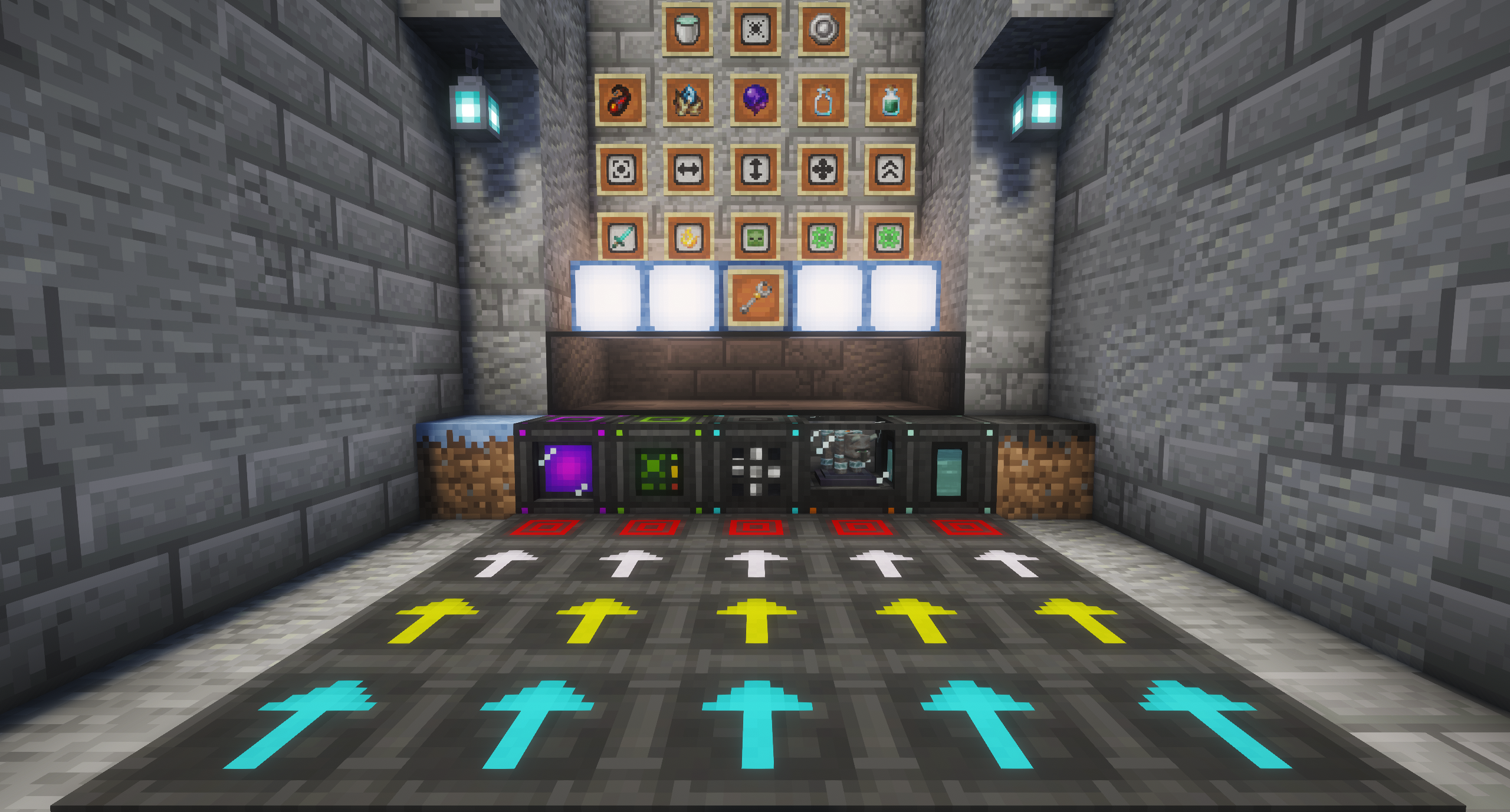
A mob farming automation mod. Flow pads and fans push mobs where you want them, attack pads kill them, and collectors pick up whatever they drop.
About this Mod
Automate Mobs
A mob farming automation mod. Flow pads and fans push mobs where you want them, attack pads kill them, and collectors pick up whatever they drop.
Features
Flow Pads
- Directional Movement: Push mobs and items in the direction you place them
- Three Speed Tiers: Fast, Faster, and Fastest for different flow rates
- No Configuration: Direction set by placement orientation
Damage Pads + Controller
- Centralized Damage Control: One Controller manages multiple Damage Pads in multiple farms
- Pad Wrench Linking: Connect pads to controllers with visual feedback
- Stackable Enchantment Modules: Up to 10 modules per slot
- Sharpness: Increased damage output
- Fire Aspect: Burning damage over time
- Smite: Specialized undead damage
- Bane of Arthropods: Arthropod-specific damage
- Looting: Enhanced drop rates
- Redstone Activation: Damage Pads require a redstone signal to operate
- Enderman Teleport Blocking: Damage Pads prevent Endermen from escaping
Collector Block
- Configurable Collection Zone: Adjust pickup radius with Radius Increase Modules
- Zone Positioning: Offset collection area in any direction
- XP Storage: Collect and store experience as Liquid XP — deposit and withdraw one level at a time, or all at once (26.1.2 Exclusive)
- Liquid XP Output: Expose stored XP as a fluid via pipes or direct bucket interaction (26.1.2 Exclusive)
- Void Filtering: Automatically delete unwanted items with up to 3 configurable filter modules
- Visual Zone Preview: Wireframe overlay shows collection boundaries
Genesis Chamber
- Automated Mob Spawning: Spawn mobs from spawn eggs using fuel
- Fuel System: Uses most vanilla furnace fuels (coal, lava buckets, blaze rods, etc.)
- Configurable Spawn Zone: 5x5 base area, expandable to 10x10 with Radius Increase Modules
- Speed Control: Base 200 tick spawn interval, reducible to 50 ticks with Speed Modules
- Light Level Aware: Respects vanilla spawning rules (hostiles in darkness, passives in light)
- Spawn Cap: Configurable mob limit per zone (default 12)
- 3-Axis Positioning: Offset spawn zone in any direction with wireframe preview
- Automation Ready: Accepts fuel from hoppers/pipes automatically
Genesis Infuser
- Create Super-Efficient Fuels: Infuses coal and charcoal with liquid XP to produce Infused Coal and Infused Charcoal, each burning 8x longer than its vanilla counterpart
- Liquid XP Powered: Consumes 125mB of liquid XP per item — a full bucket yields 8 infused items
- Open Fluid Compatibility: Accepts any
c:experience-tagged fluid, so XP from other mods works too - Internal Buffer: Holds up to 32 buckets (32,000mB) of liquid XP
- Speed Control: Base 200 tick processing time, reducible by 15 ticks per Speed Module (up to 10)
- 6 Input / 6 Output Slots: Batch-process multiple coal and charcoal at once
- Bucket Interaction: Fill or drain the internal tank by hand with XP buckets — drain before relocating to keep your XP
- Automation Ready: Pipe liquid XP in and infused fuel out; works with hoppers and fluid pipes in any direction
Fan
- Pushes mobs in the facing direction.
- Area of effect can be upgraded using fan upgrade module
Pad Wrench
- Operation Modes: Add or Remove mode for linking/unlinking pads
- Selection Types: Single pad or area selection for bulk operations
- Visual Feedback: Wireframe highlights linked systems
Mob Spawn Control
- Gloom Spores: Craftable item that transforms dirt into Dark Dirt
- Converts 5x5 area
- Plays sound and block break particles on conversion
- Also obtainable from hostile mob loot chests
- Dark Dirt: Accelerated hostile mob spawning blocks
- Spawns up to 12 hostile mobs per area
- Functions in darkness, ignores player proximity
- Reverts to dirt in direct sunlight
- Redstone Pulse: Receiving a redstone signal drastically accelerates spawn tick rate for exponential spawn bursts (26.1.2 Exclusive)
- Glimmer Sprouts: Craftable item that transforms dirt into Glimmer Grass
- Converts 5x5 area
- Also obtainable from passive mob loot chests
- Glimmer Grass: Accelerated passive mob spawning blocks
- Spawns up to 12 passive mobs per area
- Functions in bright light, ignores player proximity
Gene Sampling
- Empty Gene Vial: Used to collect genetic material from mobs
- Gene Sample Vial: Contains collected gene samples that can be used for crafting spawn eggs
- Life Catalust: Used for crafting spawn eggs
Gene sampling allows players to collect gene samples from creatures using Empty Gene Vials, then combine the resulting Gene Sample Vials with Incubation Crystals and Emeralds to craft spawn eggs for use in the Genesis Chamber.
Infused Coal and Charcoal
- Burns 8x longer than vanilla coal and charcoal. One Infused Coal/Charcoal can smelt a stack (64) of items.
Utility Tools
- Mob Catcher: Capture and release any non-boss mob
Decorative Blocks
- Dark Glass: Blocks light transmission while maintaining transparency and is wither immune
- Glimmer Lamp: High-output decorative lighting
Configuration
- Flexible Settings: Adjust spawn rates, mob caps, particle effects, and more
- Genesis Chamber Spawn Cap: Configurable per-zone mob limit
- Genesis Infuser: Configurable speed and cost
- Dark Dirt/Glimmer Grass: Adjust spawn rates and check intervals
- Conversion Areas: Configure Gloom Spore and Glimmer Sprout conversion radius
Required Dependencies
- Full in-game guide explaining every block and item using GuideMe.
Available Versions
How to Install Mob Flow Utilities on Your Server
Order Server
Order a Minecraft Java server with at least 3 GB RAM (4 GB recommended).
Set neoforge Loader
In the panel under "Egg", select the neoforge loader and matching Minecraft version (26.1.2).
Install Mod
Open the mod browser in the dashboard and search for "Mob Flow Utilities". Click "Install" – done! Alternatively, upload the .jar via SFTP to the /mods folder.
Compatibility
Mod Loaders
Minecraft Versions
26.1.2, 1.21.1
Server-side
✓ RequiredRecommended RAM
4 GB(min. 3 GB)Frequently Asked Questions
Mob Flow Utilities server crashes on startup – what to do?
Most common cause: wrong neoforge version or insufficient RAM. Check the server log (latest.log) for "OutOfMemoryError" or "Mixin" errors. With Mado Hosting: ensure at least 3 GB RAM is allocated and the loader matches the mod version (26.1.2). You can switch loaders with one click in the panel.
Is Mob Flow Utilities compatible with neoforge?
Mob Flow Utilities officially supports neoforge for Minecraft 26.1.2, 1.21.1. The Mado dashboard automatically detects incompatible loader combinations.
Server lagging with Mob Flow Utilities – how to optimize performance?
Recommended RAM: 4 GB (per 8 players). Use /spark profiler to check if Mob Flow Utilities consumes the most tick time. Common fixes: reduce server view-distance to 8-10, install "performant" or "starlight" as supplementary mods on Forge. With Mado Hosting, your server runs on NVMe SSDs with dedicated CPU cores for minimal latency.
Rent Modded Server
Install Mob Flow Utilities with just one click on your server.