
Mob Mincer
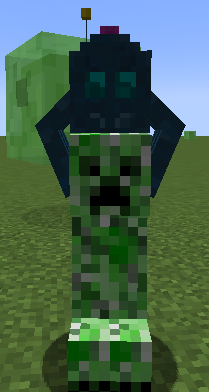
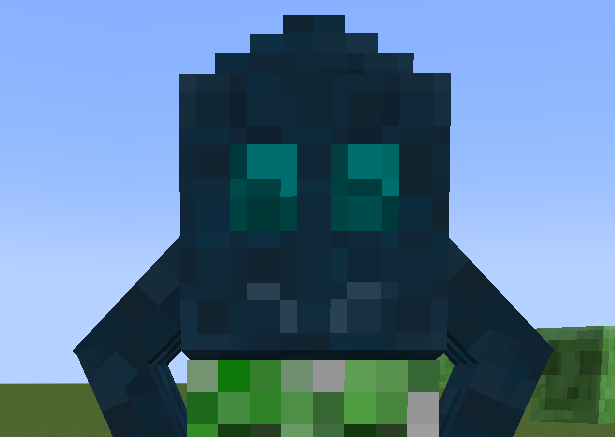
This cute little guy can be used to mince mobs for their loot over a period of time
Screenshots
About this Mod

This mod adds one item, the Mob Mincer. This cute little guy can be used to mince mobs for their loot over a period of
time. It is a mid-game alternative to mob farms to target a certain mob drop.
Usage
Crafting

- To use the Mob Mincer, simply right-click on a mob with it in your hand.
- The mincer works with any mob (even modded ones!), but it must have loot drops. Some mobs require silk touch
- To remove the mincer, left-click the mincer attached to the mob.
- The Mob Mincer has durability and will break after a certain amount of minces
- You can also use a dispenser to attach a Mob Mincer
Enchantments
Enchant the Mob Mincer with an enchantment table or anvil
- Unbreaking - Increases the chance to ignore durability damage
- Silk Touch - Allows for player drops
- Looting - Increases the amount of drops
Mending - Repairs the Mob Mincer with XPPlannedSoulspeed - Increases the speed of mincingPlanned
Attachments
Shift + right-click the Mob Mincer with the attachment in your hand to attach it. If the mincer breaks it will drop any attachments.
| Name | Item | Description |
|---|---|---|
| Storage | Chest | Stores the drops in the mincer instead of dropping them on the ground. Right click to open. |
| Pacifier | Chorus Fruit | Disables the mob's AI. |
| Feeder | Enchanted Golden Apple | Feeds the mob to heal it after mincing. Percentage healed can be configured. |
| Spreader | Sculk Catalyst | Attaches to another mob if the minced mob dies. |
Configuration
baseDurability- The base durability of the Mob Mincer. Default: 100maxMinceTick- The amount of ticks that pass between minces. Soulspeed scales this down. Default: 500unbreakingBound- The bound used for the RNG when calculating unbreaking. Chance to ignore durability: (1 / bound) *
unbreakingLevel. Default: 6mobDamagePercent- The percentage (0 - 1.0) of health the mob takes when minced. Default: 0.1feederHealPercent- The percentage (0 - 1.0) of damage healed from the feeder attachment. Default: 1coloredMobs- Whether mobs should be colored based on their current health. Default: trueallowDispensing- Whether the Mob Mincer can be attached from a dispenser. Default: trueallowKillDrop- Whether the mob should still drop loot when it dies after it has been minced at least once. Default: falsedropChance- The chance (0 - 1.0) that dropping loot is skipped. Default: 1
Disclaimer
- The Mob Mincer can be used on any mob that has a loot table, but some mobs have special conditions (eg. slimes only dropping slime balls when they are the smallest size). This will be fixed in a
later
release along with more drop customization. - Just like with killing a mob, not every mince will produce a drop, though you can improve this with looting. Without looting, you are limited to one drop per mince.
- If you cannot attach a mob mincer to a mob that drops loot, try enchanting it with Silk touch to allow for player drops.
- Certain mods may make this too overpowered. Future configuration options will allow for more customization.
Planned features
- More Minecraft versions
- More configuration
- More attachments/modifiers
- Suggestions welcome!
Dependencies
Both
- Architectury API
Forge Config Screens (Optional)Use the config file for now
Fabric
Forge
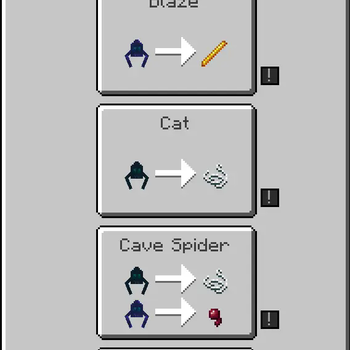
Support for Jade, JEI, and REI included
Issues
Please report any issues to the issue tracker
Available Versions
How to Install Mob Mincer on Your Server
Order Server
Order a Minecraft Java server with at least 3 GB RAM (4 GB recommended).
Set fabric Loader
In the panel under "Egg", select the fabric loader and matching Minecraft version (1.20.2).
Install Mod
Open the mod browser in the dashboard and search for "Mob Mincer". Click "Install" – done! Alternatively, upload the .jar via SFTP to the /mods folder.
Compatibility
Mod Loaders
Minecraft Versions
1.20.2
Server-side
✓ RequiredRecommended RAM
4 GB(min. 3 GB)Frequently Asked Questions
Mob Mincer server crashes on startup – what to do?
Most common cause: wrong fabric version or insufficient RAM. Check the server log (latest.log) for "OutOfMemoryError" or "Mixin" errors. With Mado Hosting: ensure at least 3 GB RAM is allocated and the loader matches the mod version (1.20.2). You can switch loaders with one click in the panel.
Is Mob Mincer compatible with fabric and neoforge?
Mob Mincer officially supports fabric, neoforge for Minecraft 1.20.2. The Mado dashboard automatically detects incompatible loader combinations.
Server lagging with Mob Mincer – how to optimize performance?
Recommended RAM: 4 GB (per 8 players). Use /spark profiler to check if Mob Mincer consumes the most tick time. Common fixes: reduce server view-distance to 8-10, install "performant" or "starlight" as supplementary mods on Forge. With Mado Hosting, your server runs on NVMe SSDs with dedicated CPU cores for minimal latency.
Similar Mods




![[TaCZ] Timeless and Classics Zero](https://cdn.modrinth.com/data/SzzJttH8/fd27766d2bb8390d284696b1dbd358f87e081439_96.webp)

Rent Modded Server
Install Mob Mincer with just one click on your server.