
MobStack26
A datapack that stacks mobs to enhance performance of large animal farms
Screenshots
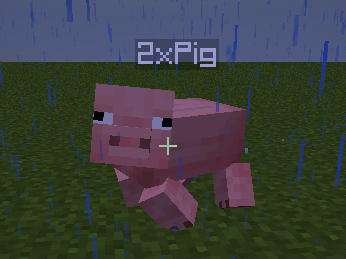
About this Mod
Ever managed to have so many farm animals around your world that it started to affect performance? No? Me neither, but the players in my server always do! And so, all similar mods and datapacks being outdated, I made my own.
Features:
- Stack nearby farm animals together to avoid large numbers of entities
- Adds a nametag to show the ammount of animals in a stack
- Respects mob variants and sheep colour
- Ignores baby mobs and nametagged mobs, your pets shall not be stacked!
Nor will your poor, imprisoned sheeps - Shearing drops multiplied by the number of mobs in a stack
- Only stacks mobs with an equal number of stacks together, making it easier to not accidentally merge all your animals and end up unable to breed the last one
- Animals can be stacked up to 64x, they wont stack if their sum is greater than 64
Suported mobs:
- Chickens
- Cows
- Mooshrooms
- Pigs
- Rabbits (Does anybody even farm rabbits? No idea)
- Sheeps
Known issues:
- Brown mooshroom variants wont remember if they ate a flower after being stacked or killed (Extremely niche issue, wont fix)
- Under certain rare conditions mobs will replicate extremely fast causing extreme lag, critical issue, working on a fix.
Credits:
Mob Stacker by NickTonj, I did not take any of his code but finding his datapack gave me the idea to do this one
Available Versions
How to Install MobStack26 on Your Server
Order Server
Order a Minecraft Java server with at least 3 GB RAM (4 GB recommended).
Set datapack Loader
In the panel under "Egg", select the datapack loader and matching Minecraft version (26.2).
Install Mod
Open the mod browser in the dashboard and search for "MobStack26". Click "Install" – done! Alternatively, upload the .jar via SFTP to the /mods folder.
Compatibility
Mod Loaders
Minecraft Versions
26.2, 26.1.2, 26.1.1 (+13 more)
Server-side
✓ RequiredRecommended RAM
4 GB(min. 3 GB)Frequently Asked Questions
MobStack26 server crashes on startup – what to do?
Most common cause: wrong datapack version or insufficient RAM. Check the server log (latest.log) for "OutOfMemoryError" or "Mixin" errors. With Mado Hosting: ensure at least 3 GB RAM is allocated and the loader matches the mod version (26.2). You can switch loaders with one click in the panel.
Is MobStack26 compatible with datapack and fabric and forge and neoforge and quilt?
MobStack26 officially supports datapack, fabric, forge, neoforge, quilt for Minecraft 26.2, 26.1.2, 26.1.1. Note: Forge and Fabric mods are NOT cross-compatible – pick one loader and stick with it. The Mado dashboard automatically detects incompatible loader combinations.
Server lagging with MobStack26 – how to optimize performance?
Recommended RAM: 4 GB (per 8 players). Use /spark profiler to check if MobStack26 consumes the most tick time. Common fixes: reduce server view-distance to 8-10, install "performant" or "starlight" as supplementary mods on Forge. With Mado Hosting, your server runs on NVMe SSDs with dedicated CPU cores for minimal latency.
Similar Mods






Rent Modded Server
Install MobStack26 with just one click on your server.