
MobStacker
Greatly increases performance by stacking mobs together reducing the physical number of entities in the world with a config for further customization. Includes a mob cap module.
Screenshots
About this Mod


MobStacker is a performance Minecraft mod to optimize entity handling, addressing a common cause of performance issues in vanilla and modded environments. By intelligently "stacking" similar mobs in close proximity, MobStacker significantly reduces server load and enhances client-side performance without compromising gameplay mechanics.
💡 Note: MobStacker preserves all loot and mob properties within stacked entities. Named mobs (via name tags) are exempt from stacking to maintain uniqueness.
Key Benefits
- 🚀 Server Performance Boost: Dramatically reduces entity processing overhead.
- 📈 Enhanced Client FPS: Lowers strain on client-side rendering.
- 🌐 Optimized Network Traffic: Minimizes entity data transmission.
- 🎮 Cleaner Gameplay: Reduces visual clutter in mob-dense areas.
- 💾 Memory Usage Reduction: Lowers overall memory footprint.
Performance Improvement
While actual performance gains vary based on server specifications, player count, and mod configurations, MobStacker can provide substantial improvements, especially in environments with:
- High mob density
- Numerous entity-adding mods
- Large, active player bases
🔗 Note:
- MobStacker has a built in configurable spawn cap module to reduce mob spawns per chunk.
Features
| Feature | Description |
|---|---|
| 📦 Smart Stacking | Automatically combines identical mob types within a configurable radius |
| 🔢 Customizable Stacks | Set preferred maximum stack sizes |
| ❤️ Flexible Health Management | Configurable options for stack health and death mechanics |
| 🚫 Selective Stacking | Ability to exclude specific entities or entire mods |
| 🔪 Stack Splitting | Implemented separator item functionality for dividing stacks |
Configuration
| Option | Description | Default |
|---|---|---|
killWholeStackOnDeath |
Determines if entire stack dies when one mob is killed | false |
stackHealth |
Combines health of stacked mobs when enabled | false |
maxMobStackSize |
Maximum number of mobs in a single stack | 16 |
stackRadius |
Radius within which mobs attempt to stack | 6.0 |
enableSeparator |
Toggles use of separator item for stack splitting | false |
consumeSeparator |
Determines if separator item is consumed on use | true |
separatorItem |
Specifies the item used as a separator | "minecraft:diamond" |
enableAssimilator |
Toggles use of assimilator item for stackable toggle | false |
consumeAssimilator |
Determines if assimilator item is consumed on use | true |
assimilatorItem |
Specifies the item used as a assimilator | "minecraft:emerald" |
ignoredEntities |
List of entities excluded from stacking | [] |
ignoredMods |
List of mod IDs whose entities are excluded from stacking | [] |
Commands
All commands require operator permissions (level 2) and are prefixed with /mobstacker.
Configuration Commands
# Toggle whole stack death
/mobstacker stackerConfig killWholeStackOnDeath [true|false]

# Toggle health stacking
/mobstacker stackerConfig stackHealth [true|false]

# Set maximum stack size
/mobstacker stackerConfig maxStackSize [value]

# Set stack radius
/mobstacker stackerConfig stackRadius [value]

# Toggle separator functionality
/mobstacker stackerConfig separator enableSeparator [true|false]

# Toggle separator consumption
/mobstacker stackerConfig separator consumeSeparator [true|false]

# Set separator item
/mobstacker stackerConfig separator separatorItem [item_id]

# Toggle assimilator functionality
/mobstacker stackerConfig assimilator enableAssimilator [true|false]

# Toggle assimilator consumption
/mobstacker stackerConfig assimilator consumeAssimilator [true|false]

# Set assimilator item
/mobstacker stackerConfig assimilator assimilatorItem [item_id]
Entity and Mod Management
# Ignore specific entity
/mobstacker ignore entity [entity_id]

# Ignore all entities from a mod
/mobstacker ignore mod [mod_id]

# Remove entity from ignore list
/mobstacker unignore entity [entity_id]

# Remove mod from ignore list
/mobstacker unignore mod [mod_id]

# Set stack size for specific entity
/mobstacker setStackSize [entity] [size]
NOTE: An entity can be given the tag {Stackdata-blocked: {CanStack:0b}} to prevent it from stacking.
Mob Cap Management
# Set mob cap for mob categories
/mobstacker mobCapConfig [options]
Additional Notes
- 🔄 Automatic stacking occurs when compatible mobs move to a new block.
- 👑 Boss entities receive special handling to preserve custom names and health bars.
- 🔌 API available for custom merging conditions, death handlers, and entity data modifiers.
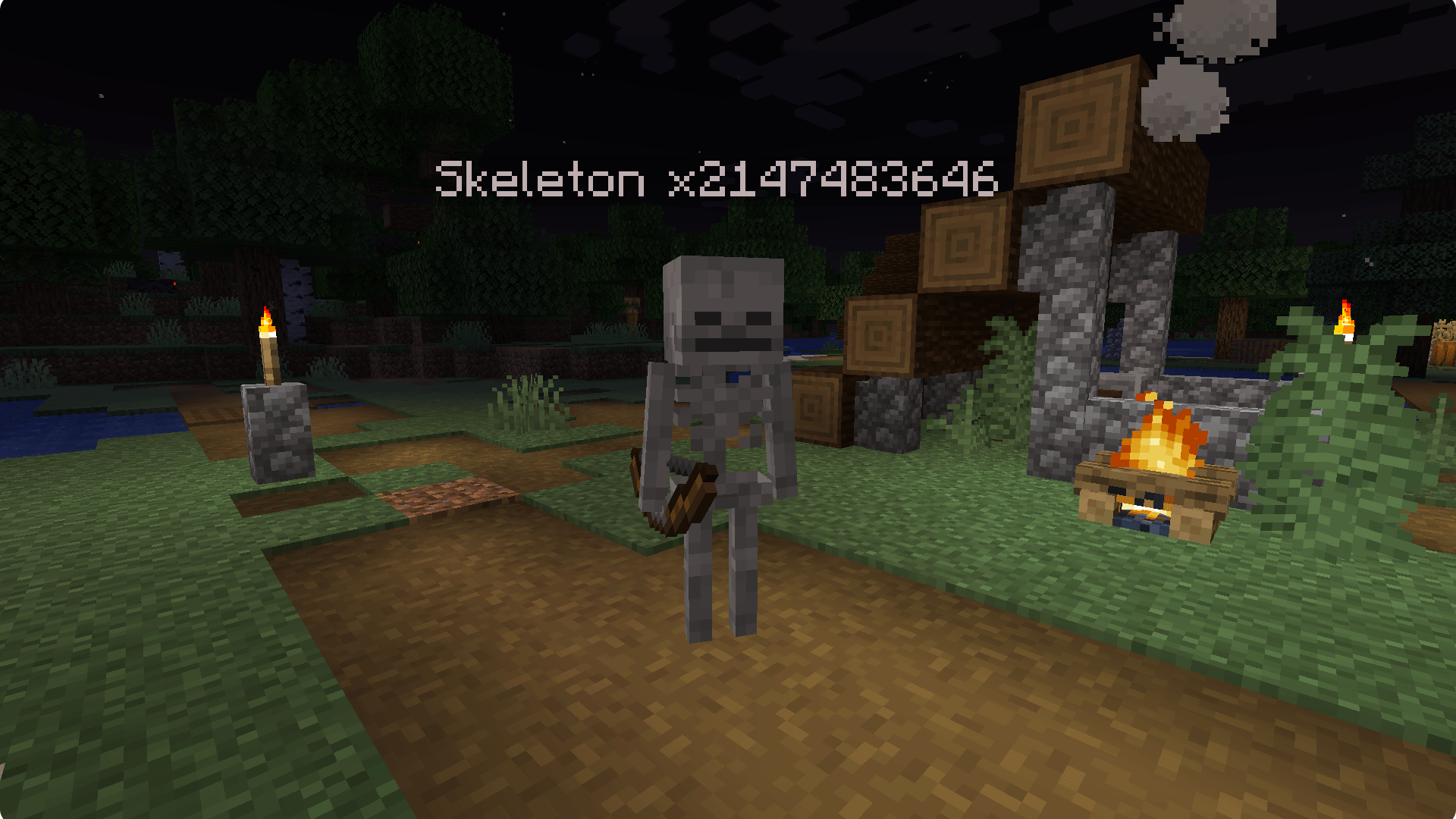
- 📊 Stacked mobs display stack size in their name (e.g., "Zombie x5").
- 🐑🐷🧟 Compatible with various entity types: animals, monsters, and NPCs.
Report issues to the issue tracker on github.
Available Versions
How to Install MobStacker on Your Server
Order Server
Order a Minecraft Java server with at least 3 GB RAM (4 GB recommended).
Set fabric Loader
In the panel under "Egg", select the fabric loader and matching Minecraft version (1.21.5).
Install Mod
Open the mod browser in the dashboard and search for "MobStacker". Click "Install" – done! Alternatively, upload the .jar via SFTP to the /mods folder.
Compatibility
Mod Loaders
Minecraft Versions
1.21.5, 1.21.4, 1.21.4-pre1 (+25 more)
Server-side
✓ RequiredRecommended RAM
4 GB(min. 3 GB)Frequently Asked Questions
MobStacker server crashes on startup – what to do?
Most common cause: wrong fabric version or insufficient RAM. Check the server log (latest.log) for "OutOfMemoryError" or "Mixin" errors. With Mado Hosting: ensure at least 3 GB RAM is allocated and the loader matches the mod version (1.21.5). You can switch loaders with one click in the panel.
Is MobStacker compatible with fabric and forge and neoforge and quilt?
MobStacker officially supports fabric, forge, neoforge, quilt for Minecraft 1.21.5, 1.21.4, 1.21.4-pre1. Note: Forge and Fabric mods are NOT cross-compatible – pick one loader and stick with it. The Mado dashboard automatically detects incompatible loader combinations.
Server lagging with MobStacker – how to optimize performance?
Recommended RAM: 4 GB (per 8 players). Use /spark profiler to check if MobStacker consumes the most tick time. Common fixes: reduce server view-distance to 8-10, install "performant" or "starlight" as supplementary mods on Forge. With Mado Hosting, your server runs on NVMe SSDs with dedicated CPU cores for minimal latency.
Similar Mods






Rent Modded Server
Install MobStacker with just one click on your server.