
Mod Settings
Provides an easy to access configuration screen for all installed mods on Fabric
About this Mod
Mod Settings for Fabric
This is a Minecraft mod for Fabric that provides an easy to access configuration
screen for all installed mods!
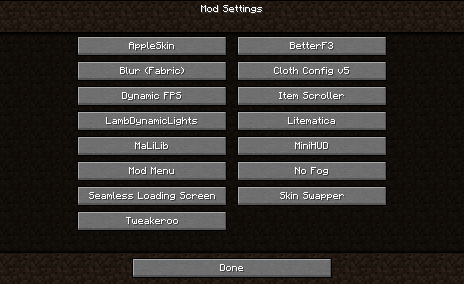
Similar to how "Mod Options" works in Forge, this will add a Vanilla-style menu screen with easy-to-access buttons to get to the configurations for your mods.
You can go directly to this screen using the Mod Settings hotkey. This means there is no need to memorize all those hotkeys for settings of all your mods. The Mod Settings hotkey is F6 by default, but this can be changed in the ordinary "Key Binds" options screen.
I created this mod when I found myself over and over again go into the Mod Menu list, scroll to the bottom to find Tweakeroo or whatever, and then try to hit the configuration button on the opposite side of the screen. With this mod, you can directly go to the configuration screen with just a single button, and unless you have an extreme amount of mods installed, they are all likely to fit on a single page.
This mod requires the Fabric loader and the Fabric API. See dependencies below.
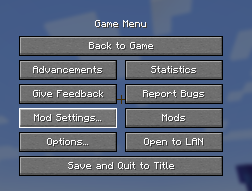
Screenshot
This is what it looks like when you are using the mod.
Interoperability
Mod Settings work fine with Mod Menu. It does not require the Mod Menu mod to be present, but if it is, it tries to add the "Mod Settings..." button close to the "Mods" button from Mod Menu.
Mod Settings use the API created by Mod Menu to query the mods for how to present a configuration screen. All mods that can be configured from within Mod Menu will show up on the Mod Settings screen, and conversely, mods that cannot be configured from within Mod Menu will not show up on the Mod Settings screen.
Dependencies
This mod needs Fabric API. If you have a modded Minecraft, chances are it is already installed. Otherwise, you can find it here: Fabric API on Modrinth.
Download
You can download the mod from any of these sites:
Installation
Install this as you would any other Fabric mod. (I recommend using a replacement launcher such as Prism Launcher for modded Minecraft.)
Support
Do you have any problems with the mod? Please open an issue on Github.
Known Incompatibilities
The mod Content Creator Integration
versions 1.9.3 and older contains an incompatible implementation of the Mod Menu
API. This is fixed in newer versions of CCI.
Available Versions
How to Install Mod Settings on Your Server
Order Server
Order a Minecraft Java server with at least 3 GB RAM (4 GB recommended).
Set fabric Loader
In the panel under "Egg", select the fabric loader and matching Minecraft version (1.21.8).
Install Mod
Open the mod browser in the dashboard and search for "Mod Settings". Click "Install" – done! Alternatively, upload the .jar via SFTP to the /mods folder.
Compatibility
Mod Loaders
Minecraft Versions
1.21.8, 1.21.7, 1.21.6 (+22 more)
Server-side
✗ UnsupportedRecommended RAM
4 GB(min. 3 GB)Frequently Asked Questions
Mod Settings server crashes on startup – what to do?
Most common cause: wrong fabric version or insufficient RAM. Check the server log (latest.log) for "OutOfMemoryError" or "Mixin" errors. With Mado Hosting: ensure at least 3 GB RAM is allocated and the loader matches the mod version (1.21.8). You can switch loaders with one click in the panel.
Is Mod Settings compatible with fabric?
Mod Settings officially supports fabric for Minecraft 1.21.8, 1.21.7, 1.21.6. The Mado dashboard automatically detects incompatible loader combinations.
Server lagging with Mod Settings – how to optimize performance?
Recommended RAM: 4 GB (per 8 players). Use /spark profiler to check if Mod Settings consumes the most tick time. Common fixes: reduce server view-distance to 8-10, install "performant" or "starlight" as supplementary mods on Forge. With Mado Hosting, your server runs on NVMe SSDs with dedicated CPU cores for minimal latency.
Similar Mods






Rent Modded Server
Install Mod Settings with just one click on your server.