
Model Exporter
Export in-game Builds into Models. (Only works for Geckolib models at the moment.)
Screenshots
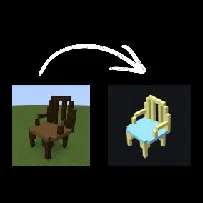
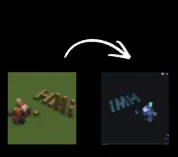
About this Mod
Model Exporter is a Minecraft NeoForge mod designed to turn in-game builds into exportable 3D model data.
It lets players record blocks using a layer system, where each layer acts like a “bone” in a model. You can select a layer, build normally in-game, and the mod tracks every block you place or remove. These layers can then be organized, parented, and assigned pivots to form structured models instead of just raw block collections.
The main goal is to bridge Minecraft building and modeling tools like Blockbench. Builds can be exported with proper structure, including per-face textures and UV mapping, making them suitable for animation or further editing outside the game.
This mod is aimed at builders, modders, and creators who want a way to convert in-game structures into usable model assets without manually rebuilding them in external software.
To start using Model Exporter, create a new world or open an existing one in creative mode. Begin by creating a layer using /layer create <name>. This layer will store any blocks you place while it is active.

Select your layer with /layer select <name>. Once selected, any blocks you place will automatically be recorded into that layer. You can confirm this through the on-screen feedback message.

Build your structure normally. If you make a mistake, breaking a block will remove it from its layer as well.

You can create multiple layers to organize different parts of your model. Layers can be parented together, and pivots can be set to control how each part rotates when exported.

When your build is complete, use the export command to generate your model data and texture atlas. The exported files can then be imported into tools like Blockbench for further editing, animation, or conversion into other formats.
Additional Details
This mod was rushed, so bugs may arise. If any issues occur during use, please leave a detailed comment explaining the issue.
If you are a mod maker and want to create a port or develop a more advanced version of this mod, you are welcome to make a comment as well. I will respond as soon as i get the time to, so we can discuss details.
Available Versions
How to Install Model Exporter on Your Server
Order Server
Order a Minecraft Java server with at least 3 GB RAM (4 GB recommended).
Set neoforge Loader
In the panel under "Egg", select the neoforge loader and matching Minecraft version (1.21.11).
Install Mod
Open the mod browser in the dashboard and search for "Model Exporter". Click "Install" – done! Alternatively, upload the .jar via SFTP to the /mods folder.
Compatibility
Mod Loaders
Minecraft Versions
1.21.11, 1.21.10, 1.21.9 (+8 more)
Server-side
✓ RequiredRecommended RAM
4 GB(min. 3 GB)Frequently Asked Questions
Model Exporter server crashes on startup – what to do?
Most common cause: wrong neoforge version or insufficient RAM. Check the server log (latest.log) for "OutOfMemoryError" or "Mixin" errors. With Mado Hosting: ensure at least 3 GB RAM is allocated and the loader matches the mod version (1.21.11). You can switch loaders with one click in the panel.
Is Model Exporter compatible with neoforge?
Model Exporter officially supports neoforge for Minecraft 1.21.11, 1.21.10, 1.21.9. The Mado dashboard automatically detects incompatible loader combinations.
Server lagging with Model Exporter – how to optimize performance?
Recommended RAM: 4 GB (per 8 players). Use /spark profiler to check if Model Exporter consumes the most tick time. Common fixes: reduce server view-distance to 8-10, install "performant" or "starlight" as supplementary mods on Forge. With Mado Hosting, your server runs on NVMe SSDs with dedicated CPU cores for minimal latency.
Similar Mods






Rent Modded Server
Install Model Exporter with just one click on your server.