moderation help
I present a mod for convenient, fast, and more comfortable moderation on a Minecraft server. This mod is designed to simplify the work of moderators, reduce the amount of manual command input, and speed up the process of issuing punishments to players.
Screenshots
About this Mod
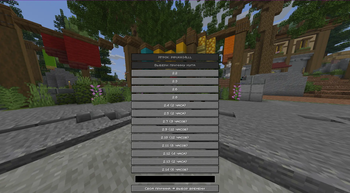
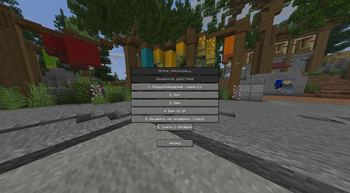
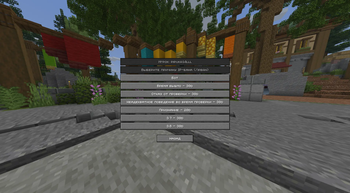
I present a mod for quick and convenient moderation on a Minecraft server. It is created to speed up the issuing of punishments, reduce the amount of manual command input, and make the staff's work easier. The mod allows you to select a player directly from the chat: just hover the cursor over the player’s name and right-click. After that, a punishment menu will open, where you can quickly choose the desired type of punishment.
Features of the mod:
Quick opening of the punishment menu by hovering over the player’s name.
Supports the following punishments: warn, mute, ban, ipban.
Predefined reasons and punishment durations.
Automatic command execution.
Call the player for a check.
Remove the player from the check.
Automatic message to the player when called for a check.
Save violations from the chat.
Automatic screenshot of the chat before opening the menu.
Renaming screenshots with the player’s name, reason, and time.
Correct identification of the player’s name, even if ranks or prefixes precede it.
Punishment statistics for the session.
List of recent players.
Call for Check:
When the “call for check” button is pressed, the mod automatically performs the necessary commands and sends the player the message: "Hello, cheat check. I am waiting for your AnyDesk in the next 5 minutes — the best option, it can be downloaded in any browser — or Discord. Also, please note that if cheating clients are detected, the ban period will be 20 days instead of 30."
Additionally, there is a button for removing a player from the check.
Screenshots:
Before opening the punishment menu, the mod takes a screenshot of the chat to record the violation. The screenshot is saved with a convenient filename indicating the player’s name, reason, and time.
Example: PlayerName__offense__2026-04-25_14-50-30.png
Main Rules and Punishments:
The mod includes the server’s main rule points:
Chat Violations:
2.1 — Warn: Flooding, caps, spamming symbols, excessive swearing.
2.2 — Mute 1–12 hours: Insulting players, staff, administration, or the project.
2.3 — Mute 1–5 days: Insulting relatives.
2.4 — Mute 2 hours: Sexual messages.
2.5 — Mute 2 hours: Inadequate behavior, suicide calls, propaganda of prohibited substances.
2.6 — Mute 1 day / Ban up to 14 days: Advertising servers, cheats, external resources, IP or links.
2.7 — Mute 9 hours: Nazism, hate speech, religious and political provocation.
2.8 — Mute 8 hours – 3 days: Links, advertising streams or videos.
2.9 — Mute 12 hours: Impersonating administration.
2.10 — Mute 12 hours: Threats outside of gameplay.
2.11 — Mute 6 hours: Threatening punishment without reason.
2.12 — Mute 12 hours – 7 days: Discussing politics.
2.13 — Mute 2 hours: Misleading players.
2.14 — Mute 6 hours: Begging from the administration.
In-Game Violations:
3.1 — Ban permanently: Prohibited or offensive nicknames.
3.2 — Ban: Multiple accounts (more than three).
3.3 — Ban 30 days: Trading for real money.
3.4 — Ban with no possibility of unban: Account sharing or selling.
3.5 — Ban permanently: Hacking or attempting to hack accounts.
3.6 — Ban 1–15 days: Exploiting bugs, lag machines.
3.7 — Ban 30 days: Using or storing third-party software: cheats, X-Ray, macros, banned mods, clickers in PvP, and other advantages. If the player admits to using prohibited software during the check, the ban period is reduced to 20 days.
3.8 — Ban 30 days: Bypassing a cheat ban with another account.
3.9 — Ban 3 days: Encouraging players to break the rules.
Target Audience:
This mod is intended for helpers, moderators, senior moderators, and server administrators. It is especially useful during peak times when quick reactions are needed to handle violations and issue punishments with minimal effort.
Available Versions
How to Install moderation help on Your Server
Order Server
Order a Minecraft Java server with at least 3 GB RAM (4 GB recommended).
Set fabric Loader
In the panel under "Egg", select the fabric loader and matching Minecraft version (1.21.11).
Install Mod
Open the mod browser in the dashboard and search for "moderation help". Click "Install" – done! Alternatively, upload the .jar via SFTP to the /mods folder.
Compatibility
Mod Loaders
Minecraft Versions
1.21.11, 1.21.10, 1.21.9 (+5 more)
Server-side
✗ UnsupportedRecommended RAM
4 GB(min. 3 GB)Frequently Asked Questions
moderation help server crashes on startup – what to do?
Most common cause: wrong fabric version or insufficient RAM. Check the server log (latest.log) for "OutOfMemoryError" or "Mixin" errors. With Mado Hosting: ensure at least 3 GB RAM is allocated and the loader matches the mod version (1.21.11). You can switch loaders with one click in the panel.
Is moderation help compatible with fabric?
moderation help officially supports fabric for Minecraft 1.21.11, 1.21.10, 1.21.9. The Mado dashboard automatically detects incompatible loader combinations.
Server lagging with moderation help – how to optimize performance?
Recommended RAM: 4 GB (per 8 players). Use /spark profiler to check if moderation help consumes the most tick time. Common fixes: reduce server view-distance to 8-10, install "performant" or "starlight" as supplementary mods on Forge. With Mado Hosting, your server runs on NVMe SSDs with dedicated CPU cores for minimal latency.
Similar Mods






Rent Modded Server
Install moderation help with just one click on your server.