
modmod
DiamondFire QOL mod for support staff and moderators
Screenshots

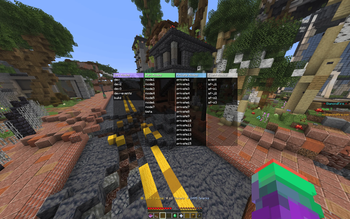

About this Mod
modmod
DiamondFire mod with various QOL features for support staff and moderators, so you can burn out and quit DF faster.
General Features
- Custom node select screen (keybind
K) - Hypercube item tag viewer (
CTRLin dev mode) - Item lore HUD display
- Custom CPU bar display
Staff Features
- Track players and draws their outline on screen (
/track <player/clear>) - Shows active support sessions and recent question on screen
- Custom moderator screen with common ban / mute reasons (keybind
X)- Punishment durations are automatically determined based on /history
- Only works on tracked players
- Custom report screen (keybind
O) - Click on reports to automatically vanish and go to the node its from
- Instant mod vanish acceleration
- Auto /support queue on join
- More readable session spy message (for SrHelper)
Aliases
/mv(/mod vanish) (Mod)/tcmv(clears tracker list and toggles vanish) (Mod)/queue(/support queue) (Helper)/cs <id>(/support spectate-code <id>) (SrHelper)
/modmod - opens config
Features you don't have permission to use will be disabled automatically.
If your permissions change while use the mod, corresponding features will be enabled / disabled accordingly.
More info on how to use this mod (mostly for staff)
Idea for hit range indicators is from https://github.com/uku3lig/hitrange
Available Versions
How to Install modmod on Your Server
Order Server
Order a Minecraft Java server with at least 3 GB RAM (4 GB recommended).
Set fabric Loader
In the panel under "Egg", select the fabric loader and matching Minecraft version (1.21.11).
Install Mod
Open the mod browser in the dashboard and search for "modmod". Click "Install" – done! Alternatively, upload the .jar via SFTP to the /mods folder.
Compatibility
Mod Loaders
Minecraft Versions
1.21.11
Server-side
✗ UnsupportedRecommended RAM
4 GB(min. 3 GB)Frequently Asked Questions
modmod server crashes on startup – what to do?
Most common cause: wrong fabric version or insufficient RAM. Check the server log (latest.log) for "OutOfMemoryError" or "Mixin" errors. With Mado Hosting: ensure at least 3 GB RAM is allocated and the loader matches the mod version (1.21.11). You can switch loaders with one click in the panel.
Is modmod compatible with fabric?
modmod officially supports fabric for Minecraft 1.21.11. The Mado dashboard automatically detects incompatible loader combinations.
Server lagging with modmod – how to optimize performance?
Recommended RAM: 4 GB (per 8 players). Use /spark profiler to check if modmod consumes the most tick time. Common fixes: reduce server view-distance to 8-10, install "performant" or "starlight" as supplementary mods on Forge. With Mado Hosting, your server runs on NVMe SSDs with dedicated CPU cores for minimal latency.
Similar Mods






Rent Modded Server
Install modmod with just one click on your server.