
Modpack Core Essentials
Change game window title and icon. Add a welcome message to the screen when you first start the game. Very light. Easy to customize. Zero bloat.
About this Mod

A lightweight, client-side utility mod built for modpack creators.
Modpack Core Essentials gives modpack authors a clean set of tools to customize modpack without any performance overhead.
✨ Features ✨
🪟 Custom Game Window Title Set a custom title for the Minecraft window to match your modpack's branding. Players will see your modpack's name in their game window title.

🖼️ Custom Window Icon Replace the default Minecraft window icon with your own.

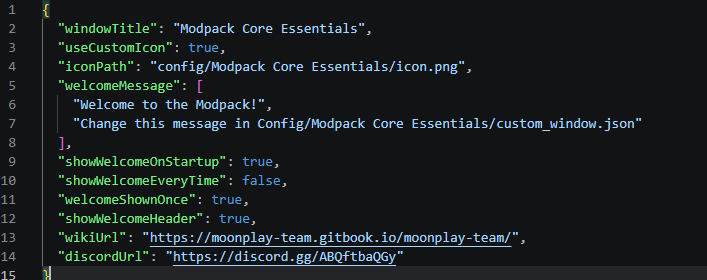
📋 Configurable Welcome Screen Display a welcome screen when players launch the game. You can configure it to appear only once (on first launch) or every time the game starts -> great for changelogs, server announcements, or greetings.

⚙️ Full ModMenu Integration Seamlessly integrates with ModMenu, providing an in-game config editor so you can tweak settings without leaving the game.

❤️ But also easy config file!
📦 Requirements
| Dependency | Version |
|---|---|
| Minecraft | 26.1.2 |
| Fabric Loader | 0.19.2+ |
| Fabric API | Any |
| Java | 25 |
Recommended: ModMenu (for in-game configuration)
In the future, we will support more versions, as well as NeoForge.
🔧 FAQ:
- Is this mod Client-Side Only?
- This mod runs entirely on the client. No need to install it on server.
- Why doesn't the icon load when I click the reload button?
- Because you can't “reload” a window icon. You need to restart the game.
- What size should the icon be?
- 64x64 or 32x32
🔗 Links
Built with ❤️ by the MoonPlay Team.
Available Versions
How to Install Modpack Core Essentials on Your Server
Order Server
Order a Minecraft Java server with at least 3 GB RAM (4 GB recommended).
Set fabric Loader
In the panel under "Egg", select the fabric loader and matching Minecraft version (26.1.2).
Install Mod
Open the mod browser in the dashboard and search for "Modpack Core Essentials". Click "Install" – done! Alternatively, upload the .jar via SFTP to the /mods folder.
Compatibility
Mod Loaders
Minecraft Versions
26.1.2, 1.21.1
Server-side
✗ UnsupportedRecommended RAM
4 GB(min. 3 GB)Frequently Asked Questions
Modpack Core Essentials server crashes on startup – what to do?
Most common cause: wrong fabric version or insufficient RAM. Check the server log (latest.log) for "OutOfMemoryError" or "Mixin" errors. With Mado Hosting: ensure at least 3 GB RAM is allocated and the loader matches the mod version (26.1.2). You can switch loaders with one click in the panel.
Is Modpack Core Essentials compatible with fabric and neoforge?
Modpack Core Essentials officially supports fabric, neoforge for Minecraft 26.1.2, 1.21.1. The Mado dashboard automatically detects incompatible loader combinations.
Server lagging with Modpack Core Essentials – how to optimize performance?
Recommended RAM: 4 GB (per 8 players). Use /spark profiler to check if Modpack Core Essentials consumes the most tick time. Common fixes: reduce server view-distance to 8-10, install "performant" or "starlight" as supplementary mods on Forge. With Mado Hosting, your server runs on NVMe SSDs with dedicated CPU cores for minimal latency.
Similar Mods



Rent Modded Server
Install Modpack Core Essentials with just one click on your server.