
Modular Drones Continued
Build a custom drone to follow you around and help you out.
Screenshots
About this Mod
This is a fork of rearth's (of OriTech fame) Buddy Drones mod. It's really fun but had some issues that were distracting. So I started fixing them, and it kind of spiraled from there.
The original mod hasn't been updated in 8 months as of this writing. I'm not sure if rearth is planning to come back to it at some point or is focused on other things, and out of respect I'd be happy to have some or all of this folded in. But as I'm planning some balance changes that may not fit the original vision, I'm keeping it separate for now and am happy to put some work into maintaining it. This project mostly exists to make it easier to add to a modpack for my friends.
Important 1.21.11+ update notes:
- Integration with the Accessories mod has been dropped, due to that mod being effectively dead at the moment.
- Both Curios (NeoForge) and Trinkets Updated (Fabric) mods are now supported for a way to equip your drone without having to use the head slot.
- I have heard on Discord that the Accessories author may resurrect it for 26.2, but that backports to 1.21.11 or 26.1 are unlikely. If that happens, I'll look at re-adding the integration at that time.
- If you have Curios or Trinkets installed, the drone can no longer be equipped to the head armor slot and must now go into the dedicated Drone slot.
- I wanted to do this previously, but it was not feasible (in a sane way) to change the item at runtime until Minecraft 1.21.2 revamped the Equippable system.
- The drone slot is objectively better in every way, so there's no reason to ever equip the drone as a helmet if you have the extra slot available.
Changes from the original:
Curious/Trinkets/Accessories integration
- If you have the Curios, Trinkets, or Accessories mod installed, now adds a dedicated Drone slot to activate your companion without having to hide your helmet
- The cosmetic head slot (Accessories only) is still supported for backwards compatibility, though this will be removed in a future version
Revamped movement to make it seem more natural
- Eliminated whiplash-inducing zips to targets
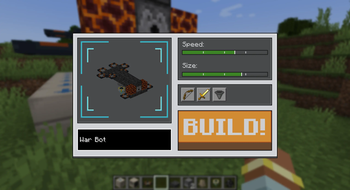
- Reworked speed/power mechanics to make them smoother and have a more intuitive relationship with "Speed" bar in the drone builder UI
- Fixed sluggish turning
- The drone is much better about navigating geometry and not phasing through solid blocks
- Has several different flight modes it can choose from to better navigate tight passages and 2-block high spaces
Arrow attack improvements
- Will not target Endermen, since projectiles make them teleport
- Arrow actually fires from the drone instead of above the player's head
- Doesn't try to target enemies through walls and underground
- Won't shoot if the player is in the way and likely to be hit
- Flies out a little ahead of the player when engaging enemies to get a better angle on them
- Some extra polish like recoil when firing, sound effects, etc
- Fixed targeting of small mobs (baby zombies) so it can hit them consistently
- Prefers to fight enemies that are close to the player, in order to defend them
Melee attack improvements
- Will not target Endermen unless they are already angry
- Perfers to fight enemies that are close to the drone itself, to minimize travel time
Item pickup improvements
- Reworked animation to make it much more smooth while carrying
- Can pick up to an entire stack of items and carry it below the drone
- Will try to gather items stackable with the one it's currently holding before returning to the player
- Tries to insert items directly into the player's inventory after returning, drops the item in the world only if the inventory is full
- Is smart about not immediately picking something up that it just dropped
- Can hold onto an item if a higher priority task like fighting an enemy interrupts it, and resume delivery after
Priority system overhaul
- Priotitizes using the dispenser (arrow) launcher over a melee weapon if the drone has both, since the arrows deal more average DPS
- Can still use melee on inelgible targets like Endermen, or if it can't get clean line of sight
- Fixed some bugs with tasks being interrupted
- Internal timers prevent rapid oscillation between tasks - drones should not be indecisive
Balance tweaks
- No longer uses the hardness of the block to determine weight, since I don't think the mod should punish players who want drones that look techy and aestehtic and reward players who slap rotors on a couple leaves or carpets
- Weight is now determined solely by number of blocks
- Excluded rotors/thrusters from the weight calculation to avoid unintuitive situations where adding a rotor can decrease your flight power
Misc
- Using a beacon block to activate the ultimate beam/sonic attack no longer looks silly; the beacon block is rotated to face forward when it's installed on the drone
- Fixed some miscellaneous bugs, including a nasty one that let players break bedrock and other unbreakable blocks
- Unified attack cooldown system for consistency
Available Versions
How to Install Modular Drones Continued on Your Server
Order Server
Order a Minecraft Java server with at least 3 GB RAM (4 GB recommended).
Set fabric Loader
In the panel under "Egg", select the fabric loader and matching Minecraft version (26.1.2).
Install Mod
Open the mod browser in the dashboard and search for "Modular Drones Continued". Click "Install" – done! Alternatively, upload the .jar via SFTP to the /mods folder.
Compatibility
Mod Loaders
Minecraft Versions
26.1.2, 26.1.1, 26.1 (+2 more)
Server-side
✓ RequiredRecommended RAM
4 GB(min. 3 GB)Frequently Asked Questions
Modular Drones Continued server crashes on startup – what to do?
Most common cause: wrong fabric version or insufficient RAM. Check the server log (latest.log) for "OutOfMemoryError" or "Mixin" errors. With Mado Hosting: ensure at least 3 GB RAM is allocated and the loader matches the mod version (26.1.2). You can switch loaders with one click in the panel.
Is Modular Drones Continued compatible with fabric and neoforge?
Modular Drones Continued officially supports fabric, neoforge for Minecraft 26.1.2, 26.1.1, 26.1. The Mado dashboard automatically detects incompatible loader combinations.
Server lagging with Modular Drones Continued – how to optimize performance?
Recommended RAM: 4 GB (per 8 players). Use /spark profiler to check if Modular Drones Continued consumes the most tick time. Common fixes: reduce server view-distance to 8-10, install "performant" or "starlight" as supplementary mods on Forge. With Mado Hosting, your server runs on NVMe SSDs with dedicated CPU cores for minimal latency.
Similar Mods





Rent Modded Server
Install Modular Drones Continued with just one click on your server.