
Modulo
Everything you build or destroy gets copied to all chunks. Yes, all chunks.
Screenshots
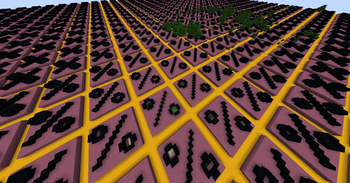
About this Mod

This mod is inspired by the many videos I saw about this kind of mod, but didn't link the mod in their description - so I made it myself.

Features
Everything you place in one chunk gets copied to all other chunks. Everything you break gets broken in all other chunks. Enjoy the chaos.
Warning: Especially on lower-end systems, keep your simulation distance low. It runs okay with higher values, but especially if you have an older CPU, placing / breaking a block freezes the game for a few hundred milliseconds when the simulation distance if above 16 (or so) chunks.
This mod is server-side only, meaning it only does anything when using it in Singleplayer worlds or when it is installed on the dedicated server. Your server's players do not need to have it installed on their clients.
Issues
Please report any bugs or other issues you encounter using this mod on the linked Github issue page.
Modpack Usage
If you for whatever reason want to, you may use this mod in modpacks and on servers without first asking me for permission, or even crediting me, as long as you do not pretend that you made this mod and do not ask for payment in exchange for access to your modpack. Credit is appreciated, tho :3
Available Versions
How to Install Modulo on Your Server
Order Server
Order a Minecraft Java server with at least 3 GB RAM (4 GB recommended).
Set forge Loader
In the panel under "Egg", select the forge loader and matching Minecraft version (1.20.1).
Install Mod
Open the mod browser in the dashboard and search for "Modulo". Click "Install" – done! Alternatively, upload the .jar via SFTP to the /mods folder.
Compatibility
Mod Loaders
Minecraft Versions
1.20.1, 1.20
Server-side
✓ RequiredRecommended RAM
4 GB(min. 3 GB)Frequently Asked Questions
Modulo server crashes on startup – what to do?
Most common cause: wrong forge version or insufficient RAM. Check the server log (latest.log) for "OutOfMemoryError" or "Mixin" errors. With Mado Hosting: ensure at least 3 GB RAM is allocated and the loader matches the mod version (1.20.1). You can switch loaders with one click in the panel.
Is Modulo compatible with forge?
Modulo officially supports forge for Minecraft 1.20.1, 1.20. The Mado dashboard automatically detects incompatible loader combinations.
Server lagging with Modulo – how to optimize performance?
Recommended RAM: 4 GB (per 8 players). Use /spark profiler to check if Modulo consumes the most tick time. Common fixes: reduce server view-distance to 8-10, install "performant" or "starlight" as supplementary mods on Forge. With Mado Hosting, your server runs on NVMe SSDs with dedicated CPU cores for minimal latency.
Rent Modded Server
Install Modulo with just one click on your server.