
ModVerifier
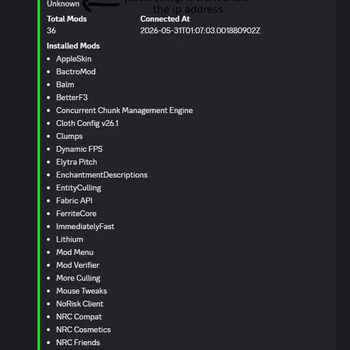
A mod that scans player's mods and sends the list to your Discord server
Screenshots

About this Mod
ModVerifier🔍
a server and client side Fabric mod for Minecraft servers that allow both Java besides Bedrock Edition players to connect. For server administrators, this tool verifies the mods that Java players use while it allows Bedrock players to join without any interference.
To avoid large amounts of data in the server console, ModVerifier sends connection information to Discord webhooks. With those webhooks, staff members can see in real time which players are joining and which modifications the players are using.
On servers that use Geyser or Floodgate for cross play, administrators must manage different types of users. Java players can use powerful client side mods that might break server rules. In contrast Bedrock players use mobile devices or consoles that do not have mod folders.
ModVerifier manages those two environments in specific ways
For Java Players - It checks the list of client side mods when a player connects so that the server remains fair and the mod usage is clear.
For Bedrock Players - It identifies the platform and does not perform a check, which allows the players to join immediately. By doing this the mod avoids sending extra data packets or causing players to lose their connection.
ModVerifier exists within the network login pipeline of the server so that it can manage connections
The Handshake & Platform Check
When a player starts a connection, ModVerifier intercepts the login event. It
Who is this for? (Important Note)
ModVerifier is specifically designed for small, private servers and tight-knit friend groups.
It is not meant for large public networks with hundreds of players at once. Since it uses direct Discord webhooks and external avatar APIs for each connection, using this on a big public server could quickly hit Discord's rate limits and create unwanted network congestion.
If you run a friendly survival server, a private SMP, or a community hub for your friends to play Java and Bedrock together, this mod is perfect for you!
Setting up ModVerifier on your private server only takes a few minutes. Follow these simple steps to get it running:
Step 1: Install the Mod
Download the ModVerifier .jar file.
Drop the file into your server's mods folder and your client's mods folder.
Note: Make sure you also have Fabric API and Floodgate (if you are running a cross-play server) installed in your mods folder.
Start your server once to let it generate the configuration files, then stop it.
Step 2: Create a Discord Webhook
Open your Discord server and go to the channel settings where you want the connection reports to appear.
Navigate to Integrations -> Webhooks -> Create Webhook.
Customize the default name if you like, and click Copy Webhook URL.
Step 3: Configure the Mod
Go to your server files and open the config folder.
Locate and open the file named mod_verifier.json.
Paste your Discord Webhook URL inside the quotation marks next to "discordWebhookUrl". It should look like this:
JSON
{
"discordWebhookUrl": "https://discord.com/api/webhooks/your-copied-url-here"
}
Available Versions
How to Install ModVerifier on Your Server
Order Server
Order a Minecraft Java server with at least 3 GB RAM (4 GB recommended).
Set fabric Loader
In the panel under "Egg", select the fabric loader and matching Minecraft version (26.1.2).
Install Mod
Open the mod browser in the dashboard and search for "ModVerifier". Click "Install" – done! Alternatively, upload the .jar via SFTP to the /mods folder.
Compatibility
Mod Loaders
Minecraft Versions
26.1.2, 26.1.1, 26.1
Server-side
✓ RequiredRecommended RAM
4 GB(min. 3 GB)Frequently Asked Questions
ModVerifier server crashes on startup – what to do?
Most common cause: wrong fabric version or insufficient RAM. Check the server log (latest.log) for "OutOfMemoryError" or "Mixin" errors. With Mado Hosting: ensure at least 3 GB RAM is allocated and the loader matches the mod version (26.1.2). You can switch loaders with one click in the panel.
Is ModVerifier compatible with fabric?
ModVerifier officially supports fabric for Minecraft 26.1.2, 26.1.1, 26.1. The Mado dashboard automatically detects incompatible loader combinations.
Server lagging with ModVerifier – how to optimize performance?
Recommended RAM: 4 GB (per 8 players). Use /spark profiler to check if ModVerifier consumes the most tick time. Common fixes: reduce server view-distance to 8-10, install "performant" or "starlight" as supplementary mods on Forge. With Mado Hosting, your server runs on NVMe SSDs with dedicated CPU cores for minimal latency.
Similar Mods






Rent Modded Server
Install ModVerifier with just one click on your server.