
Mo Flowers
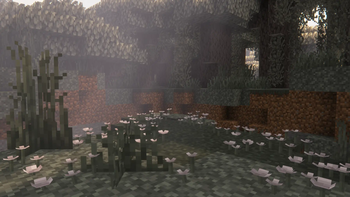
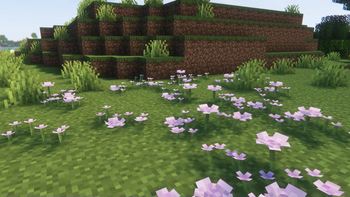
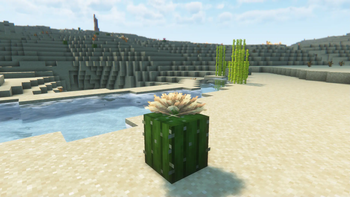
MoFlowers is a Minecraft mod that adds new flowers, shrubs and decorative blocks, with associated mechanics, biome generation, flower management API, custom rendering and localisation support.
Screenshots



About this Mod
MoFlowers - Bring New Life to Your Minecraft World!
MoFlowers is a Minecraft mod that breathes new life into your adventures by adding a wide variety of unique flowers, berry bushes, and decorative blocks. Every plant is carefully designed to blend naturally into the world, offering new mechanics, vibrant biomes, and creative possibilities for builders and explorers alike.
✨ Main Features
- New Flowers & Bushes: Discover species like wildflowers with open/closed states, lavenders, calendulas, foxgloves, hebeas, and aquatic lilies...
- Berry Bushes: Harvest sweet blue and glowing berries for food and attracting animals.
- Flowers Chest: A chest that only accepts mod items for organizing your floral collection.
- Decorative Blocks: Petals, pots, and tall variants for customization.
- Biome Integration: New plants naturally generate in specific biomes.
- Public API: Allows other mods or datapacks to register compatible flowers and blocks.
- Custom Rendering & Loot: Unique drop system and visual effects.
- Multilanguage Support: Available in English and Spanish.
📥 Installation
- Install Fabric Loader.
- Download the latest release from GitHub.
- Place the
.jarfile into yourmodsfolder.
🧩 MoFlowers API Documentation
MoFlowers provides a simple and extensible API for modders and datapack creators to register, query, and interact with custom flowers and related blocks.
Accessing the API
Use the static access point to get the API instance
import net.bichal.moflowers.api.MoFlowersAPI;
import net.bichal.moflowers.api.IMoFlowersAPI;

IMoFlowersAPI api = MoFlowersAPI.getInstance();
Registering Flowers
You can register new flowers, blocks, or detailed flower data-blocked:
// Register a flower item
api.registerFlower(myFlowerItem);

// Register a flower block
api.registerFlowerBlock(myFlowerBlock);

// Register a custom flower with extra data
api.registerCustomFlower(new FlowerData.Builder(myItem, myBlock)
.defaultColor(0xFF00FF)
.tallVariant(true)
.biomeRestriction(myBiomeId)
.build());
Querying Flowers
Check if an item or block is a MoFlower
boolean isFlower = api.isMoFlower(item);
boolean isFlowerBlock = api.isMoFlowerBlock(block);
Flowers Chest
Access the special Flowers Chest block and item
Item flowersChestItem = api.getFlowersChestItem();
Block flowersChestBlock = api.getFlowersChestBlock();
Flower Registration Events
Subscribe to flower registration events for integration
api.registerFlowerRegistrationCallback(flowerData ->{
// Your code here (e.g., log, add custom behavior)
});
Extending MoFlowers
- Add new flowers: Register your own flowers or blocks for full compatibility.
- Custom recipes/tags: Use the provided tags for recipes, advancements, and more.
- Localization: Add translations for your custom flowers using standard Minecraft lang files.
For more details, see the JavaDocs in the api package or explore the example usages in the mod source.
This mod is licensed is All Rights Reserved.
Available Versions
How to Install Mo Flowers on Your Server
Order Server
Order a Minecraft Java server with at least 4 GB RAM (6 GB recommended).
Set fabric Loader
In the panel under "Egg", select the fabric loader and matching Minecraft version (1.21.5).
Install Mod
Open the mod browser in the dashboard and search for "Mo Flowers". Click "Install" – done! Alternatively, upload the .jar via SFTP to the /mods folder.
Compatibility
Mod Loaders
Minecraft Versions
1.21.5
Server-side
✓ RequiredRecommended RAM
6 GB(min. 4 GB)Frequently Asked Questions
Mo Flowers server crashes on startup – what to do?
Most common cause: wrong fabric version or insufficient RAM. Check the server log (latest.log) for "OutOfMemoryError" or "Mixin" errors. With Mado Hosting: ensure at least 4 GB RAM is allocated and the loader matches the mod version (1.21.5). You can switch loaders with one click in the panel.
Is Mo Flowers compatible with fabric?
Mo Flowers officially supports fabric for Minecraft 1.21.5. The Mado dashboard automatically detects incompatible loader combinations.
Server lagging with Mo Flowers – how to optimize performance?
Recommended RAM: 6 GB (per 5 players). Use /spark profiler to check if Mo Flowers consumes the most tick time. Common fixes: reduce server view-distance to 8-10, install "performant" or "starlight" as supplementary mods on Forge. With Mado Hosting, your server runs on NVMe SSDs with dedicated CPU cores for minimal latency.
Similar Mods




Rent Modded Server
Install Mo Flowers with just one click on your server.