
Moisturization
Giver greater control over farmland moistness and crop growth. Also sprinklers.
Screenshots
About this Mod
Have you ever wanted to make farming more difficult for no reason? Or maybe you have a reason? Do you like taking showers?
If you answered any of these questions - doesn't even have to be a yes - then perhaps this mod is for you.
Moisturization lets you control how farmland behaves around water, how crops grow, and the efficiency of bonemeal on crops. It also provides sprinklers to saturate farmland with.
I recommend using a resource pack like this one so you can see how much moisture farmland has remaining.
By default, farmland now only becomes wet when right next to a block (diagonally, too). Old-school "villager-style" farms will still work, but more irrigation will be required in larger farms to keep all of your farmland moist. That is, unless you want to use...
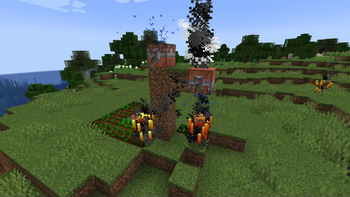
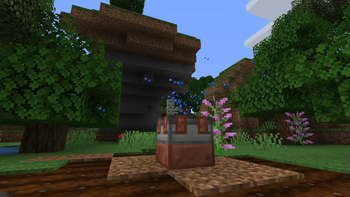
Sprinklers! The sprinkler is a new redstone device that waters farmland in a 5x5 radius around it. Upon activation, it spews a fountain of r e f r e s h i n g water that moisturizes your farmland (and your skin!*).
*skin enhancements not guaranteed
This mod also changes how crops grow. By default, if a crop is not growing on moist farmland, it will turn into a dead bush. Additionally, crops now grow at 1/7th their usual rate and bone meal only works 1/3rd of the time!
HOWEVER... this mod is mostly configurable!
Here's what you can currently change:
- Whether crops die without water
- The natural growth reduction of crops
- The bone meal growth reduction of crops (including disabling crop bonemealing entirely)
- The range at which farmland absorbs water
- The rate at which farmland dries
- The range of sprinklers
In the future, I may implement more features for this mod, so stay tuned!
As with all of my mods, you have my full permission to look at and use the source code however the license permits. You may also use it as a learning resource for your own mods. Just... please don't go around stealing code, okay?
Available Versions
How to Install Moisturization on Your Server
Order Server
Order a Minecraft Java server with at least 3 GB RAM (4 GB recommended).
Set fabric Loader
In the panel under "Egg", select the fabric loader and matching Minecraft version (1.20.1).
Install Mod
Open the mod browser in the dashboard and search for "Moisturization". Click "Install" – done! Alternatively, upload the .jar via SFTP to the /mods folder.
Compatibility
Mod Loaders
Minecraft Versions
1.20.1, 1.19.3, 1.19.2 (+5 more)
Server-side
✓ RequiredRecommended RAM
4 GB(min. 3 GB)Frequently Asked Questions
Moisturization server crashes on startup – what to do?
Most common cause: wrong fabric version or insufficient RAM. Check the server log (latest.log) for "OutOfMemoryError" or "Mixin" errors. With Mado Hosting: ensure at least 3 GB RAM is allocated and the loader matches the mod version (1.20.1). You can switch loaders with one click in the panel.
Is Moisturization compatible with fabric?
Moisturization officially supports fabric for Minecraft 1.20.1, 1.19.3, 1.19.2. The Mado dashboard automatically detects incompatible loader combinations.
Server lagging with Moisturization – how to optimize performance?
Recommended RAM: 4 GB (per 8 players). Use /spark profiler to check if Moisturization consumes the most tick time. Common fixes: reduce server view-distance to 8-10, install "performant" or "starlight" as supplementary mods on Forge. With Mado Hosting, your server runs on NVMe SSDs with dedicated CPU cores for minimal latency.
Similar Mods



Rent Modded Server
Install Moisturization with just one click on your server.