More Berries
Adds berry bushes to fabric
Screenshots
About this Mod
More Berries
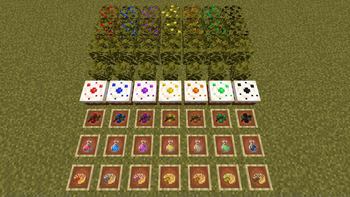
Adds six berry bushes found around the world, very useful when you are about to run out of food! Grab them with shears and replant them at home.
Blue ones spawn in forests, dark oak forests and groves, yellow ones in birch forests, orange ones in badlands and savannas, purple ones in swamps, green ones in jungles and black ones in planes. They are quite common and spawn in pumpkin-like patches. Like sweet berries they restore one food point. Craft them together with a juicer to gain one and a half points per juice. Craft them into a pie to gain 4 points.
All added blocks and items

Juicer recipe:

Juices recipes:

Cake recipes (Also effects vanilla cake that now requires a sweet berry):

Pie recipes:

Berry bush recipes (Requires enabling of the craftable berry bushes property in the config):

You are allowed to use this mod in modpacks as long as it is hosted on Curseforge or Modrinth.
Thanks Siphalor for the juicer, juices and pie textures!


Mod support
Nourish (Berry related items count as the correct type of nutrition)
Dehydration (Juices give hydration)
FAQ
Q: Can you make berries replantable?
A: I want you to have to collect them rather than just finding one bush and then having infinite berries. As it was requested so many times I added a config option for it in version 1.3.5 that can be enabled.
Q: Can you make a forge version?
A: No, I only develop for fabric (The source is available so you can port it yourself if you ask)
Q: Why does increasing the spawn chance make the bushes more rare?
A: For some reason that's how Minecraft work so decrease the value if you want to make them more common
Q: Is this mod abandoned?
A: No! When a new major Minecraft update is released I'll port it to that version
Q: What is required to collect berry bushes?
A: Shears. Silk touch is not required!
Q: How do you use biome tags in the config?
A: Instead of namespace:biome, write #namespace:name where name is a biome tag, for example is_forest. Multiple biome tags and biomes can be mixed so that the berry bush will spawn in all those biomes
Q: How do I change the spawn chances of berry bushes?
A: This has to be down with a world gen datapack, just like configuring vanilla worldgen. However berry bush spawning biomes can still be configured in the config.
Available Versions
How to Install More Berries on Your Server
Order Server
Order a Minecraft Java server with at least 4 GB RAM (6 GB recommended).
Set fabric Loader
In the panel under "Egg", select the fabric loader and matching Minecraft version (26.1.2).
Install Mod
Open the mod browser in the dashboard and search for "More Berries". Click "Install" – done! Alternatively, upload the .jar via SFTP to the /mods folder.
Compatibility
Mod Loaders
Minecraft Versions
26.1.2, 26.1.1, 26.1 (+26 more)
Server-side
✓ RequiredRecommended RAM
6 GB(min. 4 GB)Frequently Asked Questions
More Berries server crashes on startup – what to do?
Most common cause: wrong fabric version or insufficient RAM. Check the server log (latest.log) for "OutOfMemoryError" or "Mixin" errors. With Mado Hosting: ensure at least 4 GB RAM is allocated and the loader matches the mod version (26.1.2). You can switch loaders with one click in the panel.
Is More Berries compatible with fabric?
More Berries officially supports fabric for Minecraft 26.1.2, 26.1.1, 26.1. The Mado dashboard automatically detects incompatible loader combinations.
Server lagging with More Berries – how to optimize performance?
Recommended RAM: 6 GB (per 5 players). Use /spark profiler to check if More Berries consumes the most tick time. Common fixes: reduce server view-distance to 8-10, install "performant" or "starlight" as supplementary mods on Forge. With Mado Hosting, your server runs on NVMe SSDs with dedicated CPU cores for minimal latency.
Similar Mods



Rent Modded Server
Install More Berries with just one click on your server.