
More Darkness
Enhances darkness: moon phases affect night light, caves are pitch black
Screenshots
About this Mod
More Darkness
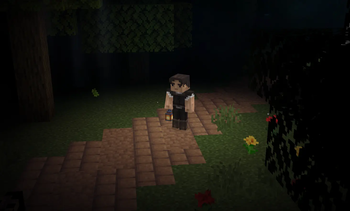
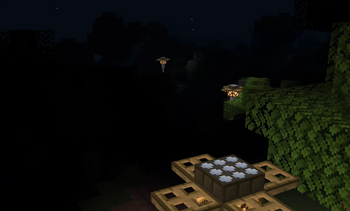
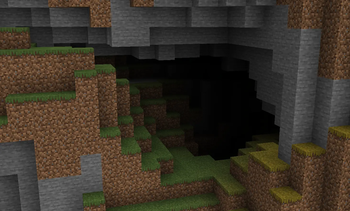
More Darkness makes Minecraft nights and caves feel truly dark. The moon phase dynamically affects nighttime brightness — full moons cast a dim glow, while new moons plunge the world into near-total darkness. Caves without light sources become pitch black.
Features
- Moon phase lighting — Night brightness follows the 8-phase lunar cycle. Full moon is the brightest, new moon the darkest.
- Pitch black caves — Underground areas with no light source are completely dark by default.
- Per-dimension control — Enable or disable darkness independently for the Overworld, Nether, and End.
- Configurable minimum brightness — Set a floor for nighttime light (starlight, atmospheric glow) so new moons aren't completely black.
- Cave ambient light — Add a faint ambient glow in caves if full darkness feels too harsh.
- Shader-aware — Automatically disables itself when an Iris or OptiFine shader pack is active, since shaders handle their own lighting.
- Polytone compatible — Works alongside Polytone and resource packs that provide custom lightmaps.
- Respects vanilla effects — Night Vision, Conduit Power, and lightning flashes behave normally.
- Client-side only — No server installation needed.
Configuration
All settings can be changed in-game via the YACL config screen, or by editing config/more_darkness.json.
| Option | Default | Description |
|---|---|---|
| Enable Mod | ✔ | Master toggle |
| Dark Overworld | ✔ | Enhanced darkness in the Overworld |
| Dark Nether | ✔ | Enhanced darkness in the Nether |
| Dark End | ✔ | Enhanced darkness in The End |
| Moon Phase Effect | ✔ | Night brightness varies with moon phase |
| Minimum Night Brightness | 0.05 | Floor for outdoor night light (0.0–0.5) |
| Cave Ambient Light | 0.0 | Ambient light in caves (0.0 = pitch black) |
| Disable With Shaders | ✔ | Auto-disable when a shader pack is active |
Dependencies
Compatibility
- Fabric and NeoForge on Minecraft 1.21.1
- Works with Polytone and custom lightmap resource packs
- Automatically defers to Iris/OptiFine shaders when active
Available Versions
How to Install More Darkness on Your Server
Order Server
Order a Minecraft Java server with at least 3 GB RAM (4 GB recommended).
Set fabric Loader
In the panel under "Egg", select the fabric loader and matching Minecraft version (1.21.1).
Install Mod
Open the mod browser in the dashboard and search for "More Darkness". Click "Install" – done! Alternatively, upload the .jar via SFTP to the /mods folder.
Compatibility
Mod Loaders
Minecraft Versions
1.21.1
Server-side
✗ UnsupportedRecommended RAM
4 GB(min. 3 GB)Frequently Asked Questions
More Darkness server crashes on startup – what to do?
Most common cause: wrong fabric version or insufficient RAM. Check the server log (latest.log) for "OutOfMemoryError" or "Mixin" errors. With Mado Hosting: ensure at least 3 GB RAM is allocated and the loader matches the mod version (1.21.1). You can switch loaders with one click in the panel.
Is More Darkness compatible with fabric and neoforge?
More Darkness officially supports fabric, neoforge for Minecraft 1.21.1. The Mado dashboard automatically detects incompatible loader combinations.
Server lagging with More Darkness – how to optimize performance?
Recommended RAM: 4 GB (per 8 players). Use /spark profiler to check if More Darkness consumes the most tick time. Common fixes: reduce server view-distance to 8-10, install "performant" or "starlight" as supplementary mods on Forge. With Mado Hosting, your server runs on NVMe SSDs with dedicated CPU cores for minimal latency.
Similar Mods




Rent Modded Server
Install More Darkness with just one click on your server.