
More equipment
This mod adds more armor and equipment.
Screenshots


About this Mod
More Armor Modrinth Description
A NeoForge mod designed to expand Minecraft's equipment system, adding a variety of powerful swords, unique armor sets, functional blocks, and special items. All armor pieces come with permanent passive bonuses that activate when worn, significantly enriching your gameplay experience!
🛡️ Core Features
- Armor Sets with Permanent Bonuses
Each armor piece grants a permanent passive effect when worn, which automatically deactivates when the piece is removed:
Armor Set
Piece
Bonus Effect
Redstone Armor
Helmet
Night Vision (Permanent)
Redstone Armor
Chestplate
Health Boost II (Permanent)
Redstone Armor
Leggings
Speed I (Permanent)
Redstone Armor
Boots
Jump Boost I (Permanent)
Enderite Armor
Helmet
Efficiency III (Permanent)
Enderite Armor
Chestplate
Health Boost XVI (Permanent)
Enderite Armor
Leggings
Speed IV (Permanent)
Enderite Armor
Boots
Jump Boost V (Permanent)
- Powerful Swords
A range of swords from fun basic options to top-tier weapons, each with unique attributes:
Dirt Sword: A fun basic sword with 150 durability, mining level equivalent to stone tools
Redstone Sword / Super Redstone Sword: High-durability redstone-based weapons with significantly increased damage and attack speed
Emerald Sword / Super Emerald Sword: Powerful weapons forged from emeralds with better enchantability
Enderite Sword: Ultra-high durability (6480) + 8 damage points, with excellent attack speed
Death Sword: Extreme damage output (12 damage points), with lower enchantability but maximum combat power
- Functional Blocks
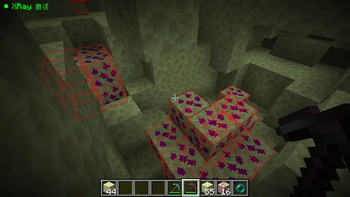
Enderite Ore: A high-hardness ore (hardness 20.0), requires corresponding tools to mine
Enderite Block: A metallic block with high explosion resistance (blast resistance 28.0), suitable for building and decoration
- Special Items
Hardened Redstone: The core crafting material for the Redstone Armor set
Enderite Ingot: The material used to craft Enderite armor, weapons, and blocks
📥 Installation
Install the latest version of NeoForge for your Minecraft version
Download the mod file from Modrinth
Place the mod file in your Minecraft mods folder
Launch the game and enjoy!
⚙️ Configuration
You can adjust mod settings through the Config.java file (or in-game config menu if available), including:
Enabling/disabling specific armor bonuses
Adjusting the durability and damage values of weapons
Tweaking the spawn rate of Enderite Ore
🔧 Compatibility
Minecraft Version: 1.20.x (check the mod page for specific compatible versions)
Mod Loader: NeoForge (Forge is not supported)
Compatible with most vanilla-friendly mods, avoid using with other armor-overhaul mods to prevent conflicts
🐛 Feedback & Support
If you encounter any bugs or have suggestions for new features, feel free to:
Leave a comment on the Modrinth page
Create an issue on the mod's GitHub repository (link available on the Modrinth page)
Contact the mod developer through the provided social media links
📝 Changelog
Version 1.0.0
Initial release
Added Redstone and Enderite armor sets with passive bonuses
Added all swords and blocks listed above
Added creative mode tab for easy access to all mod content
Available Versions
How to Install More equipment on Your Server
Order Server
Order a Minecraft Java server with at least 3 GB RAM (4 GB recommended).
Set neoforge Loader
In the panel under "Egg", select the neoforge loader and matching Minecraft version (1.21.1).
Install Mod
Open the mod browser in the dashboard and search for "More equipment". Click "Install" – done! Alternatively, upload the .jar via SFTP to the /mods folder.
Compatibility
Mod Loaders
Minecraft Versions
1.21.1
Server-side
✗ UnsupportedRecommended RAM
4 GB(min. 3 GB)Frequently Asked Questions
More equipment server crashes on startup – what to do?
Most common cause: wrong neoforge version or insufficient RAM. Check the server log (latest.log) for "OutOfMemoryError" or "Mixin" errors. With Mado Hosting: ensure at least 3 GB RAM is allocated and the loader matches the mod version (1.21.1). You can switch loaders with one click in the panel.
Is More equipment compatible with neoforge?
More equipment officially supports neoforge for Minecraft 1.21.1. The Mado dashboard automatically detects incompatible loader combinations.
Server lagging with More equipment – how to optimize performance?
Recommended RAM: 4 GB (per 8 players). Use /spark profiler to check if More equipment consumes the most tick time. Common fixes: reduce server view-distance to 8-10, install "performant" or "starlight" as supplementary mods on Forge. With Mado Hosting, your server runs on NVMe SSDs with dedicated CPU cores for minimal latency.
Similar Mods




![[TaCZ] Timeless and Classics Zero](https://cdn.modrinth.com/data/SzzJttH8/fd27766d2bb8390d284696b1dbd358f87e081439_96.webp)

Rent Modded Server
Install More equipment with just one click on your server.