
Upgradable Tools
Allows you to upgrade your tools, from wood to stone to iron to diamond!
Screenshots
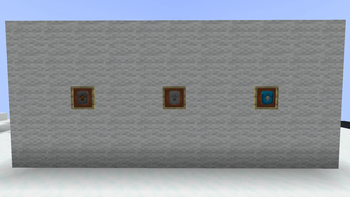
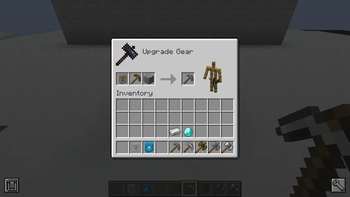
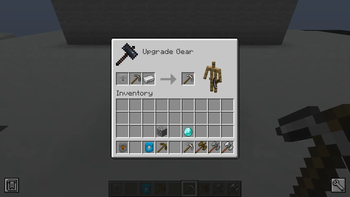
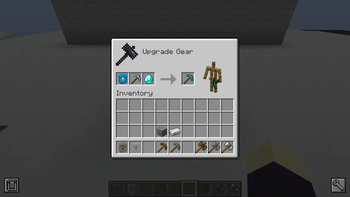
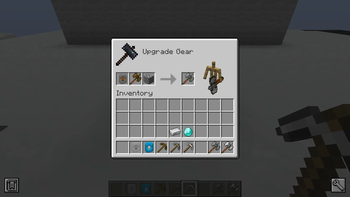
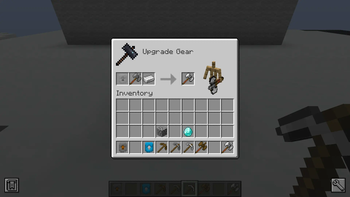
About this Mod
Upgradable Tools!
This mod adds more Smithing Templates, akin to the one that upgrades diamond to netherite, so you never have to discard your beloved tools.
Recipes:
- Wooden Upgrade - 7 dirt and 1 plank of any wood.
- Leather Upgrade - 7 dirt and 1 leather.
- Stone Upgrade - 7 planks of any wood and 1 cobblestone.
- Chain Upgrade - 7 leather and 1 chain.
- Gold "Upgrade" - 7 planks of any wood and 1 gold ingot.
- Iron Upgrade - 7 gold nuggets OR 7 cobblestone and 1 iron ingot.
- Diamond Upgrade - 7 iron ingots and 1 diamond.
- Fiery Upgrade - 7 blaze powder and 1 fiery ingot.
How to use:
To apply a specific upgrade, you will need the template and 1 of the desired material. For example, to upgrade from iron to diamond, you would need 1 diamond template, 1 diamond and your iron gear.
Random facts:
- You can upgrade any armour or tools, even modded, into any of the available upgrades - even downgrading if you so wish.
- This mod is very useful when you loot any golden equipment, since gold naturally has a high enchantability, so you will likely have better enchantments after upgrading it.
- We actually have support for Spartan Weaponry! Any tool from Spartan can be upgraded into any of the available templates.
- If you're insane, you can use a Fiery Upgrade to convert 1 steak to 1 hydra chop.
Planned Features
Planned features: (not yet implemeted)
- Turtle Helmet upgrade
- Allow application of templates to horse armour
- Twilight Forest
- Thermal Series
- Converting templates between mods (such as Ice and Fire copper -> Thermal Series copper)
- Spartan Shields
- Ice and Fire
- Aquaculture 2's Neptunium
- Mystical Agriculture
- The Bumblezone
Currently in development:
- Mazebreaker (Twilight Forest) - Texture needs doing.
- Horse Armour - Recipes need implementing.
If there are any other mods you want me to support, or any issues with the mod, please contact me on my Discord, clownfishtremu.
Can I use this in my modpack?
Yes.
Available Versions
How to Install Upgradable Tools on Your Server
Order Server
Order a Minecraft Java server with at least 3 GB RAM (4 GB recommended).
Set forge Loader
In the panel under "Egg", select the forge loader and matching Minecraft version (1.20.1).
Install Mod
Open the mod browser in the dashboard and search for "Upgradable Tools". Click "Install" – done! Alternatively, upload the .jar via SFTP to the /mods folder.
Compatibility
Mod Loaders
Minecraft Versions
1.20.1
Server-side
✓ RequiredRecommended RAM
4 GB(min. 3 GB)Frequently Asked Questions
Upgradable Tools server crashes on startup – what to do?
Most common cause: wrong forge version or insufficient RAM. Check the server log (latest.log) for "OutOfMemoryError" or "Mixin" errors. With Mado Hosting: ensure at least 3 GB RAM is allocated and the loader matches the mod version (1.20.1). You can switch loaders with one click in the panel.
Is Upgradable Tools compatible with forge?
Upgradable Tools officially supports forge for Minecraft 1.20.1. The Mado dashboard automatically detects incompatible loader combinations.
Server lagging with Upgradable Tools – how to optimize performance?
Recommended RAM: 4 GB (per 8 players). Use /spark profiler to check if Upgradable Tools consumes the most tick time. Common fixes: reduce server view-distance to 8-10, install "performant" or "starlight" as supplementary mods on Forge. With Mado Hosting, your server runs on NVMe SSDs with dedicated CPU cores for minimal latency.
Similar Mods




![[TaCZ] Timeless and Classics Zero](https://cdn.modrinth.com/data/SzzJttH8/fd27766d2bb8390d284696b1dbd358f87e081439_96.webp)

Rent Modded Server
Install Upgradable Tools with just one click on your server.