
Multiplayer Hardcore
This mod improves multiplayer hardcore experience by managing custom amount of lives per-player
Screenshots


About this Mod
Installation and usage
Mod is required on server, and optional on client.
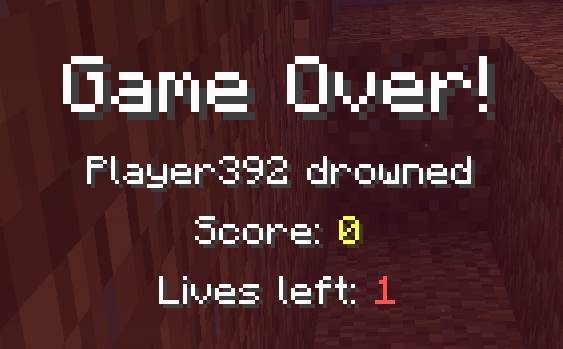
Clients without the mod will see player's lives in player list differently (scoreboard hearts), and will not see remaining lives on death screen.
This mod requires Fabric API.
This mod is disabled by default in singleplayer worlds. If you want to use it, you need to enable it in the MidnightLib config menu (either from ModMenu, or icon near difficulty picker in settings). Make sure to reenter your world after you change this setting.
Config
defaultLives- Default amount of lives given to a new player. Also affects minimum heart count in player list.maxRescueTimes- Max amount of times admin (op level 1+) can execute/hardcore rescueenableInSinglePlayer- Enables mod in singleplayer worldssetLivesOpLevel- Op level required to execute/hardcore set_lives(default 1)getLivesOpLevel- Op level required to execute/hardcore get_lives(default 1)rescueOpLevel- Op level required to execute/hardcore rescue(default 1)resetRescueOpLevel- Op level required to execute/hardcore reset_rescue(default 4)
Commands
/hardcore set_lives [playername] [count]- Set playername's lives to count. Works on offline players and@a. Requires op level 1+/hardcore get_lives [playername]- Get playername's remaining lives. Works on offline players and@a(lists all players). Requires op level 1+/hardcore rescue [playername]- If playername has used all their lives, using this command player will be given 1 additional life, and respawned on world spawn (even if player has bed - respawn will happen on world spawn). Max amount of times this can be used on a player is defined usingmaxRescueTimesconfig parameter. Requires op level 1+/hardcore reset_rescue [playername]- Resetrescuecounter for playername. Requires op level 4
Features
- Remaining players' lives are displayed as hearts in player list
- Remaining player lives are displayed on death screen
- Hardcore state is forced from server.properties (doesn't require to edit or recreate world anymore)
Available Versions
How to Install Multiplayer Hardcore on Your Server
Order Server
Order a Minecraft Java server with at least 3 GB RAM (4 GB recommended).
Set fabric Loader
In the panel under "Egg", select the fabric loader and matching Minecraft version (1.21).
Install Mod
Open the mod browser in the dashboard and search for "Multiplayer Hardcore". Click "Install" – done! Alternatively, upload the .jar via SFTP to the /mods folder.
Compatibility
Mod Loaders
Minecraft Versions
1.21
Server-side
✓ RequiredRecommended RAM
4 GB(min. 3 GB)Frequently Asked Questions
Multiplayer Hardcore server crashes on startup – what to do?
Most common cause: wrong fabric version or insufficient RAM. Check the server log (latest.log) for "OutOfMemoryError" or "Mixin" errors. With Mado Hosting: ensure at least 3 GB RAM is allocated and the loader matches the mod version (1.21). You can switch loaders with one click in the panel.
Is Multiplayer Hardcore compatible with fabric?
Multiplayer Hardcore officially supports fabric for Minecraft 1.21. The Mado dashboard automatically detects incompatible loader combinations.
Server lagging with Multiplayer Hardcore – how to optimize performance?
Recommended RAM: 4 GB (per 8 players). Use /spark profiler to check if Multiplayer Hardcore consumes the most tick time. Common fixes: reduce server view-distance to 8-10, install "performant" or "starlight" as supplementary mods on Forge. With Mado Hosting, your server runs on NVMe SSDs with dedicated CPU cores for minimal latency.
Similar Mods






Rent Modded Server
Install Multiplayer Hardcore with just one click on your server.