
MrDeadPools Simple GPS with Navigation
A simple navigation mod, including dimension navigation — provided you have saved portals.
Screenshots
About this Mod
[ENG] A simple navigation mod, including dimension navigation — provided you have saved portals.
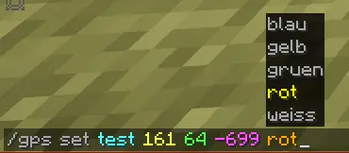
/gps set "name" "x" "y" "z" "Color [Optional]"
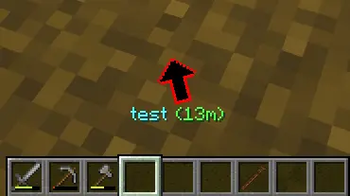
You can start navigation to the specified coordinates .
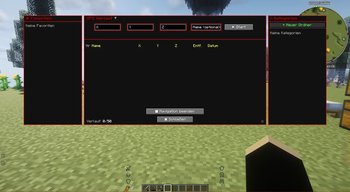
These coordinates are then saved in the "History," including the dimension. From there, you can, of course, start navigation again, share them, add them to your favorites, or add them to a route (if you wish to create a multi-point route). 50 entries are saved after that, the oldest ones are automatically deleted.
To open the history: press "G" (this can be changed in the options) or /gps history.
You can also start navigation in the History window.
You can create categories on the right side, in which GPS destinations can also be saved by right-clicking within the history window.
/gps share
You can share your current navigation in the chat using /gps share or in the GPS GUI by clicking the arrow "[↗]". Any player can then click on the message to start the navigation as well.
/gps end
Ends the current navigation.
[GER] Eine einfache Navigationsmodifikation mit Dimensionsnavigation – vorausgesetzt, du hast Portale gespeichert.
/gps set "Name" "x" "y" "z" "Farbe [Optional]"
Startet eine Navigation zu den angegebenen Koordinaten.
Diese Koordinaten werden dann zusammen mit der Dimension im Verlauf gespeichert. Von dort aus kannst du die Navigation natürlich erneut starten, die Koordinaten teilen, zu deinen Favoriten hinzufügen oder sie einer Route hinzufügen (falls du eine Route mit mehreren Punkten erstellen möchten). Es werden 50 Einträge gespeichert, die ältesten werden automatisch gelöscht.
Um den Verlauf zu öffnen: Drücke "G" (diese Taste kann in den Optionen geändert werden) oder gebe
"/gps history" ein.
Du kannst die Navigation auch direkt im Verlaufsfenster starten.
Auf der rechten Seite kannst du Kategorien erstellen, in denen GPS-Ziele ebenfalls per Rechtsklick im Verlaufsfenster gespeichert werden können.
/gps share
Du kannst deine aktuelle Navigation im Chat mit /gps share oder in der GPS-Benutzeroberfläche durch Klicken auf den Pfeil "[↗]" teilen. Jeder Spieler kann dann auf die Nachricht klicken, um die Navigation ebenfalls zu starten.
/gps end
Beendet die aktuelle Navigation
Available Versions
How to Install MrDeadPools Simple GPS with Navigation on Your Server
Order Server
Order a Minecraft Java server with at least 3 GB RAM (4 GB recommended).
Set neoforge Loader
In the panel under "Egg", select the neoforge loader and matching Minecraft version (1.21.1).
Install Mod
Open the mod browser in the dashboard and search for "MrDeadPools Simple GPS with Navigation". Click "Install" – done! Alternatively, upload the .jar via SFTP to the /mods folder.
Compatibility
Mod Loaders
Minecraft Versions
1.21.1
Server-side
✓ RequiredRecommended RAM
4 GB(min. 3 GB)Frequently Asked Questions
MrDeadPools Simple GPS with Navigation server crashes on startup – what to do?
Most common cause: wrong neoforge version or insufficient RAM. Check the server log (latest.log) for "OutOfMemoryError" or "Mixin" errors. With Mado Hosting: ensure at least 3 GB RAM is allocated and the loader matches the mod version (1.21.1). You can switch loaders with one click in the panel.
Is MrDeadPools Simple GPS with Navigation compatible with neoforge?
MrDeadPools Simple GPS with Navigation officially supports neoforge for Minecraft 1.21.1. The Mado dashboard automatically detects incompatible loader combinations.
Server lagging with MrDeadPools Simple GPS with Navigation – how to optimize performance?
Recommended RAM: 4 GB (per 8 players). Use /spark profiler to check if MrDeadPools Simple GPS with Navigation consumes the most tick time. Common fixes: reduce server view-distance to 8-10, install "performant" or "starlight" as supplementary mods on Forge. With Mado Hosting, your server runs on NVMe SSDs with dedicated CPU cores for minimal latency.
Similar Mods




Rent Modded Server
Install MrDeadPools Simple GPS with Navigation with just one click on your server.