
MrShulker
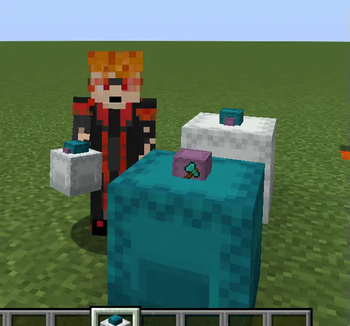
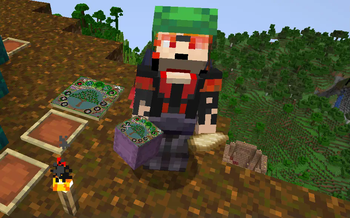
Allows attaching items to display on the lids of your shulker boxes for better inventory management.
Screenshots
About this Mod
Overview
MrShulker started as a re-creation of the (assumed abandoned) Shulker+ Mod.
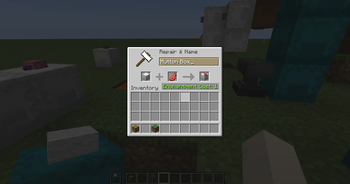
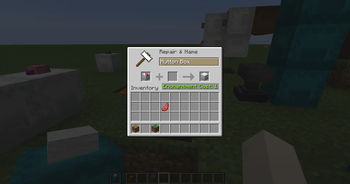
The mod allows players to attach items to shulker boxes for 1 xp using an anvil. The attached item then appears on the lid of the shulker box.
MrShulker is backward compatible with Shulker+, If you are migrating from a world which had Shulker+, you need to have MrShulker installed at the time of migration for the data to carry over.
Features
- MrShulker's main feature is to attach items to shulker boxes for display purposes.
- Version 1.3.0 introduced dyeing of shulker boxes via crouch-use thanks to tnoctua.
- A top-down gui view is provided by the MrShulker Flat GUI View Companion resource pack.
- Version 1.4.0 introduced client-configuration options to set lid item scales to be used in different display contexts.
- Version 1.4.0 introduced server-configuration options to enable or disable specific mod features.
- Version 1.4.0 introduced the ability to set per-shulker lid item scaling.
- Version 1.4.0 introduced commands to manage these settings.
Requirements and Dependencies.
MrShulker is required server side to function.
It is not required that all players have MrShulker installed client side, but it is required for the lid items to display.
As of 1.4.0 MrShulker requires Fabric-Api.
Commands
Commands are separated into two overall groups depending on if they impact the server overall, or just a single player's personal preferences.
mrshulker
mrshulker is the root command for all server side commands. Each sub command has three modes of operation. set, query, and reset.
allow_dyeing
Controls if players can dye shulker boxes via crouch-use.
mrshulker [set|query|reset] allow_dyeing [true|false]
allow_per_shulker_scaling
Controls if players can set per-shulker scaling on shulker boxes.
mrshulker [set|query|reset] allow_per_shulker_scaling [true|false]
custom_scale
Sets, displays, or resets the custom scale to use for the shulker box in the player's main hand.
mrshulker [set|query|reset] custom_scale #.#
mrshulker_display
mrshulker_display is the root command for client side commands. Again each command has three modes of operation: set, query, and reset.
scale
The scale subcommand manages the overall scales to use in different display contexts. Most supported display_contexts align with official ItemDisplayContext types:
- firstperson_lefthand
- firstperson_righthand
- fixed: used when the shulker box is displayed in an item frame.
- ground: used when the shulker box is displayed as an item drop.
- gui: used when the shulker box is displayed anywhere in the gui: inventory, hot bar etc.
- head: used when the shulker box is displayed on the head of an armor stand.
- none: I don't know where this is used.
- thirdperson_lefthand
- thirdperson_righthand
Two special display_contexts are added to the list:
- block: used when the shulker box is placed in the world.
- default: used when there is not a specific setting configured for the current display context.
The initial state has settings for default and gui contexts.
In set mode, display_context and scale are required arguments.
mrshulker_display set scale [display_context] #.#
In query and reset mode the display_context argument is optional. If specified the command will display or reset that display_context, if omitted, the operation is performed on all configured display contexts
mrshulker_display query scale [display_context]
mrshulker_display query scale
reset removes the the scale for the specified display context, and if the context is default or gui restores the original value.
mrshulker_display reset scale [display_context]
mrshulker_display reset scale
show_custom_scales
The show_custom_scales setting controls whether per-shulker scales will display, or if display_context scales will always be used.
mrshulker_display [set|query|reset] show_custom_scales [true|false]
Lid Item Scaling
With multiple potential options available, MrShulker determines which scale to use in the following manner:
- Per-Shulker custom_scale
- If the shulker box has a custom_scale set, and both allow_per_shulker_scales, and show_custom_scales are both true, the custom_scale is used.
- display_context scale for the current ItemDisplayContext
- If the current ItemDisplayContext has a configured scale, it is used.
- the value set for the 'default' display_context
- The always present 'default' value is used as a fall back if neither of the above are chosen.
Available Versions
How to Install MrShulker on Your Server
Order Server
Order a Minecraft Java server with at least 3 GB RAM (4 GB recommended).
Set fabric Loader
In the panel under "Egg", select the fabric loader and matching Minecraft version (1.21.8).
Install Mod
Open the mod browser in the dashboard and search for "MrShulker". Click "Install" – done! Alternatively, upload the .jar via SFTP to the /mods folder.
Compatibility
Mod Loaders
Minecraft Versions
1.21.8, 1.21.7, 1.21.6 (+1 more)
Server-side
✓ RequiredRecommended RAM
4 GB(min. 3 GB)Frequently Asked Questions
MrShulker server crashes on startup – what to do?
Most common cause: wrong fabric version or insufficient RAM. Check the server log (latest.log) for "OutOfMemoryError" or "Mixin" errors. With Mado Hosting: ensure at least 3 GB RAM is allocated and the loader matches the mod version (1.21.8). You can switch loaders with one click in the panel.
Is MrShulker compatible with fabric?
MrShulker officially supports fabric for Minecraft 1.21.8, 1.21.7, 1.21.6. The Mado dashboard automatically detects incompatible loader combinations.
Server lagging with MrShulker – how to optimize performance?
Recommended RAM: 4 GB (per 8 players). Use /spark profiler to check if MrShulker consumes the most tick time. Common fixes: reduce server view-distance to 8-10, install "performant" or "starlight" as supplementary mods on Forge. With Mado Hosting, your server runs on NVMe SSDs with dedicated CPU cores for minimal latency.
Similar Mods


Rent Modded Server
Install MrShulker with just one click on your server.