
MSM Better Explosions
Makes explosions in Medieval Siege Machines slightly better
Screenshots
About this Mod
MSM Better Explosions
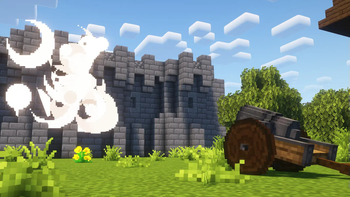
Medieval Siege Machines is a great mod, but unfortunately, it lacks impactful visual or sound effects for explosions. This datapack enhances explosions with improved visuals, sound effects, and adjusted physics.
What does it Change?
It completely overhauls the way certain projectiles (of mortar, culverin, catapult and trebuchet) in this mod collide with blocks, adding explosion particles, sounds, and slightly reducing the explosion radius for balance.
How does it Work?
Every tick, the datapack scans a 3×3×3 area around the projectiles for solid blocks. Upon detection, it spawns a creeper that instantly explodes and removes the original projectile to prevent the mod's default explosion. Thus, it will NOT WORK when: peaceful difficulty is set or mob griefing is disabled.
Where to Find MSM for 1.19.x and 1.20.1?
You can find them on CurseForge.
Known Issues
The script might fail when a projectile is fired from certain angles, allowing the mod’s original explosion. Due to a lot of scanning occuring, firing many projectiles at once can cause freezes on weaker hardware.
Changelog
Versions for 1.18.2 and 1.19.x are available now! Unfortunately, v1.0.0 does not work on 1.16.5, but that might be fixed in the future.
Credits
Medieval Siege Machines
Available Versions
How to Install MSM Better Explosions on Your Server
Order Server
Order a Minecraft Java server with at least 3 GB RAM (4 GB recommended).
Set datapack Loader
In the panel under "Egg", select the datapack loader and matching Minecraft version (1.20.1).
Install Mod
Open the mod browser in the dashboard and search for "MSM Better Explosions". Click "Install" – done! Alternatively, upload the .jar via SFTP to the /mods folder.
Compatibility
Mod Loaders
Minecraft Versions
1.20.1, 1.19.2, 1.19.1 (+2 more)
Server-side
✓ RequiredRecommended RAM
4 GB(min. 3 GB)Frequently Asked Questions
MSM Better Explosions server crashes on startup – what to do?
Most common cause: wrong datapack version or insufficient RAM. Check the server log (latest.log) for "OutOfMemoryError" or "Mixin" errors. With Mado Hosting: ensure at least 3 GB RAM is allocated and the loader matches the mod version (1.20.1). You can switch loaders with one click in the panel.
Is MSM Better Explosions compatible with datapack and forge?
MSM Better Explosions officially supports datapack, forge for Minecraft 1.20.1, 1.19.2, 1.19.1. The Mado dashboard automatically detects incompatible loader combinations.
Server lagging with MSM Better Explosions – how to optimize performance?
Recommended RAM: 4 GB (per 8 players). Use /spark profiler to check if MSM Better Explosions consumes the most tick time. Common fixes: reduce server view-distance to 8-10, install "performant" or "starlight" as supplementary mods on Forge. With Mado Hosting, your server runs on NVMe SSDs with dedicated CPU cores for minimal latency.
Similar Mods




![[TaCZ] Timeless and Classics Zero](https://cdn.modrinth.com/data/SzzJttH8/fd27766d2bb8390d284696b1dbd358f87e081439_96.webp)

Rent Modded Server
Install MSM Better Explosions with just one click on your server.