
Much More Tools
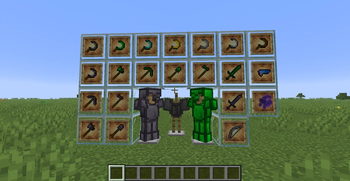
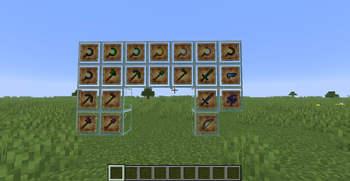
This adds more tools such as emerald and obsidian tiers, a whole new tool type and more!
Screenshots
About this Mod
⚒️ Much More Tools – Because “More” Just Wasn’t Enough
Ever look at Minecraft’s tool selection and think, “Huh. Kinda mid.”
Well buckle up, because Much More Tools dumps a whole pile of shiny, dangerous, and occasionally questionable gear right into your world.
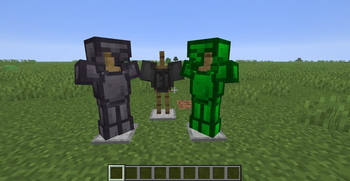
💎 Emerald Gear
For when you want to look rich and stab things slightly faster.
🟪 Obsidian Gear
Chunky. Heavy. Nearly indestructible. Basically the gym bro of armour tiers.
🌿 The Sickle
Why punch grass like a caveman when you can swoosh through plants with style? Perfect for farming, landscaping, and looking like a medieval gardener with attitude.
👻 Shadow Warper Chestplate
Wear it and—poof—you’re invisible. Great for sneaking, pranking, or avoiding conversations with villagers.
🏹 Shadow Bow
It’s dark, dramatic, and probably broods in your inventory.
🔫 The Infiniblaster
A weapon that never runs out of ammo because reloading is for mortals. Point, click, pew forever.
If you wanted “a few new tools,” you’ve come to the wrong place. If you wanted too many tools, welcome home.
Available Versions
How to Install Much More Tools on Your Server
Order Server
Order a Minecraft Java server with at least 3 GB RAM (4 GB recommended).
Set neoforge Loader
In the panel under "Egg", select the neoforge loader and matching Minecraft version (1.21.8).
Install Mod
Open the mod browser in the dashboard and search for "Much More Tools". Click "Install" – done! Alternatively, upload the .jar via SFTP to the /mods folder.
Compatibility
Mod Loaders
Minecraft Versions
1.21.8, 1.21.4, 1.21.1
Server-side
✗ UnsupportedRecommended RAM
4 GB(min. 3 GB)Frequently Asked Questions
Much More Tools server crashes on startup – what to do?
Most common cause: wrong neoforge version or insufficient RAM. Check the server log (latest.log) for "OutOfMemoryError" or "Mixin" errors. With Mado Hosting: ensure at least 3 GB RAM is allocated and the loader matches the mod version (1.21.8). You can switch loaders with one click in the panel.
Is Much More Tools compatible with neoforge?
Much More Tools officially supports neoforge for Minecraft 1.21.8, 1.21.4, 1.21.1. The Mado dashboard automatically detects incompatible loader combinations.
Server lagging with Much More Tools – how to optimize performance?
Recommended RAM: 4 GB (per 8 players). Use /spark profiler to check if Much More Tools consumes the most tick time. Common fixes: reduce server view-distance to 8-10, install "performant" or "starlight" as supplementary mods on Forge. With Mado Hosting, your server runs on NVMe SSDs with dedicated CPU cores for minimal latency.
Similar Mods




![[TaCZ] Timeless and Classics Zero](https://cdn.modrinth.com/data/SzzJttH8/fd27766d2bb8390d284696b1dbd358f87e081439_96.webp)

Rent Modded Server
Install Much More Tools with just one click on your server.