
Multigame Mayhem
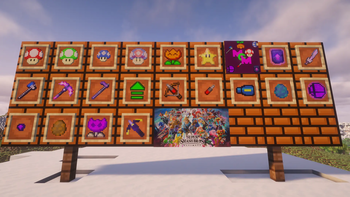
This mod adds items from other games into Minecraft! Games added includes: Mario, Deltarune, Terraria, and more!
Screenshots
About this Mod
Multigame Mayhem adds items from other games and new achivments relating to those items as well as 2 new paintings. I won't list what games and what from here because spoilers, but some notable ones include: Mario, Terraria, and Deltarune.
Also, I have a feedback form now! Check it out here!
Full list
Smash Bros: Smash Ball, Smash Ball Shard*Super Mario Bros: Fire Flower, Super Mushroom, Super Star, Mini Mushroom, 1-Up Mushroom, Odd Mushroom*, and Dragon Flower*
Marble It Up: Super Jump
Terraria: Meowmere and Nebula Pickaxe
BTD: Dart Monkey, Dart, Dart Crossbow, Mastery Crossbow
Megaman: Megaman, Mega-Blaster
Multigame Mayhem: Odd Mushroom, Legendary Upgrade Template, Smash Ball Shard, and Dragon Flower
- Based off of items from that series
Primary Artist: Simon
Secondary Artist And Programmer: Tobin
Mod making platform and spawn egg textures: Mcreator team
Mob Skin Makers: Unkown
Available Versions
How to Install Multigame Mayhem on Your Server
Order Server
Order a Minecraft Java server with at least 3 GB RAM (4 GB recommended).
Set neoforge Loader
In the panel under "Egg", select the neoforge loader and matching Minecraft version (1.21.8).
Install Mod
Open the mod browser in the dashboard and search for "Multigame Mayhem". Click "Install" – done! Alternatively, upload the .jar via SFTP to the /mods folder.
Compatibility
Mod Loaders
Minecraft Versions
1.21.8
Server-side
✓ RequiredRecommended RAM
4 GB(min. 3 GB)Frequently Asked Questions
Multigame Mayhem server crashes on startup – what to do?
Most common cause: wrong neoforge version or insufficient RAM. Check the server log (latest.log) for "OutOfMemoryError" or "Mixin" errors. With Mado Hosting: ensure at least 3 GB RAM is allocated and the loader matches the mod version (1.21.8). You can switch loaders with one click in the panel.
Is Multigame Mayhem compatible with neoforge?
Multigame Mayhem officially supports neoforge for Minecraft 1.21.8. The Mado dashboard automatically detects incompatible loader combinations.
Server lagging with Multigame Mayhem – how to optimize performance?
Recommended RAM: 4 GB (per 8 players). Use /spark profiler to check if Multigame Mayhem consumes the most tick time. Common fixes: reduce server view-distance to 8-10, install "performant" or "starlight" as supplementary mods on Forge. With Mado Hosting, your server runs on NVMe SSDs with dedicated CPU cores for minimal latency.
Similar Mods




Rent Modded Server
Install Multigame Mayhem with just one click on your server.