
MultiHuD
MultiHUD is a customizable HUD mod for Minecraft Fabric that adds Armor, Inventory, Potion, FPS, HUD elements inspired by Lunar and Feather clients. It provides a clean and lightweight interface to display important information directly on your screen.
Screenshots
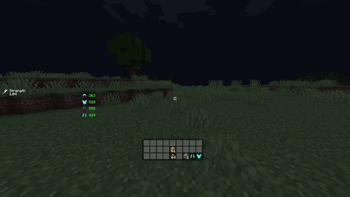
About this Mod
MultiHuD
Status: Released
Loader: Fabric
Supported Versions: 1.21.x & 1.20.x
Overview
MultiHuD is a lightweight, modular HUD enhancement mod for Minecraft Fabric, designed to give players full control over their on-screen information.
Inspired by the clean and modern interfaces of popular clients such as Feather Client and Lunar Client, MultiHuD brings a highly customizable HUD system to the Fabric ecosystem without sacrificing performance or simplicity.
Whether you're tracking your FPS during intense PvP fights, monitoring potion effects in real time, or navigating the world with precise coordinates, MultiHuD allows you to build a clean and efficient interface tailored to your playstyle.
Both 1.20.x and 1.21.x versions now share the same improvements, ensuring a consistent experience across supported versions.
Each module works independently and can be freely positioned and scaled, giving you complete control over how information appears on your screen.
Included Modules
MultiHuD includes several essential HUD components designed to enhance gameplay while remaining lightweight and unobtrusive.
Potion HUD
Displays all active potion effects with their corresponding icons and remaining duration, allowing you to monitor buffs and debuffs without opening your inventory.
FPS HUD
Shows your current frames per second in real time so you can monitor performance during gameplay.
Coordinates HUD
Displays your precise X, Y, Z coordinates along with your current facing direction (North, South, East, West), making navigation easier for exploration, building, or survival gameplay.
Armor HUD
Provides a visual representation of your equipped armor along with durability information, helping you track when your gear needs repairing or replacing.
Inventory HUD
Displays a preview of your currently held item and allows quick visual access to hotbar items without distracting from gameplay.
Core Features
Fully Draggable Interface
Every module can be freely dragged and positioned anywhere on your screen, allowing you to design your layout exactly the way you want.
Independent Scaling
Each HUD element can be resized individually. Important information can be made larger for visibility, or scaled down for a minimalist interface.
Custom Keybind System
Assign custom keybinds to toggle individual modules or the entire HUD instantly during gameplay.
Clean Client-Style Design
MultiHuD uses a modern visual style inspired by popular PvP clients, blending seamlessly with Minecraft's default interface while maintaining a polished appearance.
Performance Focused
Built specifically for Fabric with performance in mind. The mod is optimized to ensure minimal CPU usage and no noticeable FPS impact.
Persistent Configuration
All settings, module positions, and toggles are automatically saved, ensuring your HUD layout remains the same every time you launch the game.
Why MultiHuD?
MultiHuD delivers a client-level HUD experience in a standalone Fabric mod. Instead of installing a full client just for interface improvements, you get a flexible, lightweight solution that integrates seamlessly with any Fabric modpack.
With the latest update, both 1.20.x and 1.21.x versions now include the same features, improvements, and optimizations, providing a consistent and polished experience across versions.
Available Versions
How to Install MultiHuD on Your Server
Order Server
Order a Minecraft Java server with at least 3 GB RAM (4 GB recommended).
Set fabric Loader
In the panel under "Egg", select the fabric loader and matching Minecraft version (1.21.11).
Install Mod
Open the mod browser in the dashboard and search for "MultiHuD". Click "Install" – done! Alternatively, upload the .jar via SFTP to the /mods folder.
Compatibility
Mod Loaders
Minecraft Versions
1.21.11, 1.21.10, 1.21.9 (+16 more)
Server-side
✗ UnsupportedRecommended RAM
4 GB(min. 3 GB)Frequently Asked Questions
MultiHuD server crashes on startup – what to do?
Most common cause: wrong fabric version or insufficient RAM. Check the server log (latest.log) for "OutOfMemoryError" or "Mixin" errors. With Mado Hosting: ensure at least 3 GB RAM is allocated and the loader matches the mod version (1.21.11). You can switch loaders with one click in the panel.
Is MultiHuD compatible with fabric?
MultiHuD officially supports fabric for Minecraft 1.21.11, 1.21.10, 1.21.9. The Mado dashboard automatically detects incompatible loader combinations.
Server lagging with MultiHuD – how to optimize performance?
Recommended RAM: 4 GB (per 8 players). Use /spark profiler to check if MultiHuD consumes the most tick time. Common fixes: reduce server view-distance to 8-10, install "performant" or "starlight" as supplementary mods on Forge. With Mado Hosting, your server runs on NVMe SSDs with dedicated CPU cores for minimal latency.
Similar Mods




![[TaCZ] Timeless and Classics Zero](https://cdn.modrinth.com/data/SzzJttH8/fd27766d2bb8390d284696b1dbd358f87e081439_96.webp)

Rent Modded Server
Install MultiHuD with just one click on your server.