
Multiplicative Enchantment Damage
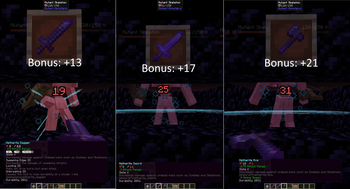
Changes Sharpness, Smite, Bane of Arthropods and Impaling damage calculations to be percentage based. This mod aims to lessen the gap between enchanted heavy vs light weapons.
Screenshots
About this Mod
Changes Sharpness, Smite, Bane of Arthropods and Impaling damage calculations to be percentage based. This mod aims to lessen the gap between enchanted heavy vs light weapons.
Mods often add "fast and weak" vs "slow and powerful" and even 2-handed weapons. When the additional damage from enchantments is all linear, the balance falls apart and fast weapons almost always win out in DPS in lategame. Because of the flat additions, the % DPS increase for 1 handed is much greater than 2 handed due to faster attack rate.
Fully Configurable!
So you can fine tune the balance:
- Whether to run the multiplier logic at all for this enchant.
- Whether to override the default enchantment behavior (undo flat additions)
- What the first level multiplier is.
- What each additional level adds to that multiplier.
Default Settings
This mod changes the following enchantments by default (Based on Vanilla scaling at 6 damage from a lighter weapon, Knives, + vanilla enchants scaled to percentage instead):
- Sharpness changed from, +1 first level, +0.5 per additional: +16.8% level 1, + 8.3% per additional. (x1.5 at level 5)
- Bane of Arthropods, Smite, Impaling changed from 2.5 per level: +41.6% per level. (x3.08 base damage at level 5 vs specific mobs)
Keep in mind this stacks on top of crits (e.g. 1.5x from crit times 3.08x)
Note: For modded enchantments from my experience (Illager's Bane and Sculk's Smite, will vary per mod), they don't have hardcoded damage scaling logic and will work through a Data Pack.
Replace their damage minecraft:add effect(s) with the following:
"type": "minecraft:multiply",
"factor": {
"type": "minecraft:linear",
"base": 1.416,
"per_level_above_first": 0.416
}
I recommend unzipping the given mod jar(s) to find the data folder path to their "enchantments" folder. Until I find a mod that doesn't work with a datapack, I don't see the need to make config support for modded enchantments specifically. If you find a modded enchantment that doesn't work through a Datapack, feel free to bring up an issue on the GitHub!
Available Versions
How to Install Multiplicative Enchantment Damage on Your Server
Order Server
Order a Minecraft Java server with at least 3 GB RAM (4 GB recommended).
Set neoforge Loader
In the panel under "Egg", select the neoforge loader and matching Minecraft version (1.21.1).
Install Mod
Open the mod browser in the dashboard and search for "Multiplicative Enchantment Damage". Click "Install" – done! Alternatively, upload the .jar via SFTP to the /mods folder.
Compatibility
Mod Loaders
Minecraft Versions
1.21.1
Server-side
✓ RequiredRecommended RAM
4 GB(min. 3 GB)Frequently Asked Questions
Multiplicative Enchantment Damage server crashes on startup – what to do?
Most common cause: wrong neoforge version or insufficient RAM. Check the server log (latest.log) for "OutOfMemoryError" or "Mixin" errors. With Mado Hosting: ensure at least 3 GB RAM is allocated and the loader matches the mod version (1.21.1). You can switch loaders with one click in the panel.
Is Multiplicative Enchantment Damage compatible with neoforge?
Multiplicative Enchantment Damage officially supports neoforge for Minecraft 1.21.1. The Mado dashboard automatically detects incompatible loader combinations.
Server lagging with Multiplicative Enchantment Damage – how to optimize performance?
Recommended RAM: 4 GB (per 8 players). Use /spark profiler to check if Multiplicative Enchantment Damage consumes the most tick time. Common fixes: reduce server view-distance to 8-10, install "performant" or "starlight" as supplementary mods on Forge. With Mado Hosting, your server runs on NVMe SSDs with dedicated CPU cores for minimal latency.
Similar Mods




![[TaCZ] Timeless and Classics Zero](https://cdn.modrinth.com/data/SzzJttH8/fd27766d2bb8390d284696b1dbd358f87e081439_96.webp)

Rent Modded Server
Install Multiplicative Enchantment Damage with just one click on your server.