
Mushroom Madness
A Mushroom Island expansion mod.
Screenshots

About this Mod
Mushroom Madness aims to update Mushroom Island biomes, giving them the care that they've deserved to get over the years.
Fungal Clumps
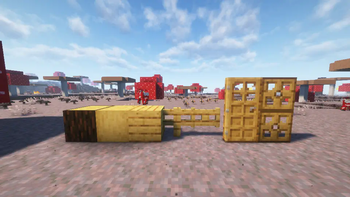
Dropped by Mycelium Overgrowth (A new block similar to short grass), fungal clumps can be placed on logs to convert them into Sporewood Logs, giving access to a new woodset. They also spread on trees, and eat away at leaves.
The Sporewood Forest
Many of the features in this mod spawn inside of the Sporewood Forest, a sub-biome of the Mushroom Fields. This keeps the vanilla Mushroom Fields still feeling like a desolate, peaceful land, while also providing new resources in the immediate vacinity.
Glowcaps
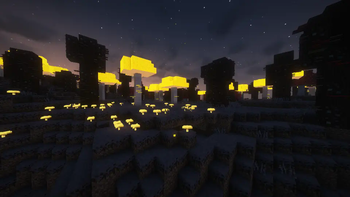
Spawning inside of the Sporewood Forest, these mushrooms are inspired by the glowing mushrooms found within Minecraft Dungeons. By default, they emit a very small amount of light. However, once stepped on, they become a stronger light source. They can be waxed to stay in either state, which also allows them to be placed anywhere your heart desires.
Glowcap Blocks
Similar to the vanilla huge mushrooms, Huge Glowcaps are made up of Glowcap Blocks. Unlike the vanilla huge mushrooms, these blocks create glowing spores in the nearby area, similar to the Spore Blossom. These particles can make for great ambiance in a player's builds.
The Mycologist's Tower
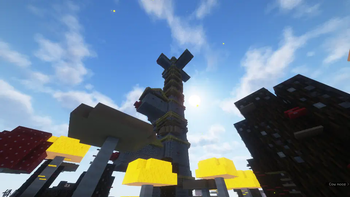
Home of the Mycologist, you may rarely stumble across this structure in the Sporewood Forest. It has several pieces of loot unique to the structure that are worth going for;
- A smithing template that allows players to upgrade their bows with mushrooms
- A bottomless bowl of mushroom stew
- A brand new Music Disc
The Mycologist
A new mushroom bow wielding illager, whose design is inspired by The Mycologists from Inscryption.

Available Versions
How to Install Mushroom Madness on Your Server
Order Server
Order a Minecraft Java server with at least 4 GB RAM (6 GB recommended).
Set fabric Loader
In the panel under "Egg", select the fabric loader and matching Minecraft version (1.21.1).
Install Mod
Open the mod browser in the dashboard and search for "Mushroom Madness". Click "Install" – done! Alternatively, upload the .jar via SFTP to the /mods folder.
Compatibility
Mod Loaders
Minecraft Versions
1.21.1
Server-side
✓ RequiredRecommended RAM
6 GB(min. 4 GB)Frequently Asked Questions
Mushroom Madness server crashes on startup – what to do?
Most common cause: wrong fabric version or insufficient RAM. Check the server log (latest.log) for "OutOfMemoryError" or "Mixin" errors. With Mado Hosting: ensure at least 4 GB RAM is allocated and the loader matches the mod version (1.21.1). You can switch loaders with one click in the panel.
Is Mushroom Madness compatible with fabric?
Mushroom Madness officially supports fabric for Minecraft 1.21.1. The Mado dashboard automatically detects incompatible loader combinations.
Server lagging with Mushroom Madness – how to optimize performance?
Recommended RAM: 6 GB (per 5 players). Use /spark profiler to check if Mushroom Madness consumes the most tick time. Common fixes: reduce server view-distance to 8-10, install "performant" or "starlight" as supplementary mods on Forge. With Mado Hosting, your server runs on NVMe SSDs with dedicated CPU cores for minimal latency.
Rent Modded Server
Install Mushroom Madness with just one click on your server.