
Mushrooms Realm
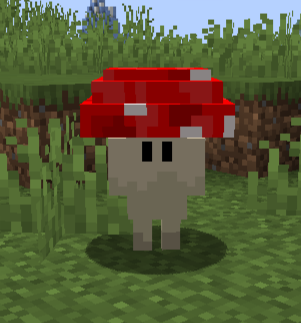
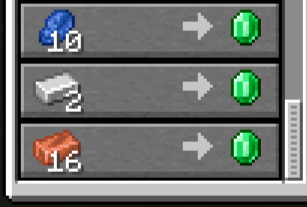
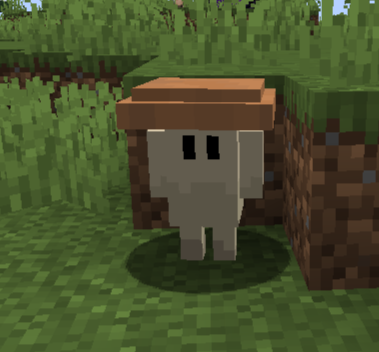
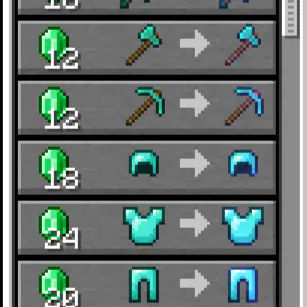
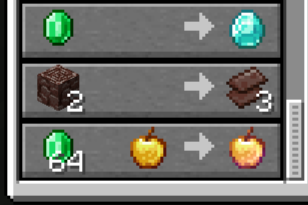
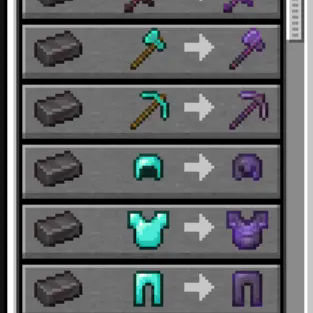
Два новых грибных торговца со своими торгами // Two new mushroom traders with their own markets
Screenshots
About this Mod
Русский
Мод добалвяет две новые сущности: красный и коричневый гриб. Коричневый гриб асоциируется как обычный мир, а красный - незер. Коричневый гриб обменивает за изумруды алмазную броню на алмазную броню с одним рандомным зачарованием максимального лва, тоже самое с инструментами и мечом. Красный гриб обменивает незеритовую броню с такой же логикой зачарований.
Как встретить одну из сущностей?
- Они спавнятся вокруг игрока каждые 5 минут - 60 минут и пропадают через 10 минут (все можно настроить в конфиге) и если игрок в обычном мире - спавнится коричневый гриб, в незере - красный.
English
The mod adds two new entities: a red and a brown mushroom. The brown mushroom is associated as an ordinary world, and the red one is not. The brown mushroom exchanges diamond armor for emeralds for diamond armor with one random enchantment of maximum LVL, the same with tools and a sword. The red mushroom exchanges non-cerite armor with the same enchantment logic.
How to meet one of the entities?
- They spawn around the player every 5 minutes - 60 minutes and disappear after 10 minutes (everything can be configured in the config) and if the player is in the normal world, a brown mushroom will spawn, and a red one in the cave.
Available Versions
How to Install Mushrooms Realm on Your Server
Order Server
Order a Minecraft Java server with at least 3 GB RAM (4 GB recommended).
Set forge Loader
In the panel under "Egg", select the forge loader and matching Minecraft version (1.20.6).
Install Mod
Open the mod browser in the dashboard and search for "Mushrooms Realm". Click "Install" – done! Alternatively, upload the .jar via SFTP to the /mods folder.
Compatibility
Mod Loaders
Minecraft Versions
1.20.6, 1.20.5, 1.20.4 (+3 more)
Server-side
✓ RequiredRecommended RAM
4 GB(min. 3 GB)Frequently Asked Questions
Mushrooms Realm server crashes on startup – what to do?
Most common cause: wrong forge version or insufficient RAM. Check the server log (latest.log) for "OutOfMemoryError" or "Mixin" errors. With Mado Hosting: ensure at least 3 GB RAM is allocated and the loader matches the mod version (1.20.6). You can switch loaders with one click in the panel.
Is Mushrooms Realm compatible with forge?
Mushrooms Realm officially supports forge for Minecraft 1.20.6, 1.20.5, 1.20.4. The Mado dashboard automatically detects incompatible loader combinations.
Server lagging with Mushrooms Realm – how to optimize performance?
Recommended RAM: 4 GB (per 8 players). Use /spark profiler to check if Mushrooms Realm consumes the most tick time. Common fixes: reduce server view-distance to 8-10, install "performant" or "starlight" as supplementary mods on Forge. With Mado Hosting, your server runs on NVMe SSDs with dedicated CPU cores for minimal latency.
Similar Mods




Rent Modded Server
Install Mushrooms Realm with just one click on your server.