Music Config
Configure how much a music track should be played in Minecraft.
About this Mod
Music Config
Configure how much a music track should be played in Minecraft.
Features
- Set frequency of each music track grouped by context
- Search through every track by name and artist
- Preview randomly selected, context-specific, music
- Support for additional music from resource packs or other mods!
How it works
Usually, when Minecraft plays background music, it selects a random music track to play. These tracks exist in a pool based on the current context (things such as your location, your gamemode, whether you're in a world at all, etc.). For example, when you visit a Swamp Biome Minecraft attempts to play music, it picks a random track from a list of three (Aerie, Firebugs and Labyrinthine). (This is internally known as the sound event minecraft:music.overworld.swamp and is accessible with the /playsound command.)
Music Config allows you to set how often each track should be played in each context. You can select the frequency of each track, so that some tracks play more often than others, or you can disable some tracks entirely. In the previous example, the context would be "overworld: swamp." You could set the frequency of Aerie to Often, Firebugs to Sometimes and Labyrinthine to Never. This would mean that Aerie plays almost every time Minecraft attempts to play music in a Swamp, Firebugs plays occasionally and Labyrinthine never plays.
How to use
- Install the mod & start Minecraft
- Go to the config screen (Options > Music & Sounds > Music Config)
- Optionally, search for tracks by name or artist and/or collapse unimportant contexts
- In a context, set the frequency of each track by adjusting the slider
- Test the randomness of the music from this context, by clicking the play button (▶️) next to the context name
- Click "Done" to save your changes (writes to file
.minecraft/music_config.json)
Now you can enjoy your custom music experience in Minecraft!
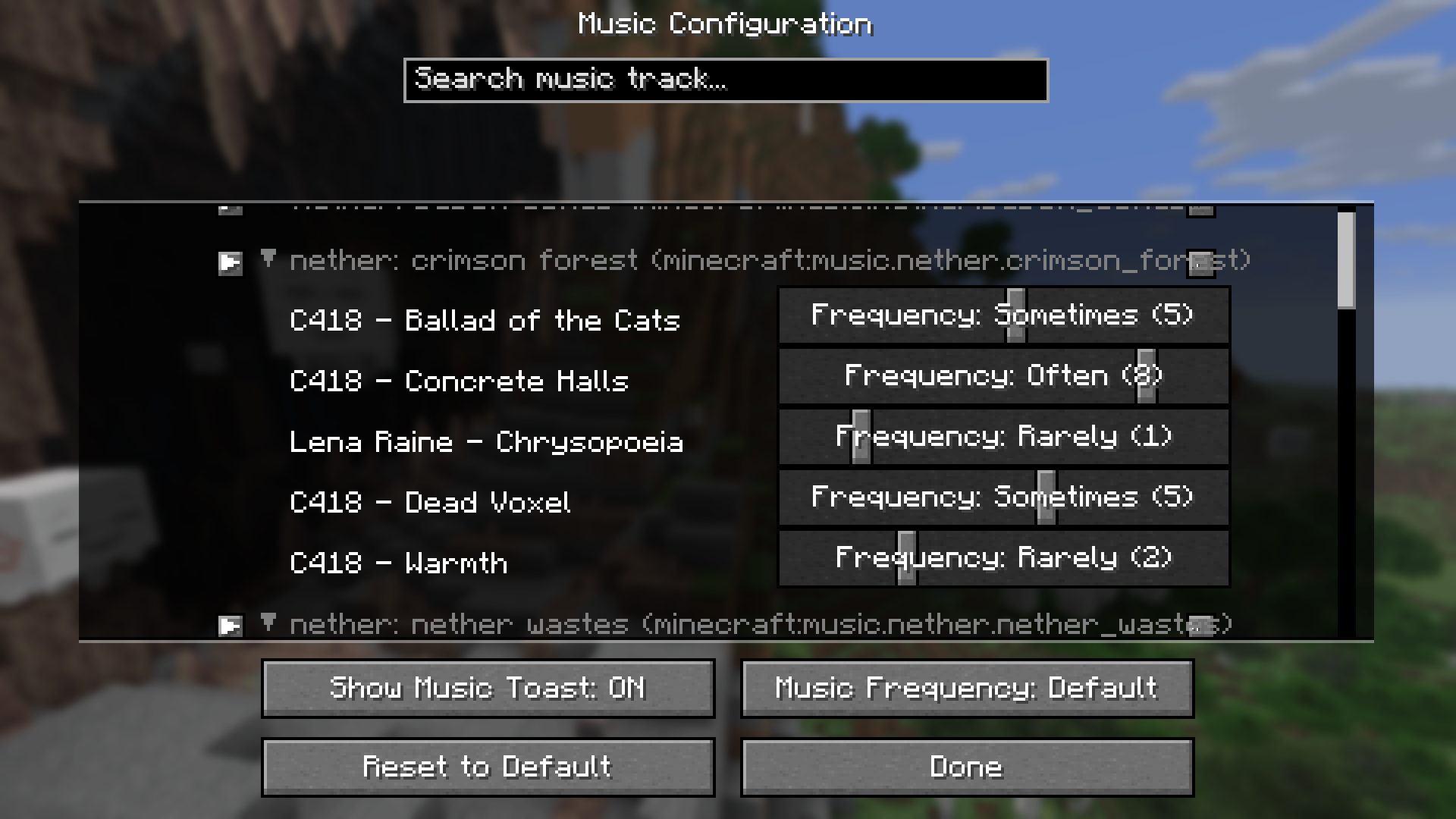
Example: setting play frequency per track from the "nether: crimson forest" context.
Here's a short summary of what every context in the game exactly represents:
| Context | Description |
|---|---|
| A context prefixed by "overworld:" | Represents a biome in the Overworld. Music plays when player is in that biome. |
| A context prefixed by "nether:" | Represents a biome in the Nether. Music plays when player is in that biome. |
| "end" | Music plays when player is in the End. |
| "creative" | Music plays when player is in Creative mode. |
| "credits" | Music plays during the game's credits sequence. |
| "dragon" | Music plays when fighting the Ender Dragon. |
| "game" | A sort of fallback; music plays when no other context requirement is met. |
| "menu" | Music plays on the Main Menu. |
| "under water" | Music plays when the player is submerged in water. |
Report an Issue
Use GitHub's Issue Tracker to report Issues such as requests or bugs.
Available Versions
How to Install Music Config on Your Server
Order Server
Order a Minecraft Java server with at least 3 GB RAM (4 GB recommended).
Set fabric Loader
In the panel under "Egg", select the fabric loader and matching Minecraft version (1.21.7).
Install Mod
Open the mod browser in the dashboard and search for "Music Config". Click "Install" – done! Alternatively, upload the .jar via SFTP to the /mods folder.
Compatibility
Mod Loaders
Minecraft Versions
1.21.7, 1.21.6
Server-side
✗ UnsupportedRecommended RAM
4 GB(min. 3 GB)Frequently Asked Questions
Music Config server crashes on startup – what to do?
Most common cause: wrong fabric version or insufficient RAM. Check the server log (latest.log) for "OutOfMemoryError" or "Mixin" errors. With Mado Hosting: ensure at least 3 GB RAM is allocated and the loader matches the mod version (1.21.7). You can switch loaders with one click in the panel.
Is Music Config compatible with fabric?
Music Config officially supports fabric for Minecraft 1.21.7, 1.21.6. The Mado dashboard automatically detects incompatible loader combinations.
Server lagging with Music Config – how to optimize performance?
Recommended RAM: 4 GB (per 8 players). Use /spark profiler to check if Music Config consumes the most tick time. Common fixes: reduce server view-distance to 8-10, install "performant" or "starlight" as supplementary mods on Forge. With Mado Hosting, your server runs on NVMe SSDs with dedicated CPU cores for minimal latency.
Similar Mods






Rent Modded Server
Install Music Config with just one click on your server.