
Musify!
Music! is a versatile client-side mod designed to improve the immersion and auditory experience of Minecraft for both modpack developers and regular players.
Screenshots
About this Mod
Musify!
Musify! is a versatile client-side mod designed to improve the immersion and auditory experience of Minecraft for both modpack developers and regular players. This mod allows for dynamic music customization based on in-game events like PvE Combat, Biome Exploration, Caving, and more, giving you complete control over Minecraft's soundtrack. Whether you’re crafting an immersive modpack or just want to personalize your solo adventures, Musify! provides a way to bring your world to life with the perfect soundtrack.
MUSIFY! 1.2.4 is OUT NOW!
Features:
This mod has a bunch of different features revolving around Minecraft's soundtrack:
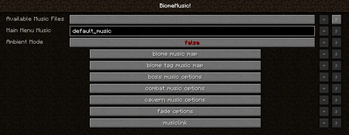
- Customizable Biome Music! This Mod allows you to customize and set up music for specific biomes, or for certain biome types. Great for that immersive feel when exploring!
- Recurrent Complex, Roguelike Dungeons, and Doomlike Dungeons Support! Set up custom music for the dungeons and structures added by these three mods!
- Combat Music! Enhance your battle experience by setting up custom combat music!
- Cavern Music! Want to feel like a true Dwarf when mining underground? Customize your worlds underground music for a new experience when mining!
- Boss Music! Customize music for boss mobs for a truely unique experience!
- Main Menu Music! Set up some custom music for Minecraft's main menu to personalize your modpack or client!
- Ambient Mode! Want to use sound effects or ambient tracks instead of music? Enable ambient mode to add to vanilla music instead of replacing it!
This mod can use and play any .ogg or .mp3 sound file! Customization of music is limited to your imagination.
Installation:
1. Install any Forge client for a compatible version.
2. Put the Jar file in the Mods folder in your instance.
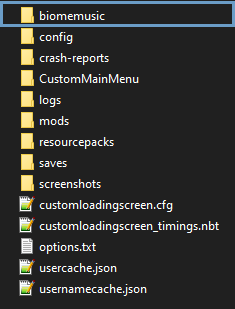
3. (OPTIONAL) Pre-make a music folder containing the .ogg or .mp3 sound files.
How to use:
Musify! can be difficult to set up, for a tutorial on how to initialize and set up the mod, please refer to the GitHub page.
Disclaimers:
- This mod can be installed client-side only, but the structure music for the three mods mentioned above will not work. For that, this mod also needs to be installed on the server side!
- While the mod does work with most Modded entities and biomes, some might not work. The mod was tested with mods like DefiledLands and Lycanites, But some mobs from other mods with which the mod was not tested might not be compatible. Similarly for some custom biomes from other mods, they might not be recognized. However, Even if the mod does not recognize a biome, as long as they either have a parent biome or biome tags, the music set using biome tags will still work.
If you do find any bugs in or crashes coming from the mod, please make an issue of github. (or to request a feature i guess.)
Available Versions
How to Install Musify! on Your Server
Order Server
Order a Minecraft Java server with at least 3 GB RAM (4 GB recommended).
Set forge Loader
In the panel under "Egg", select the forge loader and matching Minecraft version (1.12.2).
Install Mod
Open the mod browser in the dashboard and search for "Musify!". Click "Install" – done! Alternatively, upload the .jar via SFTP to the /mods folder.
Compatibility
Mod Loaders
Minecraft Versions
1.12.2
Server-side
✗ UnsupportedRecommended RAM
4 GB(min. 3 GB)Frequently Asked Questions
Musify! server crashes on startup – what to do?
Most common cause: wrong forge version or insufficient RAM. Check the server log (latest.log) for "OutOfMemoryError" or "Mixin" errors. With Mado Hosting: ensure at least 3 GB RAM is allocated and the loader matches the mod version (1.12.2). You can switch loaders with one click in the panel.
Is Musify! compatible with forge?
Musify! officially supports forge for Minecraft 1.12.2. The Mado dashboard automatically detects incompatible loader combinations.
Server lagging with Musify! – how to optimize performance?
Recommended RAM: 4 GB (per 8 players). Use /spark profiler to check if Musify! consumes the most tick time. Common fixes: reduce server view-distance to 8-10, install "performant" or "starlight" as supplementary mods on Forge. With Mado Hosting, your server runs on NVMe SSDs with dedicated CPU cores for minimal latency.
Similar Mods




Rent Modded Server
Install Musify! with just one click on your server.