
MWeb - File Sharing
Create links to your server files to share them! Links can be global, ip/user limited, timed and more. Easily zip folders and even send them to players as texturepacks! Custom Web Server responses - Part of MUtils
Screenshots
About this Mod
MWeb
Don't want to read everything? Click on the spoiler below for a compact feature overview.
For developers that are interested into the MWeb API, scroll down to the bottom.
MWeb Feature Summary
MWeb can be controlled completely by GUI or command.You can...
- ...browse through your files ingame (GUI only)
- ...create public links to any file or folder on your server
- ...create restricted links to any file or folder on your server (user, passphrase, timed, amount)
- ...edit and toggle all created links
- ...send folders or archives directly to players as resource pack
- ...zip & unzip folders/archives ingame
- ...delete & rename files ingame
- ...define folders for uploading files (can be restricted like downloads)
And for the more technical features, you can also...
- ...respond custom html/css/js on error pages
- ...define a proxy domain (like mutils.net/
instead of 1.2.3.4:1234/ ) - ...restrict every single action to a permission
The detailed description & guide is sorted into the following categories
- Creating download link
- Manage files
- Resource Pack integration
- Technical information & setup
To view all permissions and further help, visit mutils.net/mweb
This project cost a lot of work, any support is highly appreciated!
Create download link
Creating a simple download link isn't more then one click!
- Open the whitelist GUI (
/ws whitelistor/ws->manage download access) - Navigate to your file or folder
- Press a displayed button to create a link
You can create a global link or personal link (only usable by you) directly from the navigator by using your 1 & 2 hotkey. After processing (bigger folders take some time to zip) a new link is generated for you. Click on copy to copy the link in your clipboard and share it with anyone or paste it in your browser!
You can create multiple links for the same file. Press your 4 hotkey on a file or folder to manage all links. Here you can toggle, remove or even edit existing links.
(the preview use mweb.mutils.net as proxy. This is not a default behaviour)

Manage files
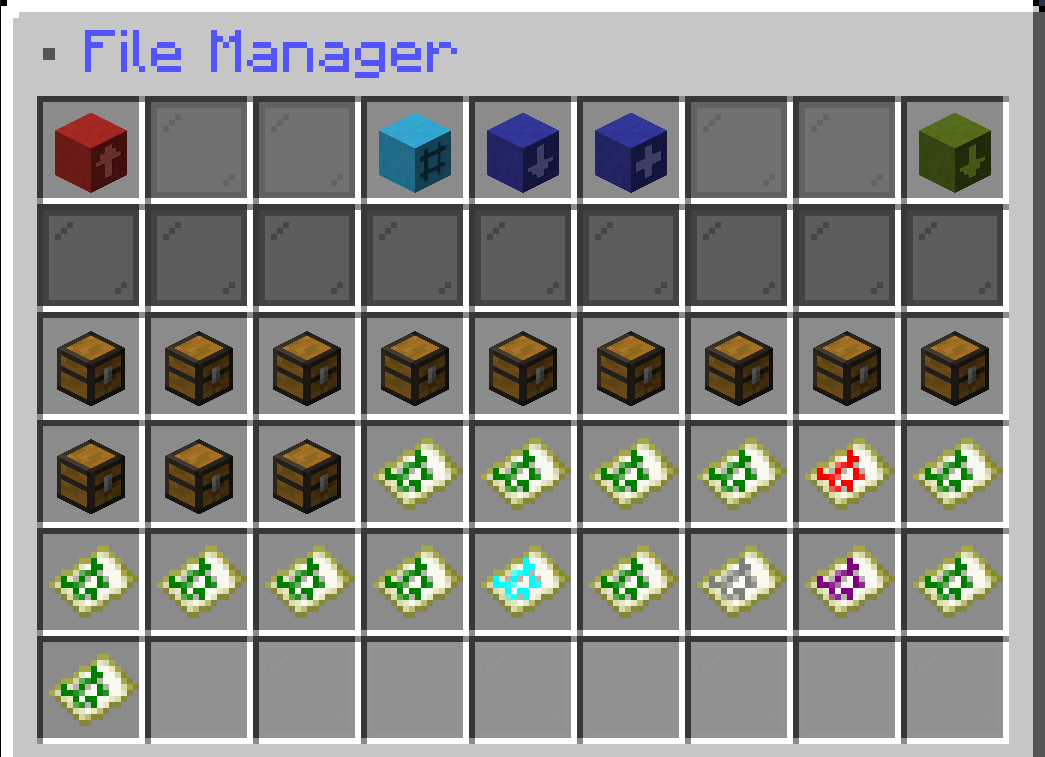
MWeb also adds helpful and simple file editing tools to make publishing easier! Open the mange GUI with /ws
- Rename files or folders (Hotkey 1)
- Zip folders (Hotkey 2)
- Unzip archives (Hotkey 4)
- Delete files or folders (Hotkey 3)
Additionally you can directly see file information like file size, file type (highlighted with item color), last edited and the path.
Resource pack integration
Send resource pack folders or archives directly to other players with one click. That allows you to modify your resource pack and update players instantly without the need of packing & uploading.
- Copy the path of your resource pack folder/archive
- Enter
/ws texturepack "<path>" <target> - Targets must accept resource packs at the first time
You can also force players to use the resource pack by adding true at the end of the command.
E.g. /ws texturepack "rp/test" @a true
Technical information & setup
MWeb is completely customizable and adapt to your needs. To make everything possible, MWeb starts a web server in the background to manage all requests. That also means you need a second open port. If you don't know what that is or have troubles to set it up ask us at our discord server.
Important - Every action is restricted to a certain permission (docs) to secure your files. OP bypasses all permissions! We highly recommend you to use permission manager like luckperms!
You don't want the number ip in your link? Use a proxy manager like nginx and enter it in the mweb config. Need help? Like before you can ask us.
API
You want to use features from MWeb in your plugin/mod? With our API you can create and manage* links
and even use our resource pack feature to dynamically create and send resource packs! Get the best experience by using Kotlin (using our api in java works too but is less enjoyable)
dependencies {
    compileOnly("de.miraculixx:mweb:1.1.0")
}
The API is located at maven central. Do not shade it into your project!
Available Versions
How to Install MWeb - File Sharing on Your Server
Order Server
Order a Minecraft Java server with at least 3 GB RAM (4 GB recommended).
Set fabric Loader
In the panel under "Egg", select the fabric loader and matching Minecraft version (1.21.4).
Install Mod
Open the mod browser in the dashboard and search for "MWeb - File Sharing". Click "Install" – done! Alternatively, upload the .jar via SFTP to the /mods folder.
Compatibility
Mod Loaders
Minecraft Versions
1.21.4, 1.21.3, 1.21.2 (+17 more)
Server-side
✗ UnsupportedRecommended RAM
4 GB(min. 3 GB)Frequently Asked Questions
MWeb - File Sharing server crashes on startup – what to do?
Most common cause: wrong fabric version or insufficient RAM. Check the server log (latest.log) for "OutOfMemoryError" or "Mixin" errors. With Mado Hosting: ensure at least 3 GB RAM is allocated and the loader matches the mod version (1.21.4). You can switch loaders with one click in the panel.
Is MWeb - File Sharing compatible with fabric and paper and purpur and quilt?
MWeb - File Sharing officially supports fabric, paper, purpur, quilt for Minecraft 1.21.4, 1.21.3, 1.21.2. The Mado dashboard automatically detects incompatible loader combinations.
Server lagging with MWeb - File Sharing – how to optimize performance?
Recommended RAM: 4 GB (per 8 players). Use /spark profiler to check if MWeb - File Sharing consumes the most tick time. Common fixes: reduce server view-distance to 8-10, install "performant" or "starlight" as supplementary mods on Forge. With Mado Hosting, your server runs on NVMe SSDs with dedicated CPU cores for minimal latency.
Similar Mods



Rent Modded Server
Install MWeb - File Sharing with just one click on your server.