
MWHud
A customizable Fabric HUD mod that displays real-time server stats like money, fly time, PVP status, and more — paired with a Paper plugin.
Screenshots
About this Mod
🎨 MWHud — Customizable HUD for Minecraft
A feature-rich, highly customizable HUD mod for Fabric that brings your server's essential stats right onto your screen — in real-time, beautifully styled, and fully draggable.
📖 About
MWHud is a Fabric client-side mod that pairs with the MWHudPlugin (Paper/Spigot) to push real-time server statistics directly to your HUD — no commands, no menus, no scoreboard clutter.
Your server stats appear right on your screen — money, fly time, PvP status, and more. Drag them where you want, style them your way, and save layouts to switch between anytime.
📸 Preview
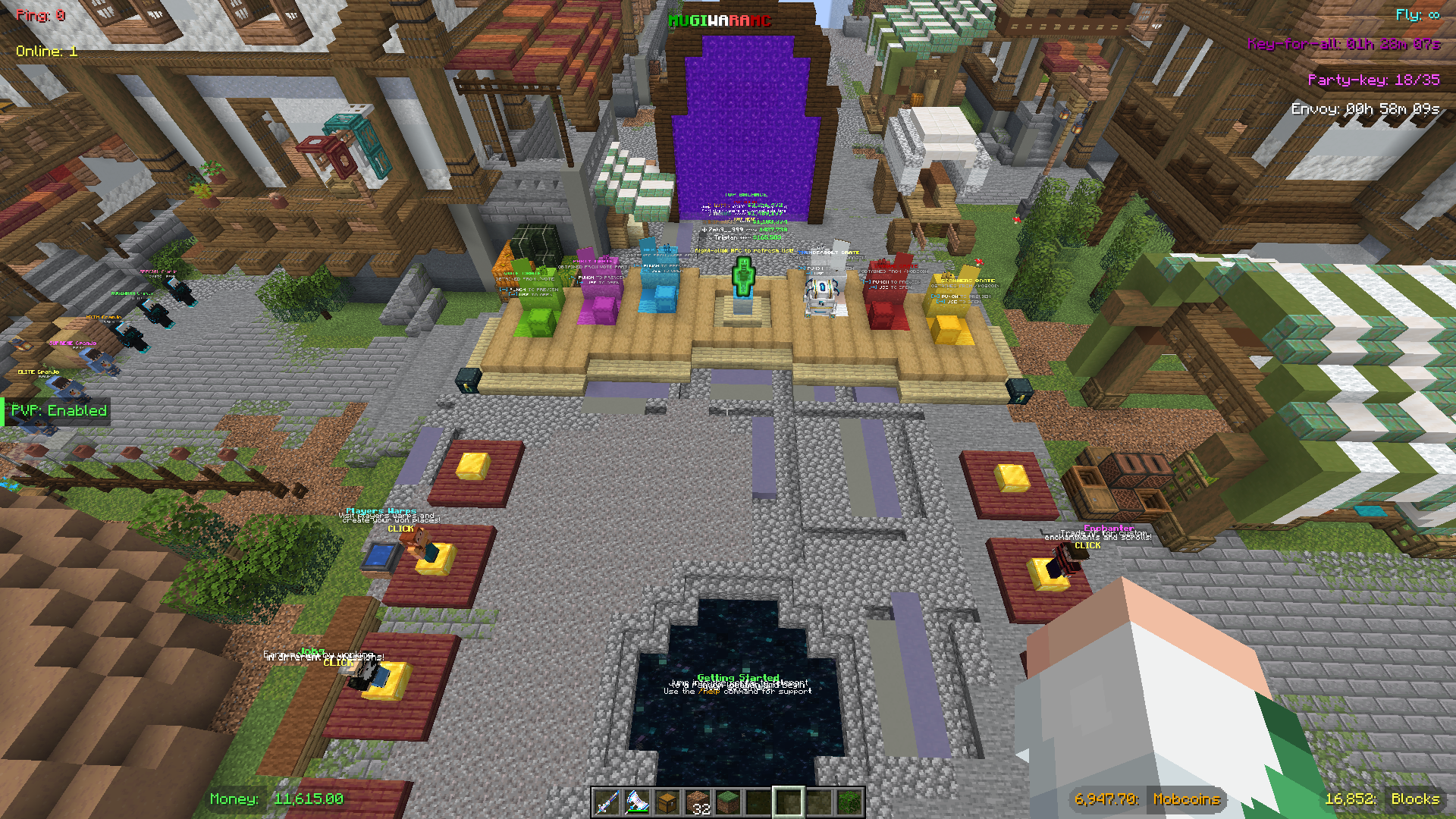
The default Mugiwara preset — fully customizable layout with all HUD elements displayed.
✨ Features
🖥️ HUD Display Elements
| Element | Description | Requires Plugin |
|---|---|---|
| 💰 Money | Your current balance | ✅ |
| 🪙 Mobcoins | Your mobcoin balance | ✅ |
| 🕊️ Fly Time | Remaining flight duration countdown | ✅ |
| 🧱 Claim Blocks | Remaining GriefPrevention claim blocks | ✅ |
| ⚔️ PvP Status | Whether PvP is enabled or disabled | ✅ |
| 📦 Envoy Timer | Countdown to the next Envoy event | ✅ |
| 🔑 Key-for-all Timer | Countdown to the next Key-for-all drop | ✅ |
| 🎉 Party Key | Current / required votes for a Vote Party | ✅ |
| 📶 Ping | Your live connection latency | ❌ |
| 👥 Online Players | Current server player count | ✅ |
| 🏷️ Server Title | A custom server name shown on-screen | ✅ |
Ping is read directly from the Minecraft client — no plugin needed.
⚙️ Customization
| Option | Details |
|---|---|
| 16 Box Shapes | Plain Box, Pill, Accent Bar, Text Only, Bottom Line, Corner Brackets, Tag/Flag, Outline Text — plus 8 split variants with ghost/pill modes |
| 15 Colors | White, Light Grey, Grey, Black, Green, Dark Green, Gold, Yellow, Cyan, Blue, Light Blue, Purple, Red, Orange, Pink |
| Server Color Sync | Auto-matches box colors to whatever the server sends; one-click reset |
| Per-box Control | Cycle value color, box shape, and label color independently per element |
| Drag & Drop | Freely reposition any box; smart snapping to edges, alignments, and midpoints |
| Group Drag | Hold Shift and drag to move a cluster of nearby boxes together |
| Hide Boxes | Toggle individual boxes off without losing their position |
| Preset System | 3 built-in presets + save unlimited custom layouts (positions, colors, shapes, visibility) |
| HUD Scale | Cycle through 5 scale presets — Tiny, Small, Normal, Large, Huge — independent of Minecraft's UI Scale |
| Smart Anchoring | Boxes auto-detect edge positions and anchor accordingly — left, center, or right — keeping layouts consistent across all scales |
Edit Mode Controls
| Control | Action |
|---|---|
| Left-click (Drag Mode) | Drag a single box |
| Shift + Left-click (Drag Mode) | Group-drag nearby boxes |
| Left-click (Edit Mode) | Cycle value color |
| Right-click (Edit Mode) | Cycle box shape |
| Shift + Right-click (Edit Mode) | Cycle label color (split shapes only) |
| Left-click (Hide Mode) | Toggle box visibility |
⌨️ Hotkeys
| Key | Action |
|---|---|
| F6 | Toggle the entire HUD on / off |
| F7 | Toggle the scoreboard on / off |
| F8 | Open HUD Configuration |
| F9 | Open Password Manager |
| Esc | Exit the current edit mode |
🔐 Password Manager (bonus feature)
MWHud includes a built-in per-server password manager, independent of the HUD itself.
| Feature | Details |
|---|---|
| Auto-login | Automatically runs /login <password> when you join a saved server |
| Per-account storage | Passwords are stored per server + player name pair |
| Encrypted storage | Passwords are AES-encrypted before being written to disk |
| In-game UI | Add, view (masked), and delete saved entries from the F9 screen |
This is entirely optional and unrelated to the HUD data system.
📦 Installation
- Install Fabric Loader for Minecraft 1.21.x
- Download the latest
mwhud-*.jarfrom the releases page - Drop it into
.minecraft/mods/ - Launch Minecraft with the Fabric profile
The mod works standalone — ping shows immediately with a default layout. Full HUD data (money, fly time, etc.) requires the MWHudPlugin installed on the server side.
🔌 Server admins: see the MWHudPlugin page for setup instructions.
🎮 Explorer's Mugiwara SMP
Join Mugiwara SMP — our thriving Minecraft Survival Multiplayer server! 🌊
Embark on an epic adventure in a friendly community-driven world featuring:
- 🏪 Shop — Buy and sell items in the player-driven economy
- 🐉 Custom Dragon — Face unique dragon battles with special rewards
- ⚾ Pokéballs — Catch mobs and build your collection
- 🛡️ Custom Items/Armors — Equip exclusive gear with special abilities
- 🏠 Grief Protection — Claim your land and build with peace of mind
- ⚔️ PvP Arena / PvP Training Arena — Test your skills in balanced combat zones
Set sail for adventure — the Grand Line awaits! 🏴☠️


Available Versions
How to Install MWHud on Your Server
Order Server
Order a Minecraft Java server with at least 3 GB RAM (4 GB recommended).
Set fabric Loader
In the panel under "Egg", select the fabric loader and matching Minecraft version (26.1.2).
Install Mod
Open the mod browser in the dashboard and search for "MWHud". Click "Install" – done! Alternatively, upload the .jar via SFTP to the /mods folder.
Compatibility
Mod Loaders
Minecraft Versions
26.1.2, 26.1.1, 26.1 (+3 more)
Server-side
✗ UnsupportedRecommended RAM
4 GB(min. 3 GB)Frequently Asked Questions
MWHud server crashes on startup – what to do?
Most common cause: wrong fabric version or insufficient RAM. Check the server log (latest.log) for "OutOfMemoryError" or "Mixin" errors. With Mado Hosting: ensure at least 3 GB RAM is allocated and the loader matches the mod version (26.1.2). You can switch loaders with one click in the panel.
Is MWHud compatible with fabric?
MWHud officially supports fabric for Minecraft 26.1.2, 26.1.1, 26.1. The Mado dashboard automatically detects incompatible loader combinations.
Server lagging with MWHud – how to optimize performance?
Recommended RAM: 4 GB (per 8 players). Use /spark profiler to check if MWHud consumes the most tick time. Common fixes: reduce server view-distance to 8-10, install "performant" or "starlight" as supplementary mods on Forge. With Mado Hosting, your server runs on NVMe SSDs with dedicated CPU cores for minimal latency.
Similar Mods




Rent Modded Server
Install MWHud with just one click on your server.