
Mystcraft Data Pack: Open New Dimensions!
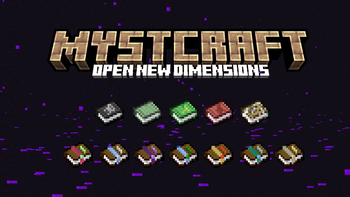
Are you interested in exploring 7 new Minecraft dimensions, in the spirit of popular game series MYST? The Mystcraft Data Pack adds books that allow you to teleport to these worlds and your own waypoints! Just don't forget a way back...
Screenshots




About this Mod



Mystcraft: Open New Dimensions
Are you interested in exploring 7 new Minecraft dimensions, in the spirit of popular game series MYST?
The Mystcraft Data Pack adds books that allow you to teleport to these worlds and your own waypoints! Just don't forget a way back...
About
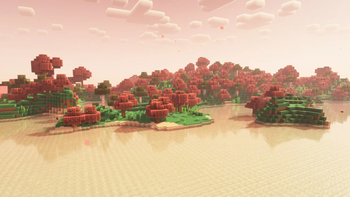
These 7 dimensions come with their own special biomes and resources. Current dimensions are:
- Sanctuary
- Wasteland
- Sanctuary
- Blizzard
- Pocket Dimension
- Skylands
- Warrens
You can also create your own books that can teleport you to saved waypoints, last death point, and even other players. Mystcraft is even more fun with your friends and optimized to run on servers.
The gameplay guide can be accessed in-game:/trigger mystguide
Installation
To install, move the mystcraft_datapack.zip file into .minecraft/saves/YOURSAVE/datapacks
Then add the mystcraft_resources.zip into .minecraft/resourcepacks and activate it in the GUI
Future Plans
I am continuing to add features to Mystcraft. Current plans include:
- Better structures
- More custom features for biomes
- Custom models for opened books
Contributing
I develop Mystcraft as a hobby. If you're a developer, feel free to contribute on GitHub (Report bugs there as well) If you want to support, donate on KoFi!
Available Versions
How to Install Mystcraft Data Pack: Open New Dimensions! on Your Server
Order Server
Order a Minecraft Java server with at least 4 GB RAM (6 GB recommended).
Set datapack Loader
In the panel under "Egg", select the datapack loader and matching Minecraft version (26.1.2).
Install Mod
Open the mod browser in the dashboard and search for "Mystcraft Data Pack: Open New Dimensions!". Click "Install" – done! Alternatively, upload the .jar via SFTP to the /mods folder.
Compatibility
Mod Loaders
Minecraft Versions
26.1.2, 26.1.1, 26.1 (+8 more)
Server-side
✓ RequiredRecommended RAM
6 GB(min. 4 GB)Frequently Asked Questions
Mystcraft Data Pack: Open New Dimensions! server crashes on startup – what to do?
Most common cause: wrong datapack version or insufficient RAM. Check the server log (latest.log) for "OutOfMemoryError" or "Mixin" errors. With Mado Hosting: ensure at least 4 GB RAM is allocated and the loader matches the mod version (26.1.2). You can switch loaders with one click in the panel.
Is Mystcraft Data Pack: Open New Dimensions! compatible with datapack and fabric and forge and neoforge and quilt?
Mystcraft Data Pack: Open New Dimensions! officially supports datapack, fabric, forge, neoforge, quilt for Minecraft 26.1.2, 26.1.1, 26.1. Note: Forge and Fabric mods are NOT cross-compatible – pick one loader and stick with it. The Mado dashboard automatically detects incompatible loader combinations.
Server lagging with Mystcraft Data Pack: Open New Dimensions! – how to optimize performance?
Recommended RAM: 6 GB (per 5 players). Use /spark profiler to check if Mystcraft Data Pack: Open New Dimensions! consumes the most tick time. Common fixes: reduce server view-distance to 8-10, install "performant" or "starlight" as supplementary mods on Forge. With Mado Hosting, your server runs on NVMe SSDs with dedicated CPU cores for minimal latency.
Similar Mods




Rent Modded Server
Install Mystcraft Data Pack: Open New Dimensions! with just one click on your server.