
Screenshots
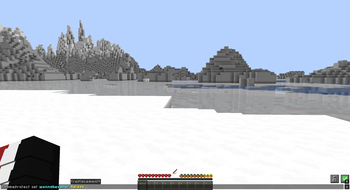
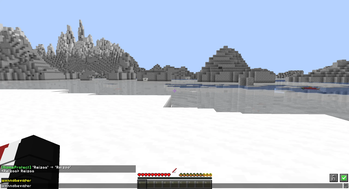
About this Mod
NameProtect
Client-side Minecraft mod for Fabric 1.21.4. Filters and replaces nicknames and chat text on your screen using custom rules. Server sees nothing - purely visual, runs only on your client.
Features
- Nickname filtering - replaces matching player names in chat, tab list, nameplates above heads, and team-colored displays
- Chat replacement - applies rules to all incoming chat messages
- Custom rules - define any number of
word → replacementpairs - Case-insensitive matching - rule
noobmatchesNOOB,Noob,nOoB - Unicode support - works with non-ASCII names (Cyrillic, etc.)
- Live config - rules persist in JSON, reload without restart
- Zero server impact - pure client-side mixins, no packets sent
Commands
All commands run client-side under /nameprotect:
| Command | Action |
|---|---|
/nameprotect set <word> <replacement> |
Add or update a rule |
/nameprotect remove <word> |
Delete a rule |
/nameprotect list |
Show all active rules |
/nameprotect reload |
Reload config from disk |
/nameprotect clear |
Remove all rules |
Example
/nameprotect set Notch SteveTheLegend
/nameprotect set badword ***
After this, any occurrence of "Notch" in chat or above heads renders as "SteveTheLegend", and "badword" becomes "***".
Config
Rules stored at .minecraft/config/nameprotect.json:
{
  "notch": "SteveTheLegend",
  "badword": "***"
}
You can edit this file directly, then run /nameprotect reload.
Requirements
- Minecraft 1.21.4
- Fabric Loader 0.16.0+
- Fabric API
- Java 21
Installation
- Install Fabric Loader for 1.21.4
- Drop Fabric API into
mods/ - Drop NameProtect jar into
mods/ - Launch - use
/nameprotectin-game
Notes
- Client-side only - does not work on the server side, does not need to be on the server
- No mixin conflicts known with major mods
- Rules apply to display only - chat history files store original text
License
MIT - Reizoo
Available Versions
How to Install NameProtected on Your Server
Order Server
Order a Minecraft Java server with at least 3 GB RAM (4 GB recommended).
Set fabric Loader
In the panel under "Egg", select the fabric loader and matching Minecraft version (1.21.11).
Install Mod
Open the mod browser in the dashboard and search for "NameProtected". Click "Install" – done! Alternatively, upload the .jar via SFTP to the /mods folder.
Compatibility
Mod Loaders
Minecraft Versions
1.21.11, 1.21.10, 1.21.9 (+20 more)
Server-side
✗ UnsupportedRecommended RAM
4 GB(min. 3 GB)Frequently Asked Questions
NameProtected server crashes on startup – what to do?
Most common cause: wrong fabric version or insufficient RAM. Check the server log (latest.log) for "OutOfMemoryError" or "Mixin" errors. With Mado Hosting: ensure at least 3 GB RAM is allocated and the loader matches the mod version (1.21.11). You can switch loaders with one click in the panel.
Is NameProtected compatible with fabric?
NameProtected officially supports fabric for Minecraft 1.21.11, 1.21.10, 1.21.9. The Mado dashboard automatically detects incompatible loader combinations.
Server lagging with NameProtected – how to optimize performance?
Recommended RAM: 4 GB (per 8 players). Use /spark profiler to check if NameProtected consumes the most tick time. Common fixes: reduce server view-distance to 8-10, install "performant" or "starlight" as supplementary mods on Forge. With Mado Hosting, your server runs on NVMe SSDs with dedicated CPU cores for minimal latency.
Rent Modded Server
Install NameProtected with just one click on your server.