
Nanbin Create Mod
We add more object so that you can create everything you want to create!
Screenshots
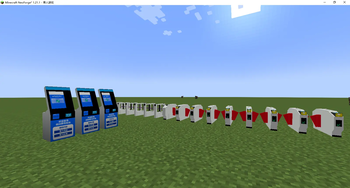
About this Mod
Nanbin Creative Mod Description
Nanbin Create is a Minecraft modification (mod) developed by LIEH_SAD, built on the foundation of the Minecraft Transit Railway (MTR) mod and designed to expand creative building and transit infrastructure capabilities. It enriches the game with specialized blocks and functional elements tailored for constructing realistic, immersive railway and transit systems, as well as custom player creations.
Core Features & Added Blocks
Platform Blocks
Dedicated blocks for building passenger platforms, available in various textures and sizes to match different station styles (e.g., concrete, tile, metal). They support seamless integration with MTR tracks and create authentic platform surfaces for waiting areas.
Station Building Blocks
A curated set of structural blocks for constructing full-scale station buildings, including walls, roofs, pillars, and decorative facades. These blocks enable players to design modern, industrial, or classic transit hubs with cohesive aesthetics.
Platform Screen Doors (PSDs)
Functional platform end/edge doors that mimic real-world transit safety barriers. They automatically align with train carriages, enhance realism, and add a polished, professional look to station platforms.
Player Creative Blocks
Customizable, flexible blocks for free-form building and unique design projects. These blocks offer diverse shapes, colors, and interactive properties, empowering players to craft original structures, art installations, or transit-related custom features beyond standard templates.
Sound Barrier Nets
Decorative and functional noise-reduction blocks/netting for railway lines and stations. They reduce in-game ambient noise from trains, add visual detail to trackside areas, and complete the immersive transit environment.
Compatibility & Use Case
- Base Dependency: Requires the Minecraft Transit Railway (MTR) mod to function fully, as it extends MTR’s transit mechanics.
- Gameplay Focus: Ideal for players building detailed railway networks, urban transit systems, or creative infrastructure projects. It bridges technical transit functionality with artistic building freedom, making it perfect for both functional transit builds and aesthetic creative mode projects.
Available Versions
How to Install Nanbin Create Mod on Your Server
Order Server
Order a Minecraft Java server with at least 4 GB RAM (6 GB recommended).
Set fabric Loader
In the panel under "Egg", select the fabric loader and matching Minecraft version (1.21.1).
Install Mod
Open the mod browser in the dashboard and search for "Nanbin Create Mod". Click "Install" – done! Alternatively, upload the .jar via SFTP to the /mods folder.
Compatibility
Mod Loaders
Minecraft Versions
1.21.1, 1.20.6, 1.20.5 (+13 more)
Server-side
✓ RequiredRecommended RAM
6 GB(min. 4 GB)Frequently Asked Questions
Nanbin Create Mod server crashes on startup – what to do?
Most common cause: wrong fabric version or insufficient RAM. Check the server log (latest.log) for "OutOfMemoryError" or "Mixin" errors. With Mado Hosting: ensure at least 4 GB RAM is allocated and the loader matches the mod version (1.21.1). You can switch loaders with one click in the panel.
Is Nanbin Create Mod compatible with fabric?
Nanbin Create Mod officially supports fabric for Minecraft 1.21.1, 1.20.6, 1.20.5. The Mado dashboard automatically detects incompatible loader combinations.
Server lagging with Nanbin Create Mod – how to optimize performance?
Recommended RAM: 6 GB (per 5 players). Use /spark profiler to check if Nanbin Create Mod consumes the most tick time. Common fixes: reduce server view-distance to 8-10, install "performant" or "starlight" as supplementary mods on Forge. With Mado Hosting, your server runs on NVMe SSDs with dedicated CPU cores for minimal latency.
Rent Modded Server
Install Nanbin Create Mod with just one click on your server.