
Naraka
Defeat Naraka Tyrant: Herobrine
Screenshots


About this Mod
Naraka : Rise of Herobrine
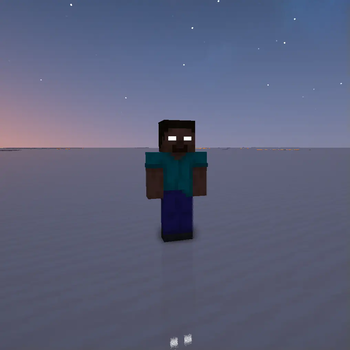
Welcome to Naraka! This mod adds Herobrine boss, new ores, and some more powerful materials which needs vanilla ores to make. Players can get reward from boss and make new tools with added new materials.
Way to Herobrine
Find the Sanctuary Compass  from chests or Wandering Traders. You can find the sacred structure where Herobrine sleeping.
Summon Herobrine
You can activate Herobrine Totem by using Flint and Steel on Netherrack above Herobrine Totem.
We can duplicate imitation gold, iron blocks nearby imitation gold will turn into imiation gold block slowly. Totem of Herobrine can duplicated with totem itself and imitation block too. Now we can fight Herobrine to lit the alter and watch Herobrine summoning. Once Herobrine defeated, he will drop purified soul metal block and we can make purified soul armor and upgrade with purified soul ores. To upgrade, we can use new smithing table with vanilla trims. (Vanilla trims are not consumed while upgrading, YAY!). Our team is preparing some methods to make final item and will be coming soon.
This mod is still WIP and there will be more contents to make out. Thank You.
Available Versions
How to Install Naraka on Your Server
Order Server
Order a Minecraft Java server with at least 3 GB RAM (4 GB recommended).
Set fabric Loader
In the panel under "Egg", select the fabric loader and matching Minecraft version (1.21.11).
Install Mod
Open the mod browser in the dashboard and search for "Naraka". Click "Install" – done! Alternatively, upload the .jar via SFTP to the /mods folder.
Compatibility
Mod Loaders
Minecraft Versions
1.21.11, 1.21.10, 1.21.9 (+3 more)
Server-side
✓ RequiredRecommended RAM
4 GB(min. 3 GB)Frequently Asked Questions
Naraka server crashes on startup – what to do?
Most common cause: wrong fabric version or insufficient RAM. Check the server log (latest.log) for "OutOfMemoryError" or "Mixin" errors. With Mado Hosting: ensure at least 3 GB RAM is allocated and the loader matches the mod version (1.21.11). You can switch loaders with one click in the panel.
Is Naraka compatible with fabric and neoforge?
Naraka officially supports fabric, neoforge for Minecraft 1.21.11, 1.21.10, 1.21.9. The Mado dashboard automatically detects incompatible loader combinations.
Server lagging with Naraka – how to optimize performance?
Recommended RAM: 4 GB (per 8 players). Use /spark profiler to check if Naraka consumes the most tick time. Common fixes: reduce server view-distance to 8-10, install "performant" or "starlight" as supplementary mods on Forge. With Mado Hosting, your server runs on NVMe SSDs with dedicated CPU cores for minimal latency.
Similar Mods




Rent Modded Server
Install Naraka with just one click on your server.