Nbt Crafting
Nbt data in json recipes! Cauldron recipes, brewing recipes and a hella lot more!
About this Mod
This project is currently unmaintained and looking for maintainers interested in further development.
For further information or if you want to help out, please join the Discord :)
This mod extends the vanilla json datapack/recipe system. It does not provide an own scripting language.

About
It's a "simple" fabric mod which allows you to add/change JSON crafting/cooking/etc. recipes to use nbt input and output.
Everything is kept nicely visualized in the vanilla gui.
This can be achieved through the now reintroduced data attribute.
For more information see the wiki pages.
You may want to use this mod with Cotton since this enables you to load datapacks globally and to remove unwanted recipes.
Extras :)
Nbt Crafting also gives you the ability to add new brewing recipes and enables you to add cauldron and anvil recipes. See the wiki for an explanation of these features.
Due to some additions made with this mod the recipe book displays also the output amount of all recipes - yay!
Server Usage
This mod works also server-side only. This causes minor cosmetic issues at the client side.
Example
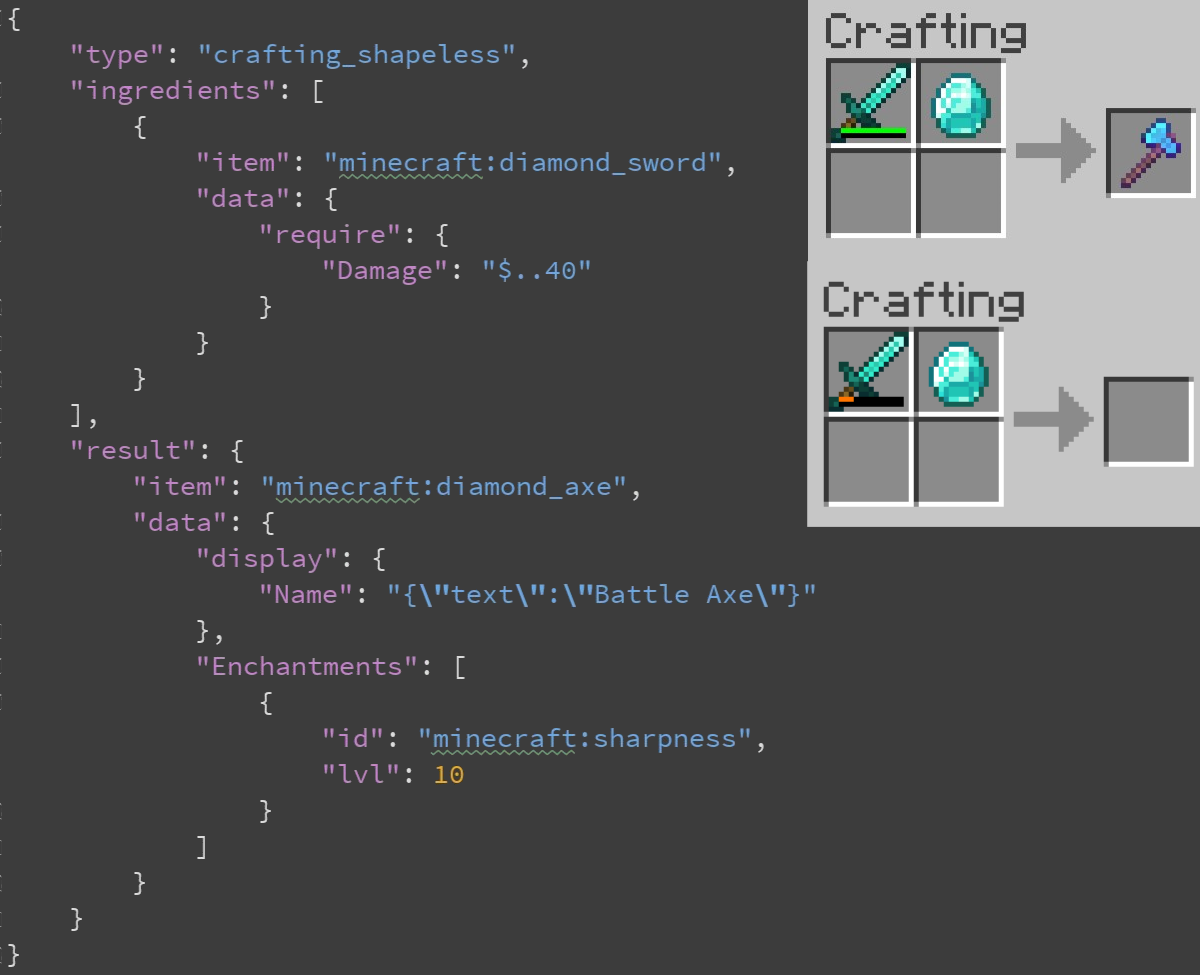
A simple recipe to get a cool "Battle Axe" of a diamond and a diamond sword with less than 41 damage.
{
  "type": "crafting_shapeless",
  "ingredients": [
    {
      "item": "minecraft:diamond_sword",
      "data": {
        "require": {
          "Damage": "$..40"
        }
      }
    },
    { "item": "minecraft:diamond" }
  ],
  "result": {
    "item": "minecraft:diamond_axe",
    "data": {
      "display": {
        "Name": "{\"text\":\"Battle Axe\"}"
      },
      "Enchantments": [
         {
           "id": "minecraft:sharpness",
           "lvl": 10
         }
      ]
    }
  }
}
Demo
Mod support
Every mod which is based on the default vanilla recipe system and which uses the Ingredient class should be compatible in terms of input nbt matching.
Feedback
If you encounter bugs or have suggestions just open a GitHub issue.
License/Modpack usage
This mod is released under Apache 2.0. Feel free to include it in modpacks etc. as long as you attribute me :)
Available Versions
How to Install Nbt Crafting on Your Server
Order Server
Order a Minecraft Java server with at least 3 GB RAM (4 GB recommended).
Set fabric Loader
In the panel under "Egg", select the fabric loader and matching Minecraft version (1.19.2).
Install Mod
Open the mod browser in the dashboard and search for "Nbt Crafting". Click "Install" – done! Alternatively, upload the .jar via SFTP to the /mods folder.
Compatibility
Mod Loaders
Minecraft Versions
1.19.2, 1.19.1, 1.19 (+34 more)
Server-side
✓ RequiredRecommended RAM
4 GB(min. 3 GB)Frequently Asked Questions
Nbt Crafting server crashes on startup – what to do?
Most common cause: wrong fabric version or insufficient RAM. Check the server log (latest.log) for "OutOfMemoryError" or "Mixin" errors. With Mado Hosting: ensure at least 3 GB RAM is allocated and the loader matches the mod version (1.19.2). You can switch loaders with one click in the panel.
Is Nbt Crafting compatible with fabric?
Nbt Crafting officially supports fabric for Minecraft 1.19.2, 1.19.1, 1.19. The Mado dashboard automatically detects incompatible loader combinations.
Server lagging with Nbt Crafting – how to optimize performance?
Recommended RAM: 4 GB (per 8 players). Use /spark profiler to check if Nbt Crafting consumes the most tick time. Common fixes: reduce server view-distance to 8-10, install "performant" or "starlight" as supplementary mods on Forge. With Mado Hosting, your server runs on NVMe SSDs with dedicated CPU cores for minimal latency.
Similar Mods



Rent Modded Server
Install Nbt Crafting with just one click on your server.