
Nebula Render Arm
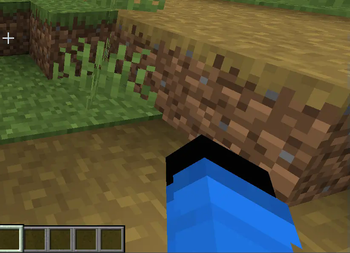
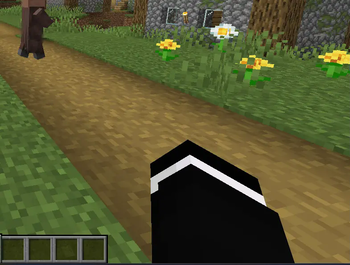
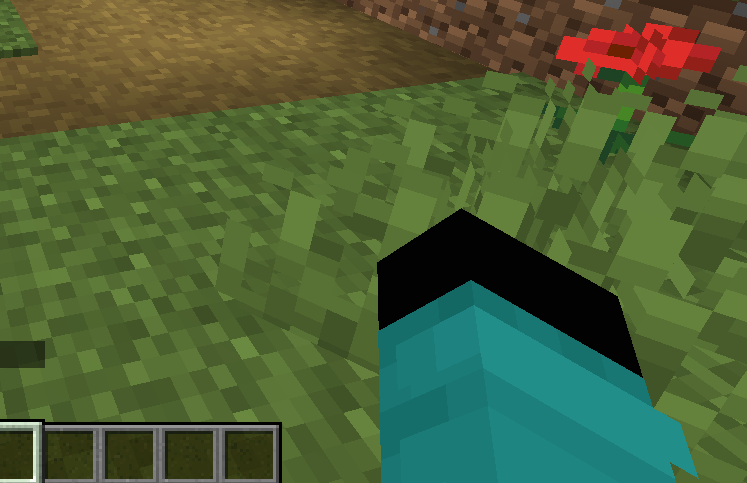
Outfits inspired by Squid Craft Game, compatible with Custom Player Models. Includes custom model and first-person support.
Screenshots
About this Mod
Español (ES):
Este mod añade una colección de trajes inspirados en Squid Craft Game, permitiéndote personalizar a tu personaje con atuendos temáticos. Los trajes funcionan de manera independiente, pero también cuentan con soporte para Custom Player Models (CPM): si importas el modelo personalizado, obtendrás una experiencia más completa.
✨ Características:
Trajes icónicos inspirados en Squid Craft Game.
Compatibles con survival y creative.
El traje es visible en primera persona al mirar tu mano.
Funciona sin modelos externos, pero se recomienda usar el modelo de CPM para mayor inmersión.
Ideal para servidores temáticos, series o roleplay.
⚠️ Nota: Este mod es un proyecto no oficial hecho por fans y no está afiliado ni respaldado por Squid Craft Game ni sus creadores.
English (EN):
This mod adds a collection of outfits inspired by Squid Craft Game, allowing you to customize your character with themed clothing. The outfits work independently, but also include support for Custom Player Models (CPM): importing the custom model will enhance the overall experience.
✨ Features:
Iconic outfits inspired by Squid Craft Game.
Works in both survival and creative.
Outfits are visible in first person when looking at your hand.
Works without external models, but CPM model support is recommended for extra immersion.
Perfect for themed servers, series, or roleplay.
⚠️ Disclaimer: This is an unofficial fan-made project and is not affiliated with or endorsed by Squid Craft Game or its creators.
Available Versions
How to Install Nebula Render Arm on Your Server
Order Server
Order a Minecraft Java server with at least 3 GB RAM (4 GB recommended).
Set forge Loader
In the panel under "Egg", select the forge loader and matching Minecraft version (1.20.1).
Install Mod
Open the mod browser in the dashboard and search for "Nebula Render Arm". Click "Install" – done! Alternatively, upload the .jar via SFTP to the /mods folder.
Compatibility
Mod Loaders
Minecraft Versions
1.20.1
Server-side
✓ RequiredRecommended RAM
4 GB(min. 3 GB)Frequently Asked Questions
Nebula Render Arm server crashes on startup – what to do?
Most common cause: wrong forge version or insufficient RAM. Check the server log (latest.log) for "OutOfMemoryError" or "Mixin" errors. With Mado Hosting: ensure at least 3 GB RAM is allocated and the loader matches the mod version (1.20.1). You can switch loaders with one click in the panel.
Is Nebula Render Arm compatible with forge?
Nebula Render Arm officially supports forge for Minecraft 1.20.1. The Mado dashboard automatically detects incompatible loader combinations.
Server lagging with Nebula Render Arm – how to optimize performance?
Recommended RAM: 4 GB (per 8 players). Use /spark profiler to check if Nebula Render Arm consumes the most tick time. Common fixes: reduce server view-distance to 8-10, install "performant" or "starlight" as supplementary mods on Forge. With Mado Hosting, your server runs on NVMe SSDs with dedicated CPU cores for minimal latency.
Similar Mods




![[TaCZ] Timeless and Classics Zero](https://cdn.modrinth.com/data/SzzJttH8/fd27766d2bb8390d284696b1dbd358f87e081439_96.webp)

Rent Modded Server
Install Nebula Render Arm with just one click on your server.