
NEI Enchantments
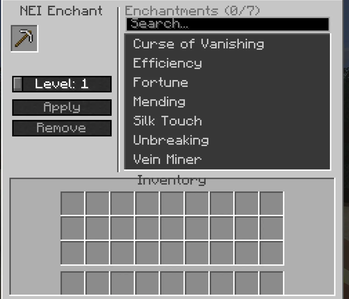
A lightweight and powerful enchantment utility mod for Minecraft 1.21.1, inspired by the classic Not Enough Items (NEI) 'X' key feature. It allows players in Creative mode to quickly enchant items with a modern and intuitive GUI.
Screenshots
About this Mod
A lightweight and powerful enchantment utility mod for Minecraft 1.21.1, inspired by the classic Not Enough Items (NEI) 'X' key feature. It allows players in Creative mode to quickly enchant items with a modern and intuitive GUI.
🚀 Features
- Quick Access: Open the enchantment menu by pressing the 'X' key while hovering over any item in your inventory.
- Smart Filtering: The menu automatically lists only the enchantments compatible with the item you are holding.
- Dynamic Levels: Go beyond vanilla limits! Apply enchantments up to Level 10.
- Real-time Sync: Changes are synchronized instantly between the visual slot and your player inventory. No more item duplication!
- Modern GUI: Clean, scrollable list with search-ready sorting and easy-to-use +/- level controls.
- English & Turkish Support: Full localization for both languages.
✨ Special Enchantments
This mod adds custom enchantments to enhance your gameplay:
- Vein Miner (Damar Madenciliği):
- Compatible with all Pickaxes.
- Automatically mines the entire ore vein (up to 60 blocks) when a single ore block is broken.
- Supports all vanilla ores and raw materials.
⌨️ Keybindings
- [X]: Open Enchantment Menu (Default, configurable in settings).
- [+]: Increase selected enchantment level.
- [-]: Decrease selected enchantment level.
🛠️ Installation
- Make sure you have Fabric Loader installed for 1.21.1.
- Drop the Fabric API jar into your
modsfolder. - Drop the NEI Enchantments jar into your
modsfolder. - Launch the game and enjoy!
🔒 Permissions
- Creative Mode: Required to use the enchantment features.
- Server Safety: Non-creative players cannot open the menu or apply enchantments through network packets.
🌐 Links & More
Official Website: Meta Prora
Available Versions
How to Install NEI Enchantments on Your Server
Order Server
Order a Minecraft Java server with at least 3 GB RAM (4 GB recommended).
Set fabric Loader
In the panel under "Egg", select the fabric loader and matching Minecraft version (26.1.2).
Install Mod
Open the mod browser in the dashboard and search for "NEI Enchantments". Click "Install" – done! Alternatively, upload the .jar via SFTP to the /mods folder.
Compatibility
Mod Loaders
Minecraft Versions
26.1.2, 26.1.1, 26.1 (+18 more)
Server-side
✓ RequiredRecommended RAM
4 GB(min. 3 GB)Frequently Asked Questions
NEI Enchantments server crashes on startup – what to do?
Most common cause: wrong fabric version or insufficient RAM. Check the server log (latest.log) for "OutOfMemoryError" or "Mixin" errors. With Mado Hosting: ensure at least 3 GB RAM is allocated and the loader matches the mod version (26.1.2). You can switch loaders with one click in the panel.
Is NEI Enchantments compatible with fabric?
NEI Enchantments officially supports fabric for Minecraft 26.1.2, 26.1.1, 26.1. The Mado dashboard automatically detects incompatible loader combinations.
Server lagging with NEI Enchantments – how to optimize performance?
Recommended RAM: 4 GB (per 8 players). Use /spark profiler to check if NEI Enchantments consumes the most tick time. Common fixes: reduce server view-distance to 8-10, install "performant" or "starlight" as supplementary mods on Forge. With Mado Hosting, your server runs on NVMe SSDs with dedicated CPU cores for minimal latency.
Rent Modded Server
Install NEI Enchantments with just one click on your server.